EarFun
Wave Pro
Device A
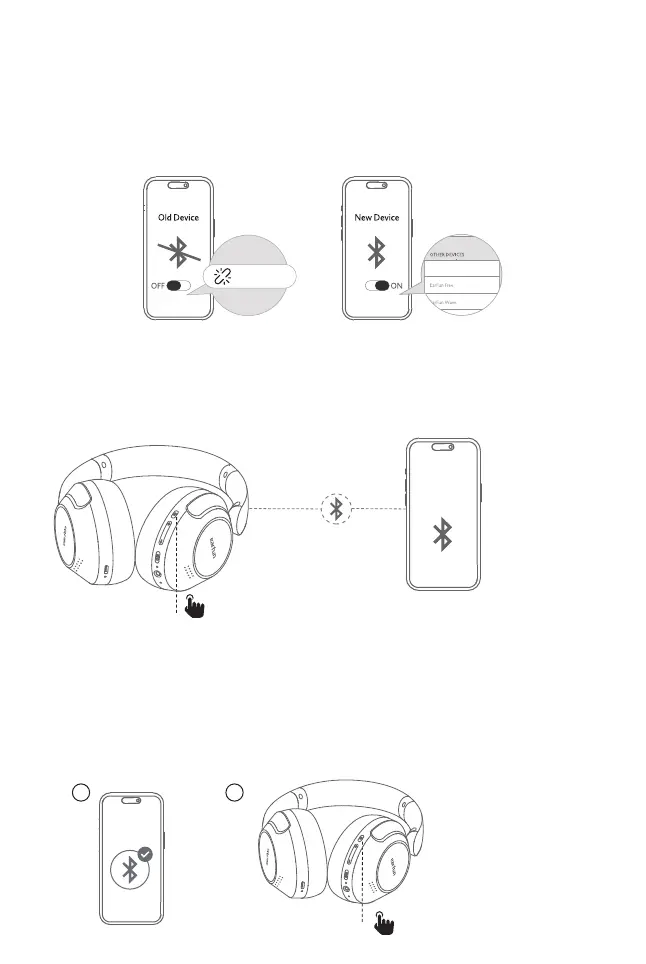
2.Connect to a New Device
Option A
Step 1. Unpair the headphones from the Bluetooth-enabled device that’s connected.
The headphones will disconnect from the current device and go into pairing
mode to be paired again.
Step 2. Search on the new device and connect.
3. Pairing and Connecting two Bluetooth devices simultaneously
Step1. Pair with the first device and stay connected.
Step2. Press triple MFB button quickly. The headphones will enter pairing mode and
will disconnected from the first device.
Step3. Search on the second device to connect the headphones.
Step4. Manually reconnect the headphones on the first device.
Option B
Step 1. Press triple MFB button quickly in connecting status. The headphones will
disconnect from the current device and go into pairing mode.
Step 2. Search on the new device and connect.
x3
EarFun Wave Pro
EarFun Wave Pro
Press quickly
1 2


 To Next Page