2s
x1
Notes:
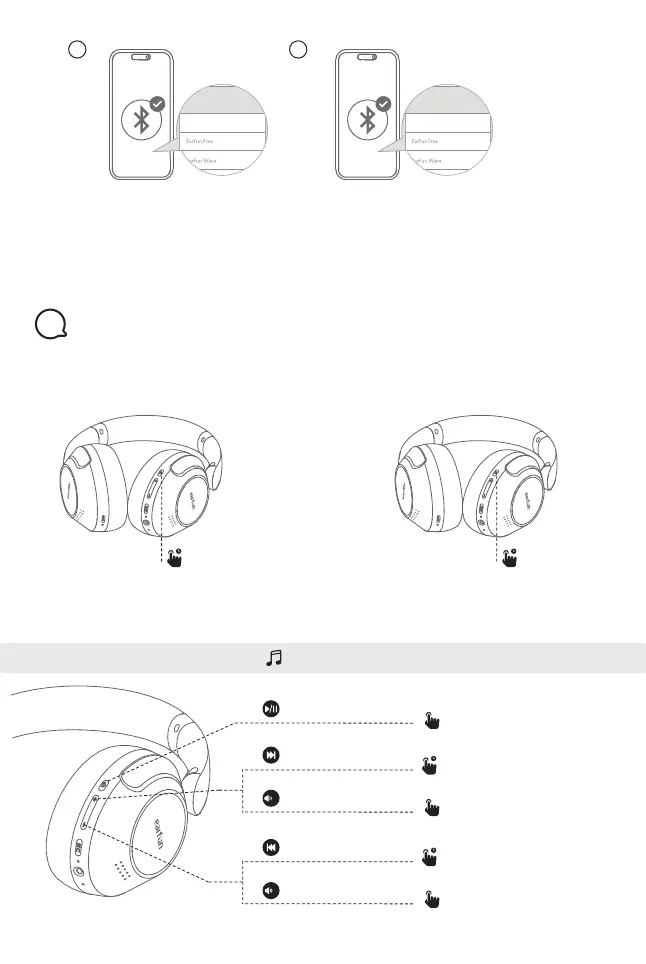
The headphones will automatically connect to both devices after finishing setting up
the multipoint connection.
Power on:
Note: If the headphones are not connected to any device, they will automatically
power off after 30 minutes for saving the battery life.
Press and hold MFB button
for 2 seconds
Play/Pause
Press once
x1
Press once
Press and hold for 2s
Power off:
Press and hold MFB button
for 5 seconds
Functions
5
Playing music
Next track
Volume up
+
-
2s
x1
Press once
Press and hold for 2s
Previous track
Volume down
2s 5s
3 4
Device B
EarFun Wave Pro
Device A
EarFun Wave Pro


 To Next Page