CAUTION
TO REDUCE THE SAFETY RISK WHEN USING THE PRODUCT
OPERATING INSTRUCTIONS
Failure to follow usage instructions may result in personal injury or significant impact on the headset's
performance, such as increased interference or weakened volume. In such cases, the batteries should be replaced
promptly. Wearing a headset helps reduce the risk of exposure to noisy environments, and any misuse or failure to
wear the headset can lead to hearing impairment or loss.
If you have any discomfort or infection in your ear, please consult a relevant doctor before wearing the headset to
avoid causing hearing impairment or loss.
For proper use, see user instructions or contact EARMOR
®
customer service Email:
cs@earmor.com
• Only use the specified type of battery provided by OPSMEN.
• If the headset is not to be used for a long time, please remove the batteries to prevent leakage that may
damage the headset or cause personal injury.
• If the microphone or any accessory is damaged or malfunctioning, please cease usage immediately.
• Contact OPSMEN official after-sales mailbox
cs@earmor.com
for maintenance service.
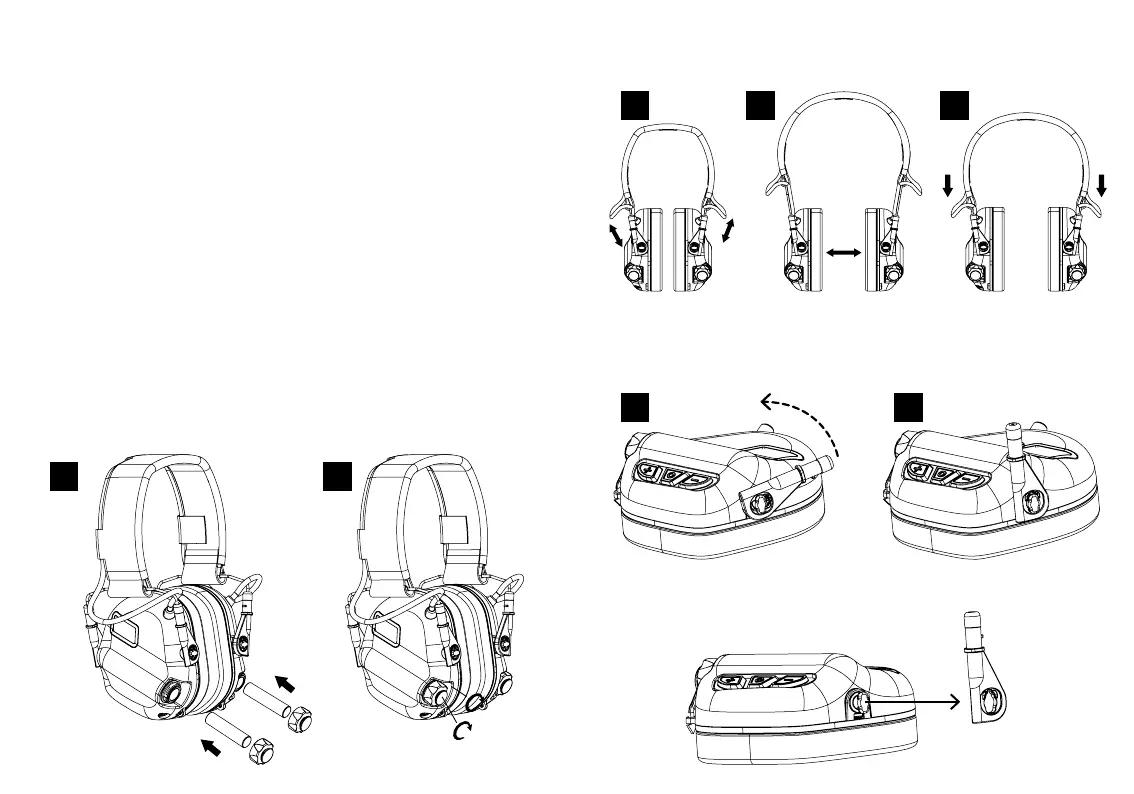
1. Battery Installation
Twist counterclockwise to open the battery cover and insert AAA batteries,
then twist clockwise to securely close the battery cover.
2. Adjusting the Headband
Slide out the earcups to ensure the earcups fully cover the ears, then adjust the height of the cups by sliding
them up or down while holding the headbandcin place. Ensure the ear fits within the ear cushion.
3. Quick Release for Headband Adapter
Step 1. Rotate the plastic slider of adapter perpendicular to the earcups.
Step 2. Gently pull apart to disconnect the adapter from the latch.
1
1
1
2
2
2
3


 To Next Page