9
D. Operation panel instruction
3. Parameter Setting:
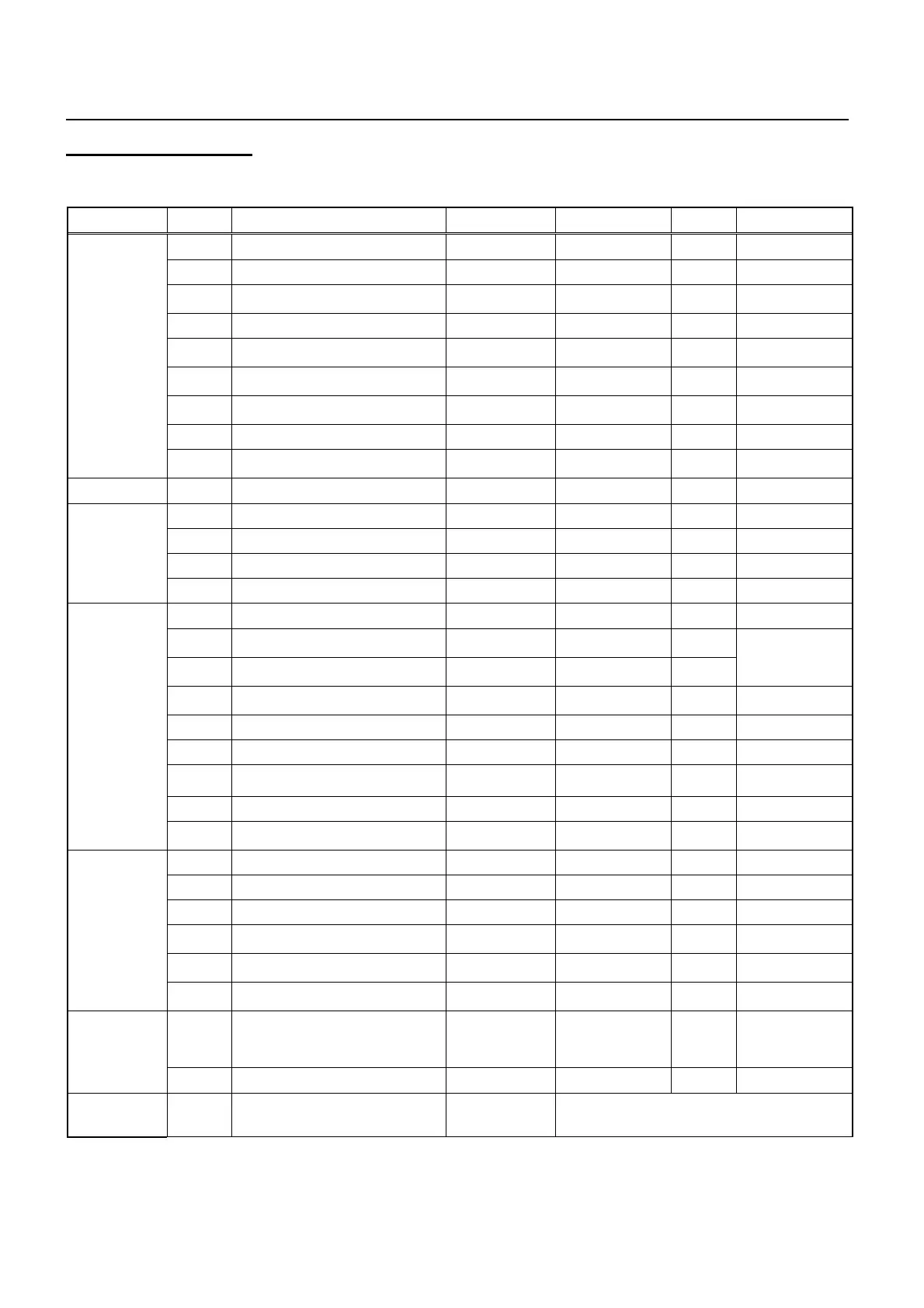
Press “MODE” button for 5 seconds; enter the Parameter setting status, the main parameter code as
below sheet:
Type Code Parameter Name Setting Range Factory Setting Unit Remark
F11 Setting temperature 5-70 55
°C
F12 Difference in Temp. 1 - 30 5
°C
F13
Determine Heat pump stop
ambient temp.
-10 – 5 -7
°C
F14 Highest temp. for heat pump 40 – 60 55
°C
F15
Turn on or off electric
heater mode
0 - 1 1 -
F16
Ambient temp. for start electric
heating
-10 - 20 0
°C
F17
Turn on or off electric heater for
sterilization function
0-1 1
F18 Sterilization cycle 1-990 336 hour
Temperature
Control
F19
Water thermal sensor
temp. amendment
-5 – 5 0
°C
Compressor F21 Compressor start delay 0 – 10 3 minute
F31 Defrost start temp. -20 – 20 -2
°C
F32 Defrost finish temp. 0 – 50 25
°C
F33 Defrost start time 1 – 999 45 minute
Defrost
F34 Max. defrost time Off, 1 – 99 10 minute
F50 Low pressure alarm mode 0 - 2 2 -
F51
Auto resume times of low
pressure alarm
0 – 10 3 time
F52
Reset time of external alarm
auto resume times
0 – 999 60 minute
F54
Electric heater overheat
protection
0 - 2 2 -
F55 Overheat resume time 0-10 3 -
F56 Alarm resume time 0-999 60
°C
F57 Exhaust temp. protection mode 0 – 2 1 -
F58 Exhaust protect temp. 50 – 125 110
°C
Alarm
F59
Exhaust temp. protection
Return difference
1 – 30 10
°C
F61 Memory status when power off Yes/No Yes -
F69 Communication baud 24/48 24 -
F70 Ambient temperature - - -
F71
Highest temp. stops circulation
pump
5-80 80
°C
F72
Temp. difference starts
circulation pump
2-99 10
°C
Function
Setting
F73
Temp. difference stops
circulation pump
1-F72 3
°C
F80 Password
OFF
0001 -- 9999
4321 -
“OFF” means no
password.
Set “0000” to
clear password.
System
Setting
F85 Display sterilization total time - - hour
Testing F98 Force defrosting (refrigeration)
Control panel
display “AdF”
Start compressor, 4-way valve and fan motor.
Press any key to exit or 20 minutes it will exit
automatic.
Remark: When enter Parameter setting status, press “up” or “down” to choose parameter code; after choose one,
press “Timer” button to show this code’s setting value, and press “up” or “down” can set the value; After finish setting,
press “Timer” button to confirm and return to Parameter code status.


 To Next Page