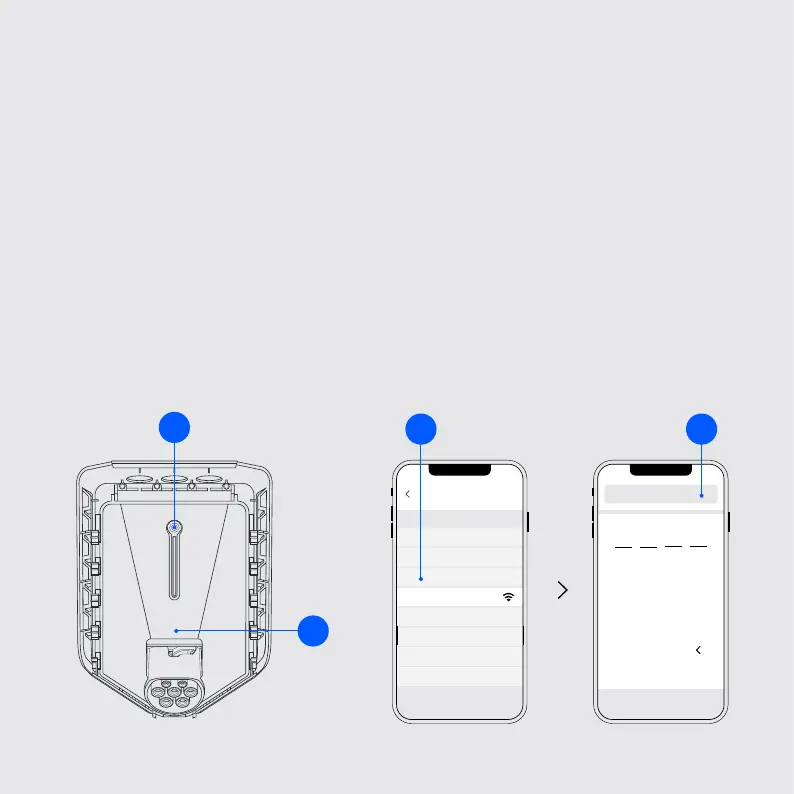
Start the conguration
6
Wi-Fi
Easee-Exx...
192.168.4.1
1
4
7
2
5
8
0
3
6
9
1. To start the conguration of the chargring robot(s), you must use a
smartphone and connect to the WiFi network on the charger you want to
be the main unit. This is done by rst holding the touch button until
the light strip turns green and you hear a conrmation tone.
2. Select the Wi-Fi network that begins with ”Easee...”
3. Open your browser and enter 192.168.4.1 in the address eld.
4. Log in with the PIN code located on the front of the chargeberry.
1
32
4


 To Next Page