Need help?
Do you have a question about the East Tester ET44 Series and is the answer not in the manual?
Checks to confirm all items are attached to the bridge, including optional accessories.
Instructions for connecting the power supply voltage and frequency range.
Information about using the provided fuses for the instrument.
Conditions for optimal operation and storage, including temperature and humidity.
Guidelines for using test fixtures and cables for accurate measurements.
Recommended warm-up time and continuous working hours for accurate measurements.
Power consumption and dimensions of the instrument.
Lists key technical specifications like supply voltage, environment, dimensions, and mass.
Identifies the components and controls on the front panel of the LCR meter.
Explains the function of various basic and directional keys on the instrument.
Identifies the connectors and power input on the rear panel.
Describes the different interfaces of the LCR meter (measurement, setting, system).
Instructions for starting up and shutting down the instrument.
Details how to select and adjust various measurement parameters like frequency and level.
Steps for setting nominal values and comparator thresholds for sorting.
How to perform list scanning over multiple frequencies for comparison.
How to enter the DC resistance measurement mode.
How to enter the electrolytic capacitor measurement mode.
How to use the relative measurement function with a reference value.
How to activate and deactivate the data retention function.
How to record and display MAX, MIN, and AVG measurement values.
Describes open circuit and short circuit correction procedures.
How to configure parameters that load on power-on.
How to enable or disable the buzzer.
Defines main and secondary measurement parameters and their combinations.
Explains series and parallel equivalent circuit modes for components.
Details the basic accuracy specifications under various conditions.
Accuracy specifications for DC Resistance measurements across ranges.
Accuracy of the test signal frequency.
Accuracy of the test signal level.
Accuracy of the output impedance.
Lists the display ranges for various measurement parameters.
Information about the USB communication interface for computer connection.
Details the RS232 connector and pin definition.
Reference for SCPI commands, with contact information for details.
Information on instrument packaging for protection against environmental factors.
Guidelines for handling and transporting the instrument safely.
Recommended storage conditions for the instrument to maintain performance.
Information on maintenance, repair, and warranty coverage.
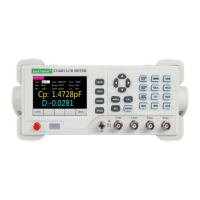
The ET44 Series Benchtop Digital Bridge is a sophisticated LCR meter designed for precise component measurement and analysis. This series, exemplified by the ET4401, ET4402, and ET4410 models, integrates a 3.5-inch TFT display with a user-friendly interface, offering a comprehensive suite of features for both manual operation and remote control.
The ET44 series benchtop digital bridge is primarily used for measuring various electrical parameters of components. It supports the measurement of inductance (L), capacitance (C), resistance (R), and impedance (Z) as main parameters. Secondary parameters include reactance (X), loss (D), quality factor (Q), impedance angle (θ), and equivalent series resistance (ESR). The device also supports DC resistance (DCR) measurement and electrolytic capacitor mode.
A key feature is its comparator function, which allows for component sorting based on user-defined nominal values and tolerance limits. This is particularly useful in production environments for quality control. The instrument can perform list scanning, enabling circulated scanning over multiple frequencies and comparison with nominal values.
Data recording capabilities include capturing maximum, minimum, and average values of measurements over a period. It also offers a data retention function to hold current measurement values. Correction functions for open circuit and short circuit are available to ensure measurement accuracy by compensating for stray admittance and residual impedance caused by test fixtures.
The device supports both series (SER) and parallel (PAR) equivalent modes, allowing users to choose the appropriate circuit model based on the component type and application. For instance, series equivalent circuits are recommended for low-value impedance elements (high-value capacitance and low-value inductance), while parallel equivalent circuits are suitable for high-value impedance elements.
The ET44 series boasts a basic accuracy of 0.2%. It features a 3.5-inch TFT display with 5 and a half bits for main parameter display and 5 digits for secondary parameters.
Measurement Ranges:
Test Frequencies:
Test Signal Level:
Internal Bias Voltage Output:
Output Impedance:
Measurement Display Speed:
Power Supply:
Dimensions:
Communication Interfaces:
The ET44 series is designed for ease of use with a clear front panel layout. Front Panel Controls:
User Interface: The display is organized into pages for measurement display, measurement setting, and system setting. The measurement display shows the main and secondary parameters, current settings (level, frequency, bias, range, compensation, resistance, speed, list status), and a message column for data automation/retention, relative display, and MAX/MIN/AVG labels/values.
Parameter Selection: Users can easily select test frequency, level, offset (bias), range, output impedance, and measurement speed using dedicated keys and direction buttons. The offset value can be precisely adjusted digit by digit.
Comparator Setting: The comparator allows setting a nominal value and tolerance limits. It provides visual feedback (e.g., "BIN: 1" for qualified, "OUT" for unqualified, "AUX" for secondary parameter failure) and supports five-gear sorting.
System Settings: The instrument allows configuration of language (Chinese, English), backlight brightness (30%, 50%, 70%, 100%), power-on parameter settings (default or previous value), and buzzer switch (ON/OFF).
Installation and Environment:
Warm-up and Continuous Working Hours:
Correction Function: The open circuit and short circuit correction functions are crucial for maintaining measurement accuracy. These compensate for stray admittance and residual impedance introduced by the test fixture. The calibration process is guided through the interface, indicating success or failure.
Warranty: The instrument should only be maintained and repaired by professional technical personnel. Unauthorized replacement of components is not covered under warranty, and users will bear the cost of such maintenance. After any maintenance, a new measurement and calibration should be performed to ensure test accuracy.
 General
| Brand | East Tester |
|---|---|
| Model | ET44 Series |
| Category | Test Equipment |
| Language | English |

 To Next Page