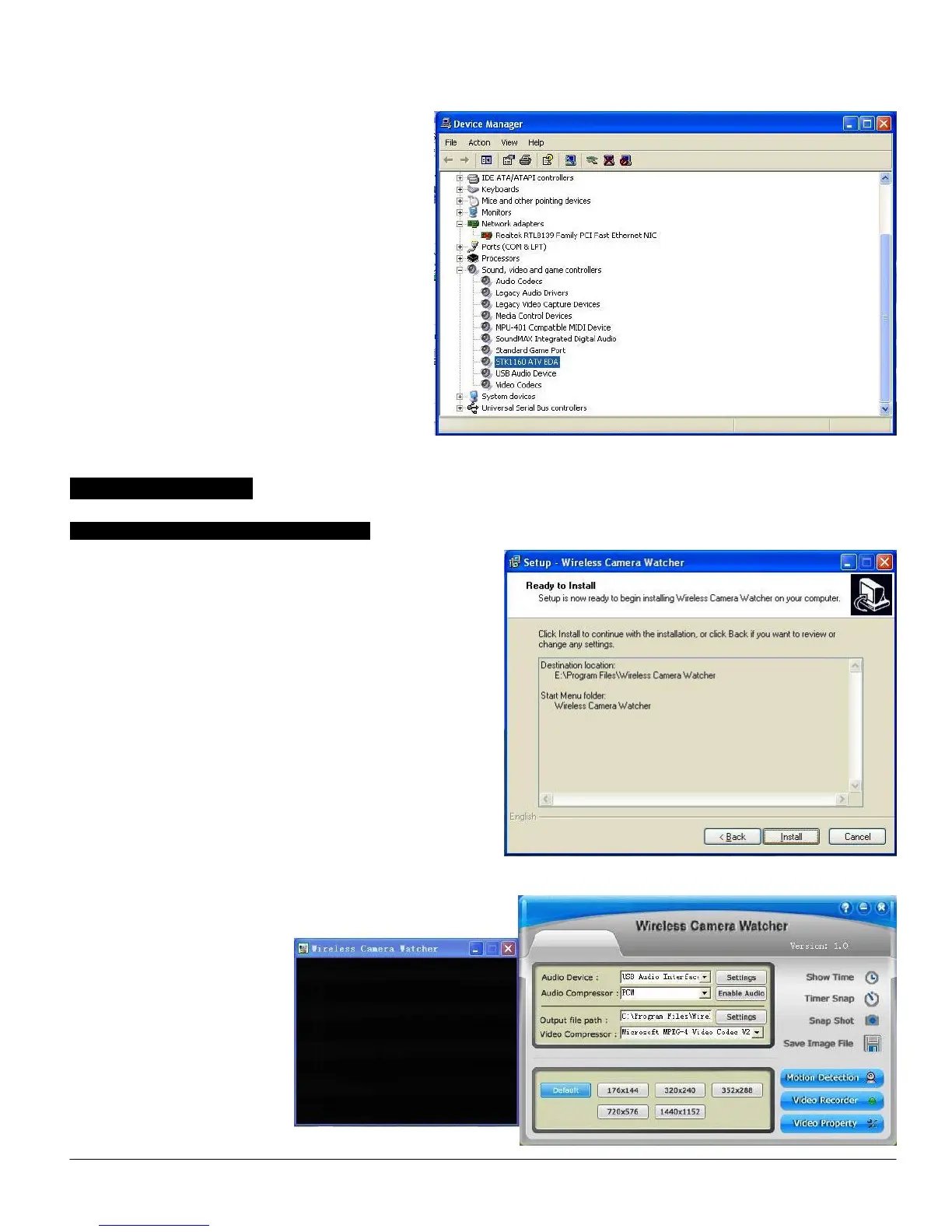
In the “Device Manager”, click on the “+symbol” on
the “Sound Video and Game controllers” section. If
the driver is installed correctly you should see the
“STK1160 ATV BDA”. If it has a Yellow mark next
to it then this means that the driver is not installed
correctly. You will need to remove the driver and
disconnect the EasyCAP001 Wireless Camera
Receiver ( or EasyCAP002 USB 2.0 DVR) from
the computer and re-connect is to install the driver
again.
Software Installation
Software Installation for 1 channel input:
To start the Application Installation for 1channel, click Start /
Run then type your CD-ROM and click “Install Wireless
Camera Watcher for 1ch”.
Select your language for the installation and Click “Next” or /
and “Install”.
Click “finish” to complete
setup, restart your computer if
needed.
Run Wireless Camera
Watcher which you just
installed.


 To Next Page