- 49 - English language
346-074-1.fmIDM
▬▬▬▬▬▬▬▬▬▬▬▬▬▬▬▬▬▬▬▬▬▬▬▬▬▬ MC/1800 MICROWAVE OVEN
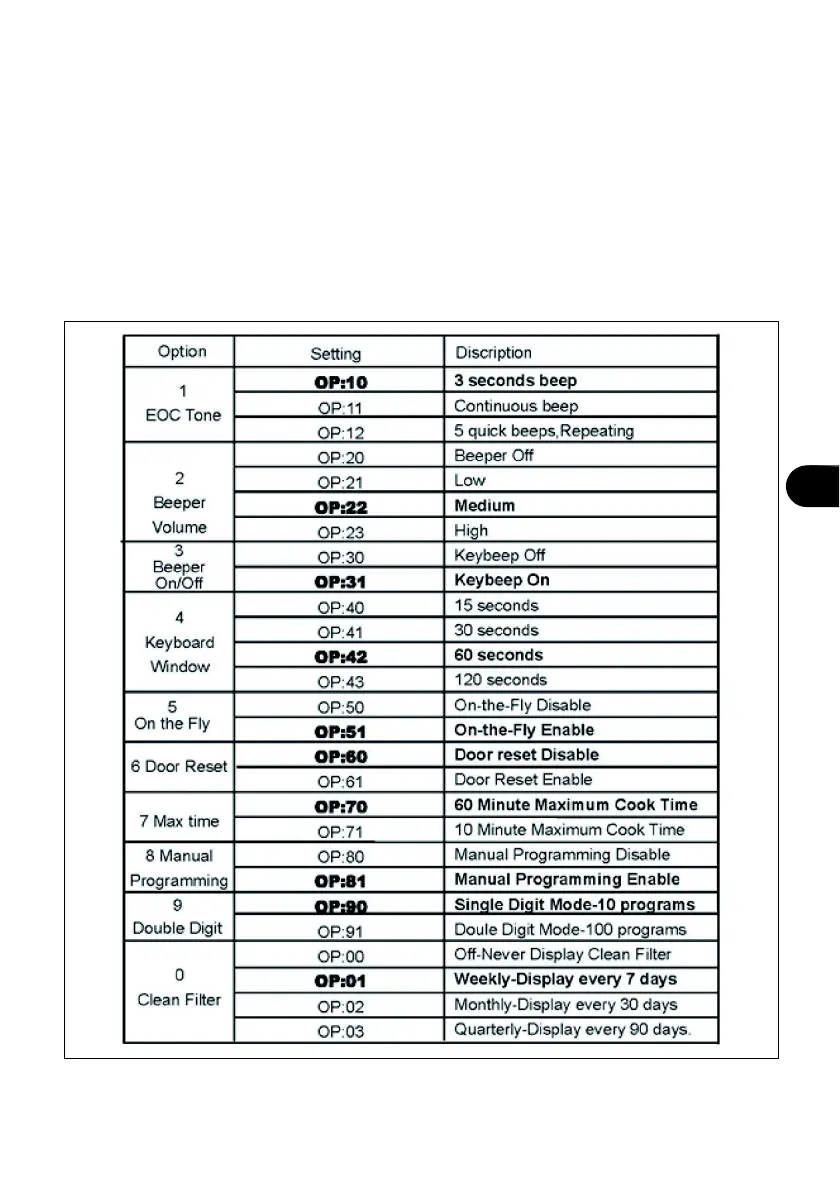
Options
Some options, such as programming with single or double key, beep volume and maximum
cooking time, can be modified to meet individual requirements.
Proceed as described below to modify the options.
– Open the door and keep numbered button "2" pressed for 5 seconds, at the end of which
an acoustic signal indicating switching to "Options" mode is emitted, to adjust the time
the appliance takes to switch to "Standby" mode.
The display (A) shows the wording "OP: -".


 To Next Page