▬▬▬▬▬▬▬▬▬▬▬▬▬▬▬▬▬▬▬▬▬▬▬▬▬▬ ME/1630 MICROWAVE OVEN
346-074-1.fmIDM
- 36 - English language
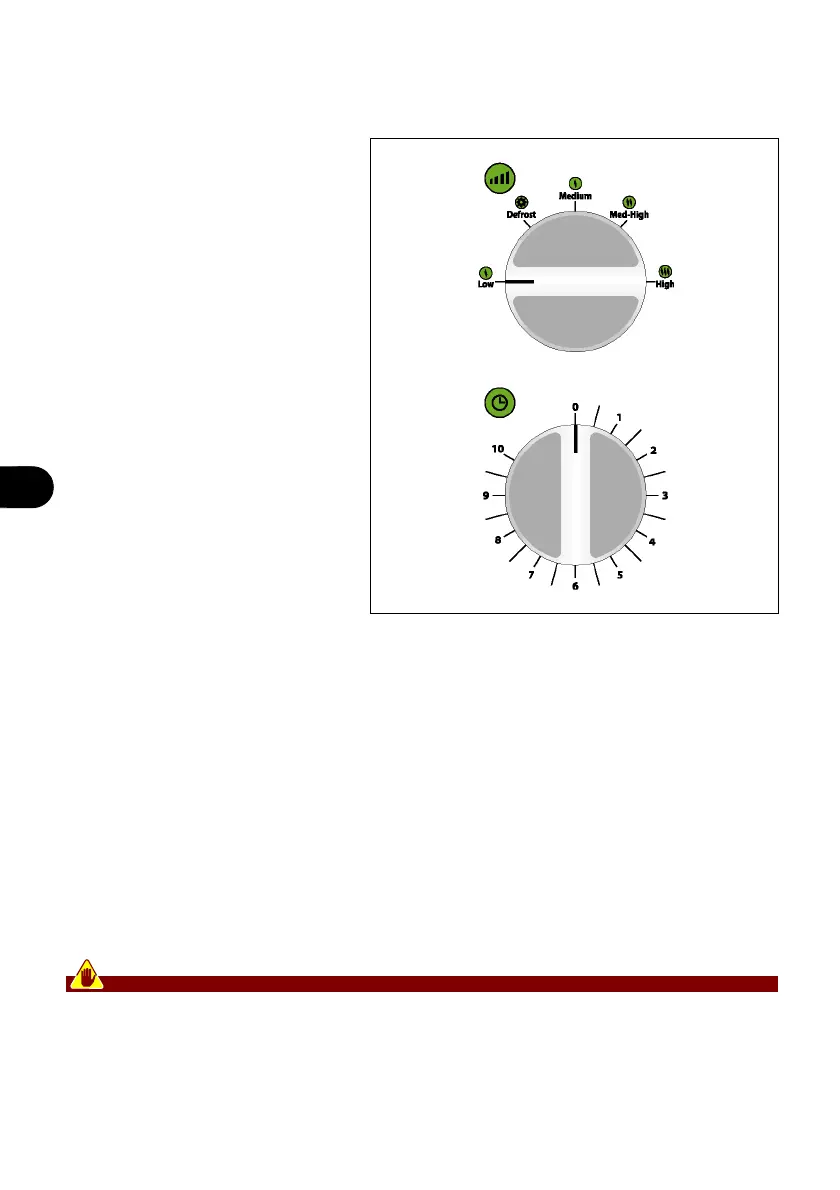
CONTROL DESCRIPTIONS
The appliance is equipped with the
listed control devices, required to
run its main functions.
A) Timer: used to start the appli-
ance and set processing time.
B) Selector: used to set the
processing power level.
Low position: microwave oper-
ating mode with low power level
(17%).
Defrost position: microwave
operating mode with medium-
low power level (33%).
Med position: microwave oper-
ating mode with medium power
level (55%).
Med-High position: microwave
operating mode with medium-
low power level (77%). (77 %).
High position: microwave oper-
ating mode with high power level (100%).
RECOMMENDATIONS FOR USE
1. Based on the type of process (defrost, cook, heat, etc.) suitably prepare food product
and place it in an appropriate container.
Cover food product that may spray chamber walls during processing.
2. Place the container in the processing chamber and close the door.
3. Rotate the selector (A) (always clockwise) to select the required power level.
4. Rotate the timer (B) to start the appliance and set processing time.
When the timer indicates that set time has elapsed, wait several seconds before remov-
ing the container.
If food product is not adequately processed, place the container in the chamber and set
a new processing time.
To avoid burn hazards, place and remove food products with specific utensils.


 To Next Page