▬▬▬▬▬▬▬▬▬▬▬▬▬▬▬▬▬▬▬▬▬▬▬▬▬▬ MC/1800 MICROWAVE OVEN
346-074-1.fmIDM
- 42 - English language
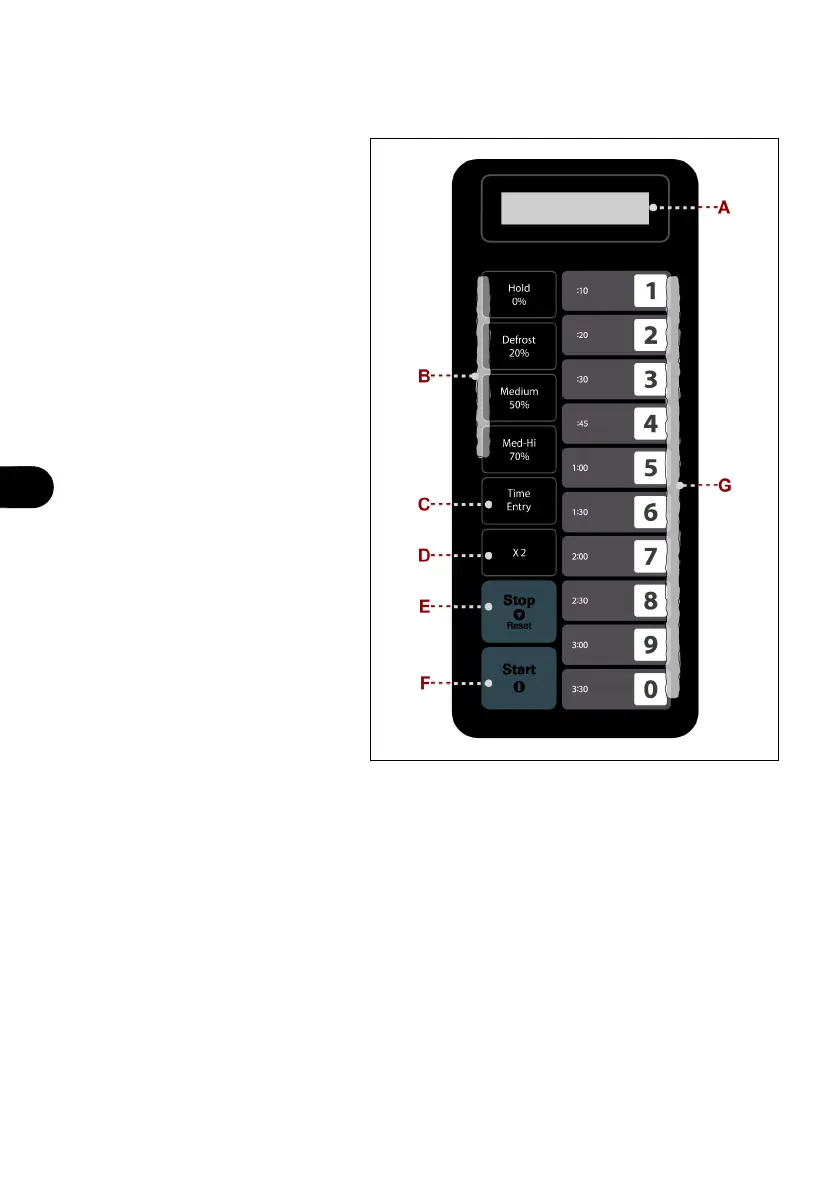
CONTROL DESCRIPTIONS
The appliance is equipped with the
listed control devices, required to
run its main functions.
A) Display: displays cook settings
and the current time.
B) Buttons: used to select the rela-
tive power level.
C) Button: used to manually set the
treatment time.
Manually entering the time does
not affect the programmed but-
tons.
D) Button: increases the pre-es-
tablished cooking time by one
percentage respect to the origi-
nal cooking time (50% standard).
The percentage is decided by
the user and can be changed for
specific cooking sequences.
This feature is extremely useful
in cooking food that can be
cooked in multiple portions, such
as potatoes or pizza slices.
E) Button: used to delete the re-
maining time, to end a program-
ming cycle or for the user
options. The changes are not accepted if button is used to end a programming or an
option change.
F) Button: used to start a cooking cycle by manually entering the time and saving the
changes made to the programming sequences or to the user options.
G) Button: used to set the pre-set cooking time.
Operating and programming modes for the various appliance functions are described in
paragraph "Operating modes".


 To Next Page