Home
Easypix
Copier
Cyber Scanner Basic
Page 14
Easypix Cyber Scanner Basic - Page 14
31 pages
Manual
Save Page as PDF
To Next Page
To Next Page
To Previous Page
To Previous Page
Loading...
13
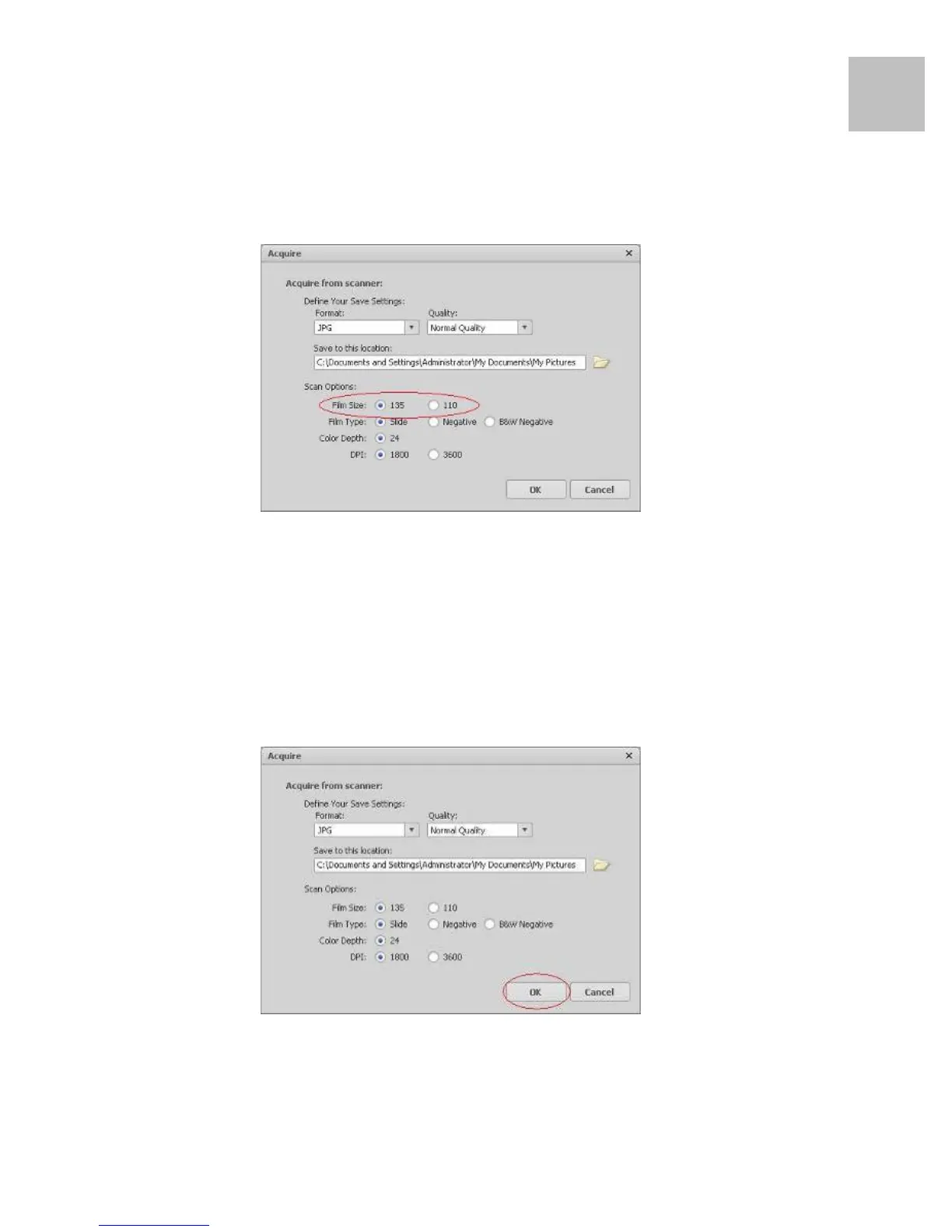
d) There
are t
wo fil
m sizes
(135 f
ilm,
110 fi
lm) t
o
choose from. You are suggested
to select
135
film, m
ost u
ser
s do
not h
ave
110
film.
110 Fil
m Holder i
s an opt
ional
part.
e) Select
the
fil
m type
you are
going t
o scan.
f) Click
“OK
”.
EN
13
15
Table of Contents
Main Page
Default Chapter
2
Table of Contents
2
1 Precautions
3
2 Preparation
6
Standard Accessories
6
L Parts Names
7
Part Names
7
3 Install the Software
8
L Install the Software in Windows
8
L Install the Software in Mac
9
Installing Software in Mac os Computer
9
4 Place Film/Slide into the Holder
10
5 Connecting the Digital Image Copier
11
6 Acquire Picture
12
L Acquire Picture from Windows
12
Acquire Picture from Mac
16
7 Edit the Pictures / Photo Editing Tools
20
Adjust
20
Retouch
24
Clipboard
26
8 Appendix
27
Specifications
27
Trouble Shooting
28
System Requirements
30


 To Next Page