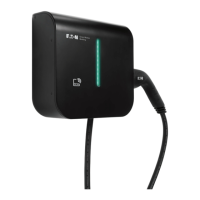
The Green Motion Building EV charger is an AC electric vehicle (EV) charger designed for use in private and public parking facilities, including multi-residential, light commercial, and industrial applications. It can be installed on a wall or a floor-mounted column, suitable for both indoor and outdoor environments.
Function Description:
The primary function of the Green Motion Building EV charger is to provide electric vehicle charging. It supports both single and three-phase connections, offering flexibility for various electrical setups. The charger is equipped with an RFID card authentication system, which can be enabled or disabled, allowing for secure access and payment processing through the Eaton Charging network manager. Charging sessions are initiated by connecting the EV cable and, if authentication is required, by passing an RFID card in front of the charger. The device provides visual feedback on its status through an LED indicator and an energy meter display.
Important Technical Specifications:
- Charging Type: AC EV charger
- Installation: Wall-mounted or floor-mounted column (optional)
- Environment: Suitable for indoor and outdoor installation
- Operating Temperature Range: -25 °C to +45 °C
- Storage and Transport Temperature Range: -25 °C to +45 °C
- Humidity: Relative humidity below 95% for use, storage, and transport
- Altitude: Maximum 2000 m above sea level
- Cable Types:
- Type 2 connector with cable (Mode 3), 230 V/400 V 32 A for single or three phases
- Type 2 connector with female socket (Mode 3)
- Energy Meter: Iskra WM3M4 (MID compliant) or Iskra WM3M4C (Eichrecht compliant)
- RFID Compatibility: ISO14443 and ISO15693 RFID cards
- Rated Voltage (Example): AC 230 - 400V 50 Hz 3L + N + PE
- Rated Current (Example): AC 32A
- Ingress Protection (Example): IP 54
- Compliance: CE, UKCA, WEEE Directive 2012/19/EU
Usage Features:
- User Interfaces:
- LED Indicator: A vertical light bar on the front cover displays the charger's status using distinct colors and patterns:
- Solid green light: EV charger ready for use.
- Flashing green light: Establishing connection with the vehicle.
- Flashing blue light: Vehicle is charging.
- Solid blue light: Vehicle is fully charged.
- Solid red light: EV charger error.
- No light: EV charger switched off or no power.
- Energy Meter Display: An integrated Iskra WM3M4 or WM3M4C energy meter shows the total energy consumption in kWh since the first switch-on. It also has an LED light to indicate connection and charging status:
- LED light off: No car connected.
- LED light blinking: A car is connected and charging.
- Solid LED light: A car is connected, but not charging.
- Charging Process:
- Check that the EV charger is ready for use (solid green LED).
- Connect the EV cable to the car's socket or use the EV owner's cable to connect to the charger's socket. For Type 2 connectors, ensure an audible click is heard.
- If RFID authentication is enabled (default), pass an RFID card in front of the charger to start charging. If disabled, charging starts automatically upon connection.
- During charging, the LED indicator flashes blue. Once fully charged, it turns solid blue.
- Stopping Charging:
- Unplug the connector from the vehicle and/or the EV charger. The connector usually needs to be released/unlocked from inside the vehicle first.
- If the charging session was authenticated with an RFID card, passing the RFID card in front of the charger can also stop the session.
- RFID Card Authentication:
- The charger can operate with or without RFID authentication. By default, authentication is enabled.
- Settings can be changed via the configuration page by professional and qualified personnel.
- RFID cards allow for authentication and payment and can be registered through the Eaton Charging network manager.
- Troubleshooting: The manual provides guidance for common issues such as the charger not starting, the LED indicator being red, the vehicle not charging despite a green LED, or the connector not releasing. For persistent problems, users are directed to contact Eaton technical support.
Maintenance Features:
- Professional Installation and Maintenance: All installation, commissioning, maintenance, and retrofitting operations must be performed by professional and qualified personnel to ensure compliance with existing standards and local regulations.
- Safety Precautions: Before any changes or alterations, the external AC line main switch must be disconnected, and circuit breakers must be open. Opening the EV charger housing is strictly prohibited for unauthorized personnel due to electric shock hazards.
- Software Updates: It is mandatory to install and maintain units with the latest system updates for new features, bug fixes, and to maintain product guarantee. Online units receive automatic updates. For offline units, users should contact Eaton technical support.
- Rating Plate: The rating plate, located on the bottom side of the charger, contains essential information such as manufacturer, model, serial number, ratings, and warnings. It must never be removed, damaged, soiled, or hidden and should be cleaned periodically.
- Disposal: End-users should contact professional and qualified personnel for disposal instructions. The product is marked with the crossed-out wheeled bin symbol, indicating it should be recycled according to the EU WEEE Directive and local environmental regulations, not discarded with household waste. Eaton encourages returning devices to authorized collection points or recycling centers.


 To Next Page


 General
