EasyManua.ls Logo

Eaton R260 - User Manual

Eaton R260
36 pages
Print Icon
To Next Page IconTo Next Page
Loading...
1
www.eaton.com/wireless
call toll free: 1-800-663-8806 DM-R260-0056A R1
Miller Industries
Raptor System
Installation / Configuration Manual
74-1833 Coast Meridian Road, Port Coquitlam, BC, Canada • V3C 6G5
Tel: (604) 944-9247 • Fax: (604) 944-9267
Toll Free 1-800-663-8806
July 23, 2020
DM-R260-0056A
Revision 1
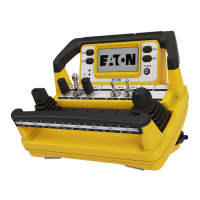
TD3100 Remote Control Unit (RCU)
R260 Base Station
Question and Answer IconNeed help?

Do you have a question about the Eaton R260 and is the answer not in the manual?

Summary

Safety Precautions

Installation Safety

Safety guidelines for installation, wiring, and location.

Personal Safety

Ensuring safe operation of machinery and remote system.

Installation Considerations

Powering the RCU

Install Battery Packs

Procedures for installing rechargeable and alkaline battery packs.

Turn On;Off the RCU

Steps to power on and off the TD3100 RCU.

Testing the RCU; Base Station Link

Service Mode

Enter Service Mode

Procedure to enter the service mode on the RCU.

Pairing Process

Procedure to pair the TD3100 with a Base Station.

Modify Operational Parameters

How to adjust TD3100 operational parameters like brightness.

Calibrate Controls

How to calibrate controls like paddles and joysticks.

Run Diagnostics

How to run diagnostics on the TD3100 for buttons and E-Stop.

Operations - TD3100 RCU

Diagnostics - R260 Base Station

Troubleshooting Guide

Test the Base Station - R260

Flowchart for troubleshooting the R260 Base Station.

Summary

Safety Precautions

Installation Safety

Safety guidelines for installation, wiring, and location.

Personal Safety

Ensuring safe operation of machinery and remote system.

Installation Considerations

Powering the RCU

Install Battery Packs

Procedures for installing rechargeable and alkaline battery packs.

Turn On;Off the RCU

Steps to power on and off the TD3100 RCU.

Testing the RCU; Base Station Link

Service Mode

Enter Service Mode

Procedure to enter the service mode on the RCU.

Pairing Process

Procedure to pair the TD3100 with a Base Station.

Modify Operational Parameters

How to adjust TD3100 operational parameters like brightness.

Calibrate Controls

How to calibrate controls like paddles and joysticks.

Run Diagnostics

How to run diagnostics on the TD3100 for buttons and E-Stop.

Operations - TD3100 RCU

Diagnostics - R260 Base Station

Troubleshooting Guide

Test the Base Station - R260

Flowchart for troubleshooting the R260 Base Station.

Eaton R260 Specifications

General IconGeneral
BrandEaton
ModelR260
CategoryRemote Control
LanguageEnglish

Related product manuals