EasyManua.ls Logo

Eaton TD3100 - User Manual

Eaton TD3100
36 pages
Print Icon
To Next Page IconTo Next Page
Loading...
1
www.eaton.com/wireless
call toll free: 1-800-663-8806 DM-R260-0056A R1
Miller Industries
Raptor System
Installation / Configuration Manual
74-1833 Coast Meridian Road, Port Coquitlam, BC, Canada • V3C 6G5
Tel: (604) 944-9247 • Fax: (604) 944-9267
Toll Free 1-800-663-8806
July 23, 2020
DM-R260-0056A
Revision 1
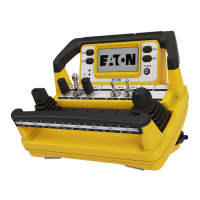
TD3100 Remote Control Unit (RCU)
R260 Base Station
Question and Answer IconNeed help?

Do you have a question about the Eaton TD3100 and is the answer not in the manual?

Summary

Safety Precautions

General Safety Guidelines

Covers installation, personal safety, care, and maintenance/welding precautions.

Lithium Battery Handling

Precautions for handling, transporting, and disposing of lithium batteries.

Installation Considerations

RCU Powering and Testing

Special Functions

Service Mode

Entering and Navigating Service Mode

Instructions on how to enter and navigate through the RCU's service mode menus.

Pairing TD3100 with Base Station

Step-by-step guide to pair the TD3100 Remote Control Unit with the R260 Base Station.

Modifying TD3100 Parameters

Details on adjusting parameters like backlight brightness, on-time, and transmitter timeout.

Diagnostics and Troubleshooting

Troubleshooting Base Station

Provides guides for troubleshooting Base Station issues based on error conditions.

Troubleshooting RCU

Guides for troubleshooting RCU display and indicator issues.

Troubleshooting Communication

Steps to troubleshoot RCU and Base Station communication link failures.

Appendix A: Manual Pairing

Summary

Safety Precautions

General Safety Guidelines

Covers installation, personal safety, care, and maintenance/welding precautions.

Lithium Battery Handling

Precautions for handling, transporting, and disposing of lithium batteries.

Installation Considerations

RCU Powering and Testing

Special Functions

Service Mode

Entering and Navigating Service Mode

Instructions on how to enter and navigate through the RCU's service mode menus.

Pairing TD3100 with Base Station

Step-by-step guide to pair the TD3100 Remote Control Unit with the R260 Base Station.

Modifying TD3100 Parameters

Details on adjusting parameters like backlight brightness, on-time, and transmitter timeout.

Diagnostics and Troubleshooting

Troubleshooting Base Station

Provides guides for troubleshooting Base Station issues based on error conditions.

Troubleshooting RCU

Guides for troubleshooting RCU display and indicator issues.

Troubleshooting Communication

Steps to troubleshoot RCU and Base Station communication link failures.

Appendix A: Manual Pairing

Eaton TD3100 Specifications

General IconGeneral
BrandEaton
ModelTD3100
CategoryRemote Control
LanguageEnglish

Related product manuals