- 22 -
EBA 435 E • EBA 435 EP
cm
inch
Cutting to specified dimensions
•
EBA 435E: The cutting size can now be set
with the handle
G
.
•
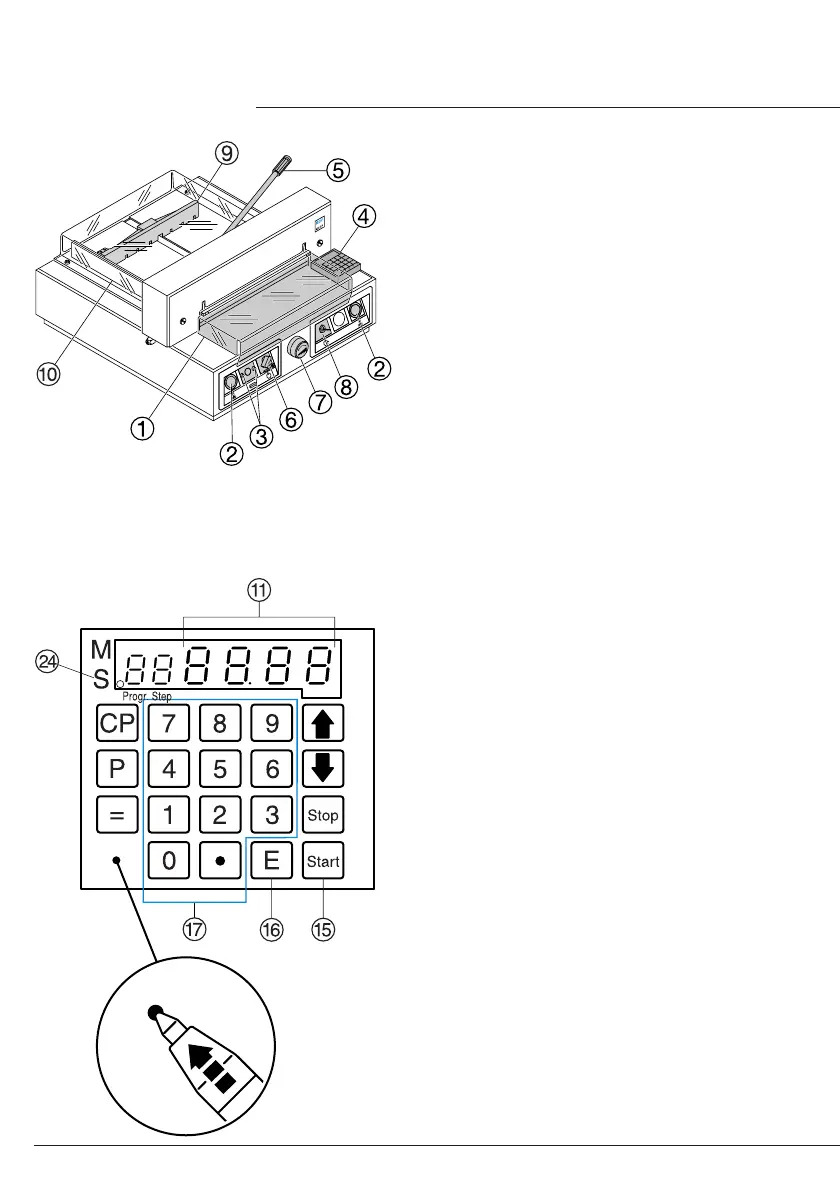
EBA 435EP: Enter dimension on the
numerical key pad
Q
LED "S"
X
appears.
(If a wrong dimension is entered this can be
corrected by pressing the
s
button).
•
Press
S
button dimension is approached,
LED "S" disappears.
Dimensions below 9 cm can only be
approached with the
S
button pressed and
held. (When the
S
button
O
is released, the
backgauge
I
moves to a measurement
of 9 cm measurement 9 cm blinks, now
press and hold the start button, backgauge
I
moves to e.g. 7 cm.
•
Insert paper and move by means of the
stacking angle to the backgauge
I
and side
lay on the left
J
.
•
Move the pressing lever
E
to the left by a
slight swing.
•
Close the front safety guard
A.
•
Release the cut.
Cut according to markings
•
Adjust the backgauge with the hand-wheel or
crank handle
G
to the back.
•
Insert paper and move by means of the
stacking angle to the backgauge
I
and side
lay on the left
J
.
•
Turn the hand-wheel or crank handle
G
to the
right until the marking on the paper to be cut
is below the cutting line indicator. The further
the hand-wheel is turned to the right, the
faster the backgauge moves. If the hand-
wheel is turned to the left the backgauge will
return quicker.
•
Move the pressing lever
E
to the left by a
slight swing.
•
Close the safety guard
A.
•
Release the cut.
•
Operation
•


 To Next Page
 Loading...