September 2012 IPV6819
Please take the following steps:
1. Close the firewall of your computer.
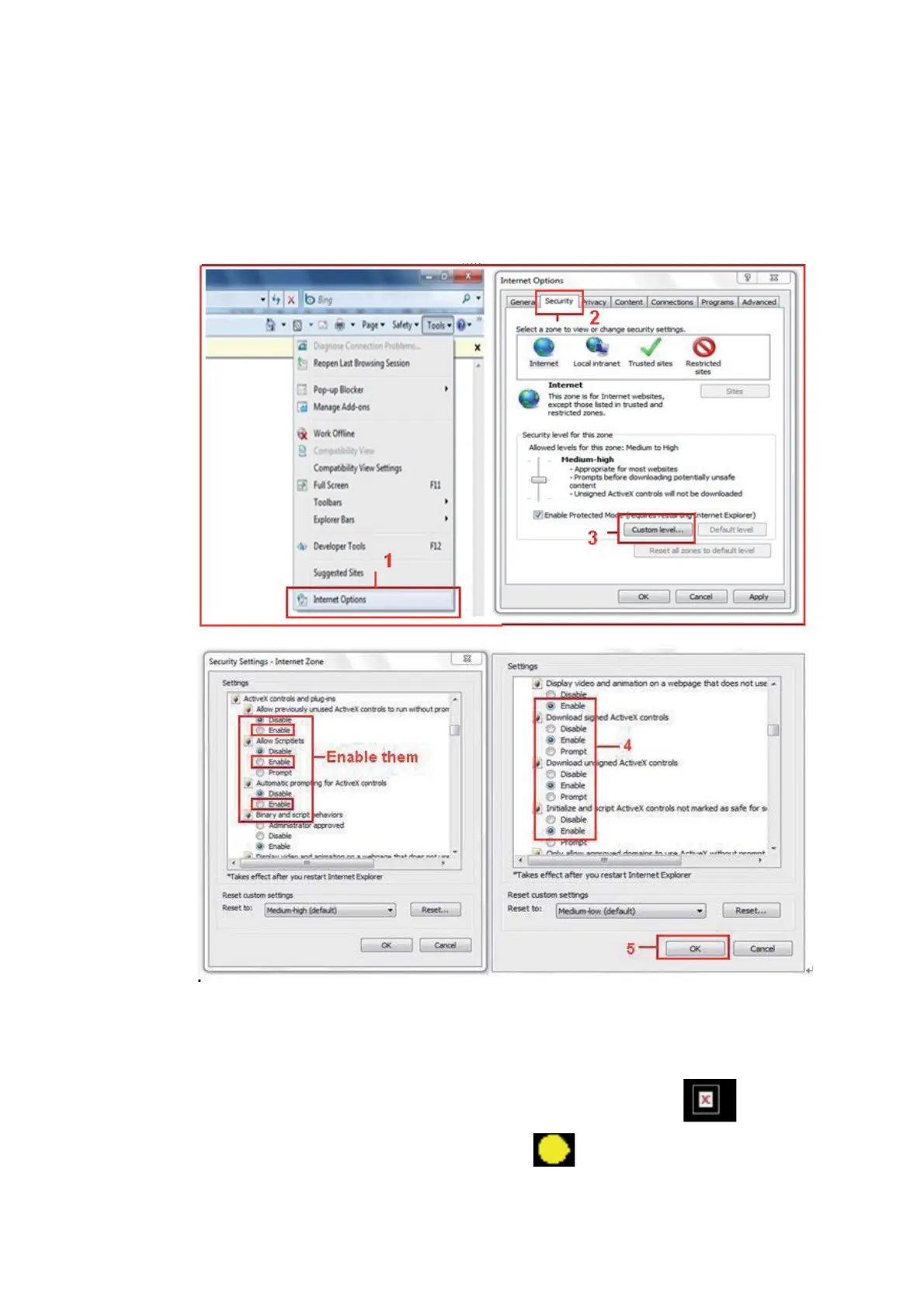
2. Change the ActiveX settings, “IE” browser > “Tool” > “Internet Options”> “Security”> “Custom Level” >
“ActiveX control and Plug-ins”, all the ActiveX options set to be “Enable”:
Especially:
Enable: Download unsigned ActiveX controls
Enable: Initialize and script ActiveX controls not marked as safe
Enable: Run ActiveX controls and plug-ins
Figure 3.1
In addition: you can also click “Start” menu->“Internet Explorer”, choose “Internet attributes “ to enter, or via
“Control Panel”->“Internet Explorer”, enter to Security setting.
If you allowed the ActiveX to run, but still could not see live video, only a Red Cross
in the center of
the video, and the device status light changed to yellow color
not green, please change to another
port number. Don’t use port 80, use another port such as 128, 1008 etc.


 To Next Page
 Loading...