17
English Français
1340– 5810– 1205
Procéder ŕ la mesure
Pour atteindre un degré de mesure aussi
précis que possible, vous devez
déterminer la température du bien ŕ
mesurer et la régler sur l’appareil.
Régler la température
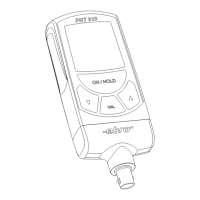
Appuyez sur la touche »CAL«.
Appuyez sur les touches ou ,
jusqu’ŕ ce que la température réelle
du bien ŕ mesurer apparaisse sur
l’écran.
Appuyez sur la touche »ON/HOLD«.
Effectuer la mesure
Immerger le capteur dans le bien ŕ
mesurer et lisez directement le pH
indiqué.
Si sur l’écran la notion
»HI«apparaît ou bien »LO«, alors
veuillez référer ŕ la page 32, „Que
faire, quand...“.
In order to achieve the highest level of
, you need to
determine the temperature of the substance
to be measured and set this on the device
each time before you measure the pH value.
until the actual
Insert the sensor into the substance
Taking measurements
measurement accuracy
Setting the temperature
u Briefly press the »CAL« key.
u Press the keys or
temperature of the substance to be
measured is shown on the display .
u Press the »ON/HOLD« key.
Carrying out the measuring process
u
to be measured and read the
displayed pH value.
If the display shows the message
»HI« or »LO«, please see page 32,
„What to do when...“.
u
u
u
u
Taking measurements
measurement accuracy
Setting the temperature
u Briefly press the »CAL« key.
u Press the keys or
temperature of the substance to be
measured is shown on the display .
u Press the »ON/HOLD« key.
Carrying out the measuring process
u
to be measured and read the
displayed pH value.
If the display shows the message
»HI« or »LO«, please see page 32,
„What to do when...“.


 To Next Page