Need help?
Do you have a question about the eCell eFOCUS PRIME 10 and is the answer not in the manual?
Company not responsible for problems caused by instruction violation or product malfunction.
General warnings about product operation, environmental factors, and user actions.
Guidelines for using, maintaining, and handling SD cards for optimal performance and data integrity.
Lists and illustrates the various physical parts included with the dash cam.
Identifies and labels the different components and ports on the dash cam unit.
Specifies the supported SD card capacities and recommendations.
Details recording modes, impact detection, and acceleration sensor specs.
Covers codec, streaming, camera, power, and temperature specifications.
Steps to prepare the device for video recording by inserting the SD card and powering on.
Details how the device records video during normal driving and handles SD card overwrites.
Explains how the device automatically records events triggered by shocks or impacts.
Describes the parking mode, including vibration detection and battery discharge prevention.
Information on free repair services, warranty periods for accessories, and chargeable repairs.
Details compensation standards for harm caused by the product as per KCА regulations.
Contact details for A/S, consulting, complaints, email, and website.
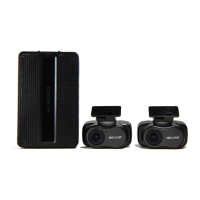
The eFOCUS PRIME 10 Mini Dash Cam is a dual-channel, Full HD (FHD) Wi-Fi enabled recording device designed for vehicle safety and surveillance. This compact dash cam system records both front and rear views, providing comprehensive coverage of your driving environment.
The primary function of the PRIME 10 is to continuously record video footage while your vehicle is in operation, serving as an important witness in case of accidents or incidents. It supports two-channel recording, capturing both the road ahead and the rear view simultaneously in FHD resolution. The integrated Wi-Fi connectivity allows for seamless interaction with a mobile application, enabling users to view live footage, review recorded videos, and adjust settings directly from their smartphone.
The dash cam operates in several recording modes to cover various scenarios. In Normal Recording mode, it continuously records video in one-minute segments, overwriting the oldest files when the SD card capacity is full. This ensures that you always have the most recent driving footage available.
For critical events, the Event Recording function is triggered by sudden impacts or shocks. When an impact is detected, the device automatically saves a separate video file in the "EVENT" folder, capturing footage from at least one minute before to three minutes after the impact. This feature is crucial for documenting accidents and can be configured for sensitivity via the mobile app. An audible event sound is generated during shock detection recording to alert the user.
The Parking Recording mode provides surveillance when the vehicle is parked, provided an uninterruptible power supply is connected. In this mode, the dash cam utilizes its acceleration sensor to detect vibrations, impacts, or motion. Any detected activity triggers recording, and the footage is saved in the "PARKING" folder. To protect the vehicle's battery, the system incorporates a battery discharge prevention function, which automatically stops recording if the voltage drops below a specified level. A voice announcement, "Parking mode is set," confirms activation of this mode.
The device also features a manual event recording function, allowing the driver to press a button to save desired images or video segments into the event folder, useful for capturing specific moments on the road.
Setting up the PRIME 10 involves inserting an SD card and connecting the power supply. Upon power-up, the main LED illuminates, and a voice announcement confirms operation. The device is designed for ease of use, with clear LED indicators for various statuses such as Wi-Fi connection, SD card status for both slots, and front/rear camera connectivity.
The Wi-Fi dongle, which connects via a USB slot, enables wireless communication with your smartphone. This allows for convenient access to the dash cam's features without needing to remove the SD card or interact directly with the device's small buttons while driving. The mobile app is the primary interface for managing settings, reviewing footage, and synchronizing the device's time with your phone.
The dash cam includes a microphone for voice recording, which can be toggled on or off using a dedicated switch. Another switch allows for SD card formatting directly from the device, a recommended maintenance action.
For optimal recording, it is important to ensure that the front area of the device lens is clean and unobstructed by foreign substances or stickers, as these can interfere with image quality. The device is designed to operate within a wide temperature range, though Wi-Fi performance is guaranteed within a narrower range.
Regular maintenance is key to ensuring the PRIME 10 operates effectively and reliably. SD card management is a critical aspect. Users are advised to use only SD cards that meet the company's specifications. The SD card is a consumable item with a warranty period of six months, and it is recommended to replace it with a new one after prolonged continuous use to prevent data saving issues.
Formatting the SD card regularly, about once a month, is strongly recommended to maintain optimal performance and prevent data corruption. This can be done directly from the device using a dedicated button or via a PC, where the "FAT32" file system should be used. Before removing the SD card from the main body, it is crucial to first disconnect the power and wait until all LEDs are off to prevent data loss or device damage. For long-term storage or conveyance, keeping the SD card in its case helps protect it from static electricity or external voltage.
Periodically checking the recorded videos on the SD card is advised to confirm that the product is functioning correctly and recording properly. If you wish to preserve specific data, it should be stored on a medium other than the SD card.
The device also has a factory reset function, accessible via a dedicated button, which can be useful for troubleshooting or restoring default settings.
In cases of non-use for extended periods, it is recommended to remove the power cable from the product to prevent vehicle battery discharge or potential fire hazards. If the dash cam's date and time are initialized due to a lack of power, they can be easily synchronized with a mobile phone via Wi-Fi.
The product is designed as a supplementary device for safe driving, and users are cautioned against controlling it while driving. Any repairs or modifications should only be performed by authorized personnel to avoid voiding the warranty and ensuring safe operation. The manufacturer is not responsible for issues arising from user modifications or improper use.
 General
| Night Vision | Yes |
|---|---|
| Viewing Angle | 170 degrees |
| Loop Recording | Yes |
| G-Sensor | Yes |
| Storage | Supports up to 128GB microSD card |

 To Next Page