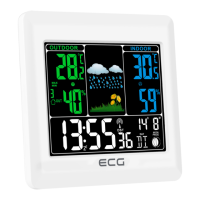
6. After next pressing SET / ALM SET button, minute gures ash. To set minutes, press +/-.
7. To return to operating mode, press SET / ALM SET button; if you do not press any button within 15
seconds, the device returns to operating mode automatically.
ALARM CLOCK SETUP
1. By pressing SET / ALM SET button, time gures change into alarm clock setup 6:00 and A1. By holding
SET / ALM SET button for 2 seconds, alarm clock gures start to ash. To set desired alarm time, press
+/- button.
2. After next pressing SET / ALM SET button, alarm minute gures ash. To set desired alarm time, press
+/- button.
3. By next pressing SET / ALM SET button, day in week icon ashes in range from MON to SUN. By help of
+/- select one of values:
MON, TUE, WED, THU, FRI, SAT, SUN Daily alarm for all days in week.
MON, TUE, WED, THU, FRI Daily alarm for working days.
SAT, SUN Daily alarm for free days.
4. The device returns to operating mode; if you do not press any button within 15 minutes, the device
returns to normal mode automatically.
5. To set alarm 2 clock, hold SET / ALM SET button till time gures change into alarm clock gures 6:00 and
A2 indicator appears. Carry out setup as in case of the alarm clock 1.
ALARM CLOCK TURN ON AND OFF
To turn on/o alarm clock 1 or 2, press ALM On-O button.
While alarm clock 1 is turned on, 1 indicator is shown. While alarm clock 2 is turned on, 2 indicator is
shown.
SNOOZE FUNCTION USE
Once the set alarm time is reached, the device generates alarm sound. Appropriate sign 1 or 2 ashes.
1) To temporarily stop alarm sound, press SNOOZE / LIGHT button; 1 or 2 indicator still ashes.
Alarm clock begins to sound after 5 minutes.
2) To completely stop alarm sound, press ALM On/O button; sound ends and 1 or 2 indicator stops
to ash; alarm clock begins to sound at the same time next day.
Alarm duration: 2 minutes
TO USE BACKLIGHT
By pressing SNOOZE / LIGHT button, LCD display lights for duration of approx. 5 seconds, then lighting turns
o.
TEMPERATURE DISPLAY IN °C OR °F
To view temperature in °C or °F, press WAVE / – (°C/°F) button.



 To Next Page