29
Installation Guide
29
tel - 1-866-766-2267
email - gmsupport@echomaster.com
Illustrations are typical and may not match exact vehicle detail
FCTP-GM2403
Trailering Camera System
Step 3:
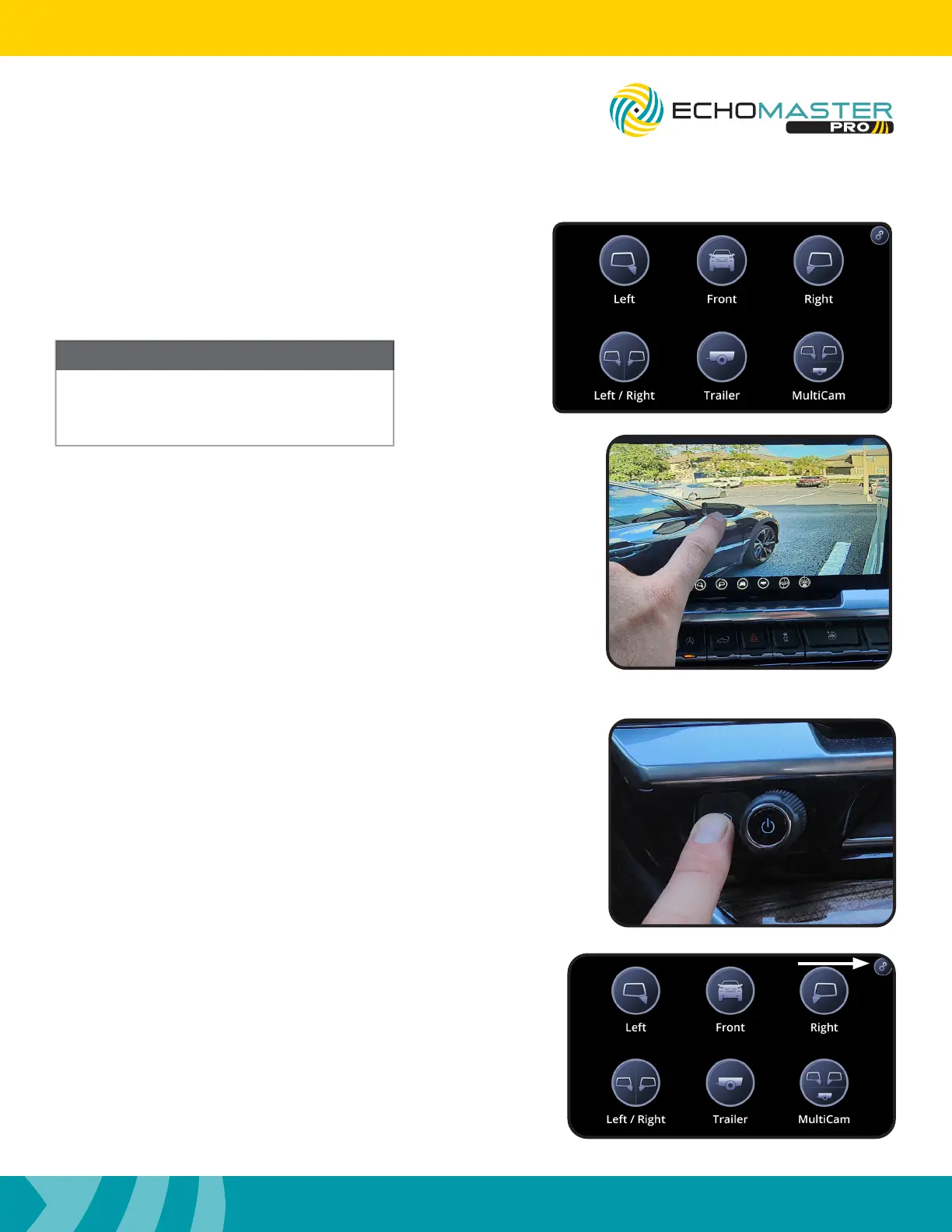
Once the Intellihaul 3.0 home screen appears, press the
corresponding button for the camera you wish to test. Pressing
the HOME button on the radio’s control panel will return you to
the Intellihaul 3.0 home screen.
NOTE
If a camera is not installed and the button is
pressed for that camera, a black screen will
be visible. Press the HOME button to select
another camera.
Step 4:
A minor camera view adjustment is built into each of the views.
If you wish to adjust the view of the selected camera press and
hold the center of the screen for 5 seconds. Without lifting your
finger, drag the image until the desired view is displayed and
then release.
Testing & Setup (continued)
Enabling the Front Camera
Step 1:
With the blind spot cameras properly adjusted, access the
Camera menu again by pressing and releasing the “HOME”
button on the factory dash panel.
Step 2:
Access the Camera Setup menu by pressing the gear icon in the
top right corner to enter the camera setup menu.


 To Next Page