8
Installation Guide
8
tel - 1-866-766-2267
email - gmsupport@echomaster.com
Illustrations are typical and may not match exact vehicle detail
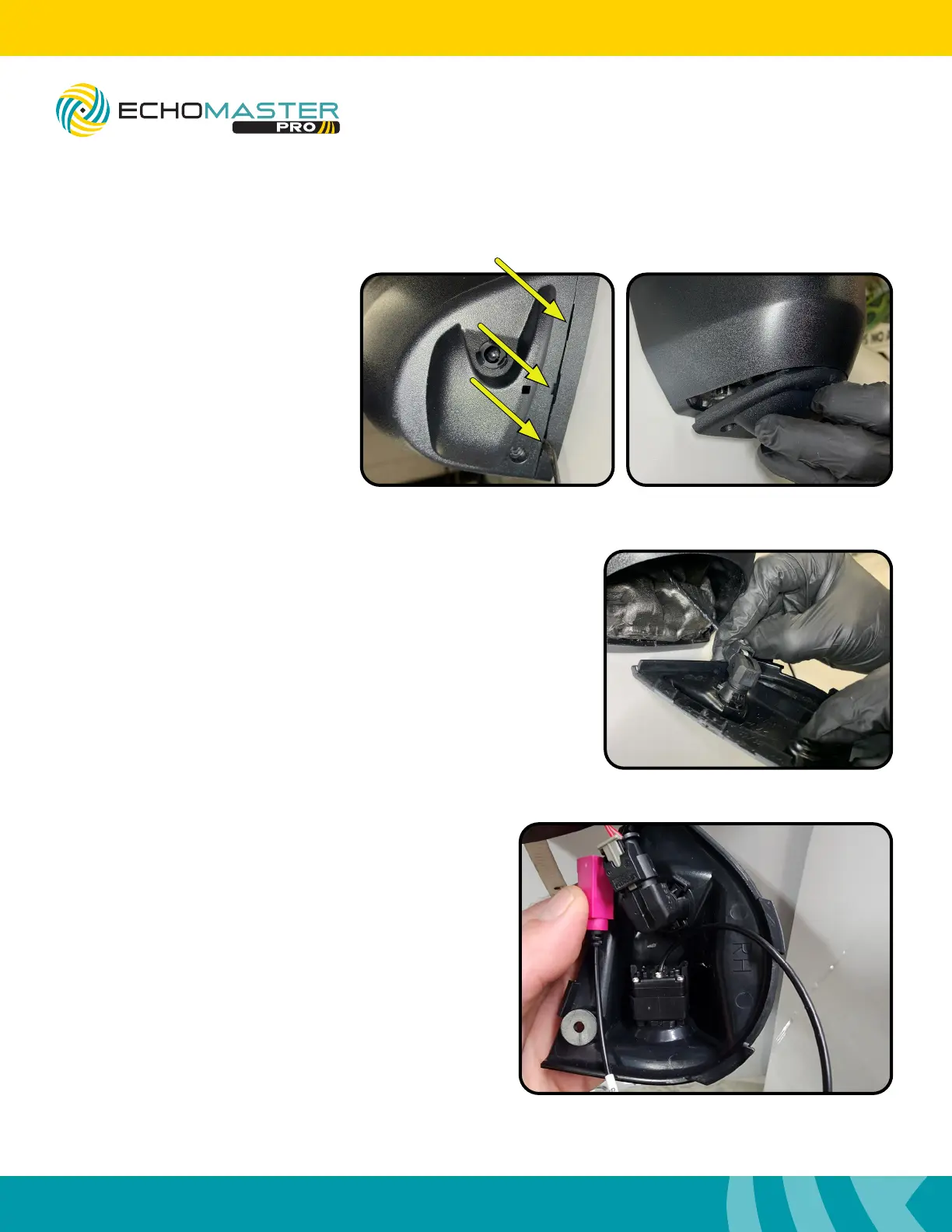
Step 3:
Remove the temperature sensor from the mirror cap
(passenger side only) and set the mirror cap aside. Try
to remove the sensor without disconnecting it from the
harness. If it is necessary to disconnect the sensor from the
harness, ensure that the battery has been disconnected.
Failure to do so will result in a check engine light for Ambient
Air Temperature Sensor.
Step 2:
Using a small flat blade pry tool
remove the bottom cap of the mirror.
There are indentations in the cap
from the factory to aide in this
procedure.
FCTP-GM2403
Trailering Camera System
Step 4 (Passenger Side Only):
Insert the temperature sensor into the new mirror
cap with the camera. This will be a bit tight and will
require some force.
Routing the Camera Cables (continued)


 To Next Page