Page 15
Connecting to a Switch
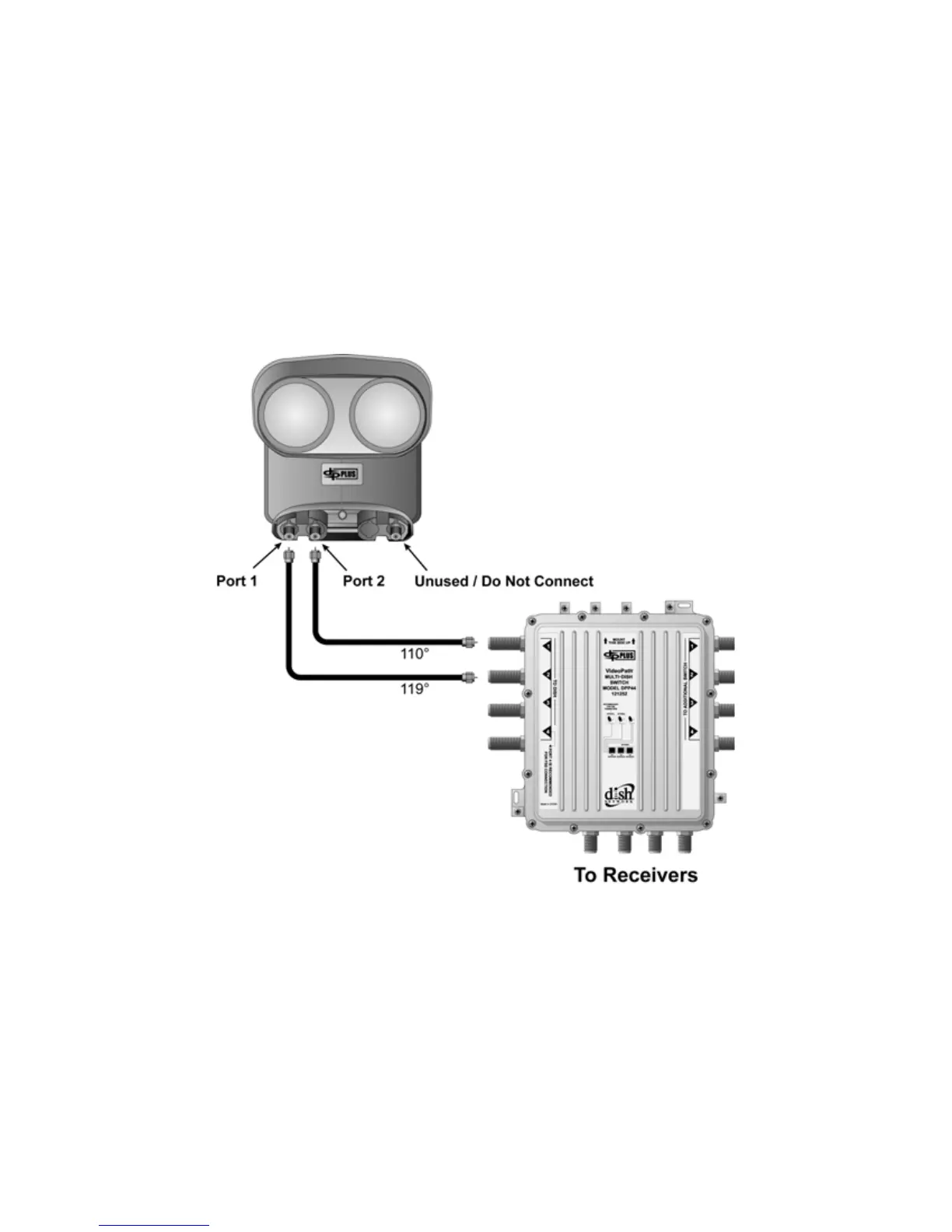
The DISH Pro Plus Twin LNBF can be connected to a DISH Pro Plus 44 switch to provide 119W and
110W satellite signals to the switch. When used this way, LNBF
PORT 1 will default to the 119W position
and LNBF
PORT 2 will default to the 110W position. The LNBF port marked LNB IN is not used and will
not provide any signal to the switch. To complete this installation, install the DP Plus Twin LNBF first
using these instructions, then install the DP Plus 44 Switch using instructions which come with the switch.
Figure 12 shows an installation example.
Note: The DISH Pro Plus Twin LNBF is NOT compatible with the DISH Pro 34 switch in any installation.
Do not install these devices together in any system, including trunked switch installations which contain
DISH Pro 34 switches.
Figure 12. Connecting to a DISH Pro Plus 44 Switch


 To Next Page