Page 3
Installing with Single-Tuner Receivers and Software-Upgraded
Dual-Tuner Receivers
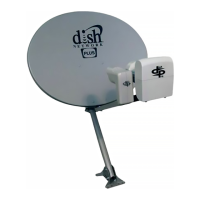
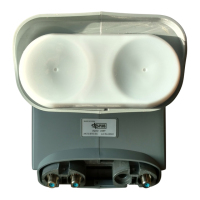
The following instructions describe how to install the DISH Pro Plus Twin LNBF on a DISH 500 antenna
with DISH Pro and Legacy single-tuner receivers and with DISH Pro Plus dual-tuner receivers that have
upgraded software, as shown in Table 1. For dual-tuner receivers that do not have upgraded software, you
must instead use the instructions in Installing with any Dual-Tuner Receiver starting on page 8.
Installation Instructions
Use the steps below while referring to Figure 6 on page 7 for this installation.
Table 1. Software Required for Dual-Tuner Receiver Installation
Receiver Software Version
DISH 322 L054 or later or current download
DISH Player-DVR 522 L059 or later or current download
DISH 721 Supported with a future version of
software
DISH Player-DVR 921 L052 or later or current download
Future DISH Pro Plus Dual-Tuner Receivers All
Locate and install the DISH 500 antenna using the instructions that came with the dish or
satellite receiver.
Run RG-6 coaxial cables from the receiver location(s) to the DISH 500 antenna using Table 2
and the notes that follow:
Table 2. Receiver Installation Options
Receiver to Install Component Requirements
DISH Pro Plus
Dual-Tuner
Receivers
DISH Pro
Single-Tuner
Receivers
Legacy
Single-Tuner
Receivers
DISH Pro Plus
Separator
Cables to DISH
Pro Plus Twin
Supports 119W/
110W
Supports additional
Compatible LNBF
1 No2YesYes
1 Yes1YesYes
2Yes2YesYes
11 Yes2YesYes
1
1
a
a. Install a DISH Pro single-tuner or DISH Pro Plus dual-tuner receiver first.
Yes 2 Yes Yes
1 No1YesYes
2 No2YesYes
1
1
a
No 2 Yes Yes
2
b
No 2 Yes No


 To Next Page