13
3. Odometer
The LCD display shows km’s or miles driven.
4. Temperature
The LCD display shows current air temperature.
5. Time
The LCD display shows current time.
6. Diagnostic fault code
If your scooter requires service an image of a wrench will flash on the LCD display along
with a code number.
1. Battery’s need recharging.
2. Battery voltage too low
3. Battery voltage too high
4. Current time limit out
5. Brake fault
6. Not in neutral at power up
7. Speed potentiometer error
8. Motor volts error
9. Other internal error
WARNING
Be careful when you perform any adjustments to avoid any injury. It is recommended that two
people help in the removal of the seat.
Tiller Adjustment
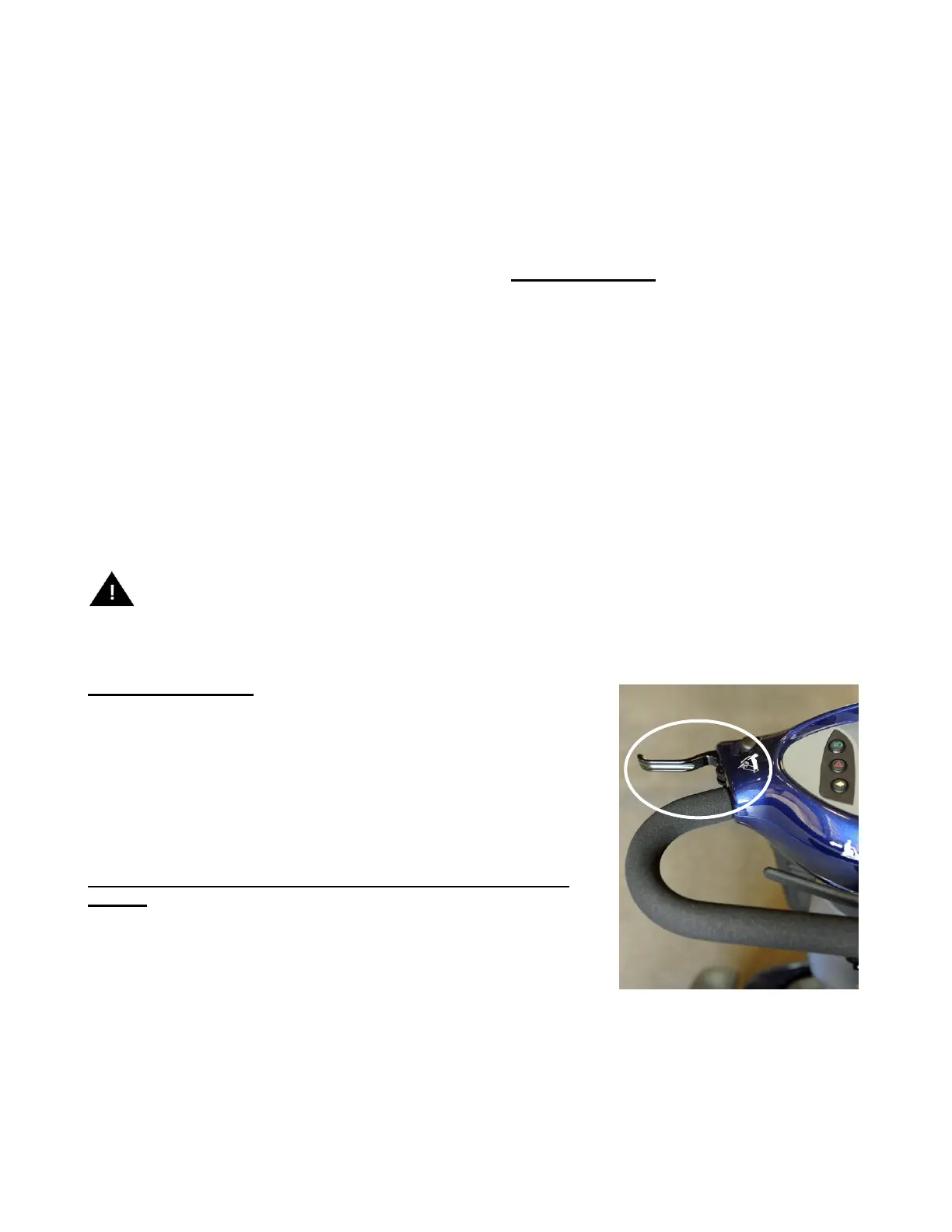
The tiller angle adjustment allows you to move the tiller dashboard to
a comfortable driving position.
1. Locate the angle adjusting lever located on the left side of
the control panel dashboard.
2. Squeeze the lever and pull the tiller towards you or away from you.
3. Once your desired angle is achieved release the lever.
**NOTE: Make sure the tiller is securely locked in place before
driving.


 To Next Page