| 43 |
After connecting the power, fully charge the robot before the first use.
Na het aansluiten van de stroom, laadt u de robot volledig op voor het eerste gebruik.
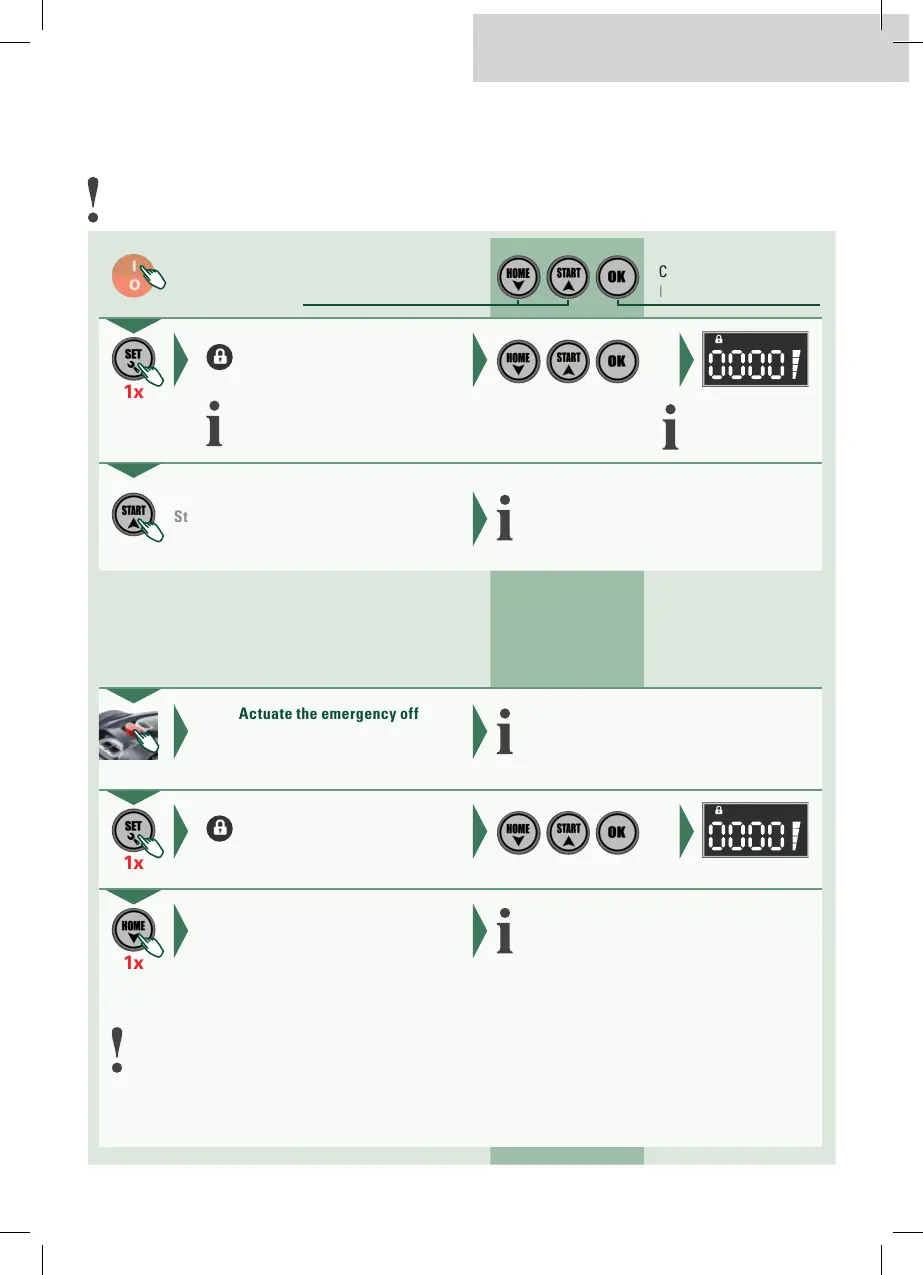
Manual start
Handmatige start
Push the start button
Startknop bedienen
1x
Set and confirm individual digits with arrows.
Afzonderlijke cijfers met pijltoetsen instellen en bevestigen.
Robot starts mowing.
Robot start het maaiproces.
Activate
Inschakelen
Confirm input
Invoer bevestigen
Increase/decrease value
Waarde verhogen/verlagen
Enter the safety code
Veiligheidscode invoeren
Back to the charging station
Terug naar laadstation
Enter the safety code
Veiligheidscode invoeren
Push the «Home button»
«Home- Taste» indrukken
Actuate the emergency off
Noodstop bedienen
1x
1x
Robot stops mowing.
Robot stopt maaiproces.
The robot starts automatically and returns to the
charging station.
De robot start automatisch en keert terug naar
het laadstation.
If the robotic mower was switched off before this, the robot must be started at the charging station.
Indien de robotmaaier van te voren werd uitgeschakeld, moet de robot op het laadstation gestart worden.
EN | NL
Initial password: 0000
Initiaal wachtwoord: 0000


 To Next Page