Need help?
Do you have a question about the EcoFlow EFD350 and is the answer not in the manual?
Information on AC, USB-A, USB-C, Car Outlet, and DC5521 output specifications.
Critical safety warnings regarding usage, handling, environment, and maintenance.
Information on using X-Stream technology for fast AC charging and speed adjustment.
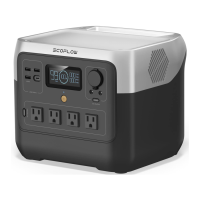
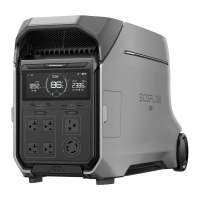
The EcoFlow DELTA 2 Max is a portable power station designed to provide reliable and efficient power for various applications, from charging personal devices to powering household appliances. It features a robust design with multiple output ports, making it a versatile solution for both everyday use and emergency situations. The device is equipped with an LCD screen that displays essential information, and it can be controlled and monitored remotely via the EcoFlow App.
The EcoFlow DELTA 2 Max serves as a portable power generator, capable of storing and delivering electrical energy. Its primary function is to provide AC, DC, and USB power outputs, allowing users to charge and operate a wide range of electronic devices and appliances. The power station incorporates EcoFlow's X-Stream fast charging technology for rapid AC recharging, and it also supports solar and car outlet charging for flexibility in different environments.
A key feature is its Emergency Power Supply (EPS) capability. When connected to grid power, the DELTA 2 Max can pass through electricity to connected devices. In the event of a power outage, it automatically switches to battery power within 30ms, providing a basic UPS function for critical loads. However, it's important to note that this is a basic UPS and does not support 0ms switching, making it unsuitable for devices requiring uninterrupted power, such as data servers.
The device also includes an X-Boost feature, which is automatically enabled when the total output exceeds the rated power. This allows the DELTA 2 Max to power high-wattage appliances beyond its nominal output by intelligently managing power delivery. X-Boost is particularly effective for heating devices but may not be compatible with all electrical appliances, especially those with strict voltage requirements or voltage protection.
For extended capacity, the DELTA 2 Max can be connected to up to two Smart Extra Batteries, significantly increasing its total energy storage.
Power On/Off: To turn on the DELTA 2 Max, press the main power button once; the LCD screen will light up, and the main power indicator will show a breathing white light. To turn it off, press and hold the main power button for at least 3 seconds until the LCD screen goes off. The device has an automatic hibernation feature: if unused for 5 minutes, the LCD screen will turn off, but the unit remains on. It also has a default standby time of 2 hours, after which it will automatically shut off if all output power buttons are off and there's no load. This standby duration can be customized via the EcoFlow app.
Charging Devices: Once the DELTA 2 Max is powered on, users can activate specific output ports by pressing the corresponding "USB power button," "12V DC power button," or "AC power button." Pressing the button again will turn off the respective ports. It's crucial to ensure that the total power consumption of all connected devices does not exceed the rated power of the DELTA 2 Max. If the AC output ports are left without any load for 12 hours, the AC power button will automatically shut down. However, if the USB or DC power buttons are on, the product will not shut off automatically.
Recharging the DELTA 2 Max:
LCD Screen Information: The LCD screen provides real-time data, including remaining battery percentage, battery level, remaining charging/discharging time, input power, output power, and various status indicators such as Wi-Fi status, fan status, and warnings for overload, high/low temperature, and battery failure.
Cleaning: To clean the DELTA 2 Max, gently wipe it with a dry, soft, clean cloth or paper towel.
Storage: For optimal battery lifespan, store the product in a dry and ventilated place at room temperature (ideally between 20°C and 30°C). Avoid storing it near water sources, intense heat, or sharp objects. Do not store it in temperatures above 45°C or below -10°C. For long-term storage (more than 3 months), it is recommended to fully discharge the product to 0%, then fully recharge it, and finally discharge it to 60%. This cycle should be performed every three months. Failure to charge or discharge the product for more than 6 months may void the warranty.
Troubleshooting: The device's LCD screen displays alarm prompts for various issues, such as USB-A/USB-C overload, AC output overload, high/low temperature charging/discharging protection, car charger overload/high temperature, and fan blockage. The manual provides solutions for each of these indicators, typically involving removing the overloaded device, allowing the battery to cool down or warm up, or checking for obstructions. If an alarm prompt persists after a restart, users are advised to stop using the product immediately and contact EcoFlow Customer Service.
Safety: The manual emphasizes several safety instructions, including avoiding use near heat sources or liquids, not disassembling the product, ensuring proper grounding, and using official components. It also advises against using the product to power medical emergency equipment and recommends consulting with manufacturers for restrictions on medical equipment use due to potential electromagnetic interference.
 General
| Brand | EcoFlow |
|---|---|
| Model | EFD350 |
| Category | Power Supply |
| Language | English |


 To Next Page