7
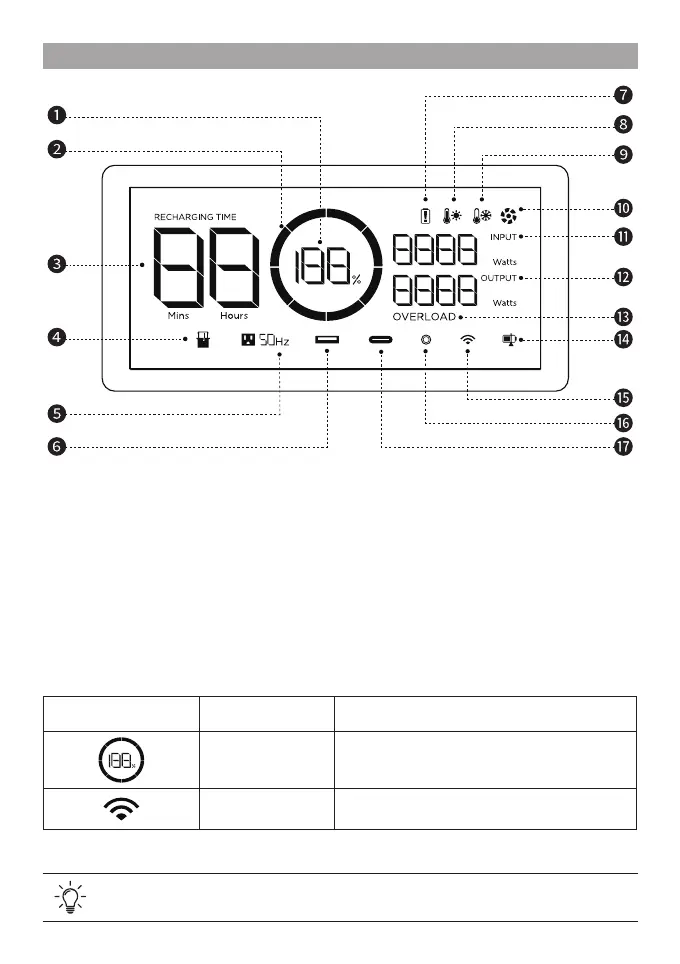
LCD Screen
Refer to "Troubleshooting" for details.
1. Remaining battery percentage
2. Battery level
3. Remaining charging/discharging time
4. Extra battery
5. AC output
6. USB-A Output
7. Battery failure warning
8. High temperature warning
9. Low temperature warning
10. Fan
11. Input power
12. Output power
13. Overload warning
14. State of charge
15. Wi-Fi status
16. 12V DC output
17. USB-C output
Icon Name State
Remaining battery
percentage
Rotating clockwise: charging
100%: fully charged
Flashing: at battery
Wi-Fi
Solid: Internet connection succeeded
Off: Internet connection failed



 To Next Page