|19
En
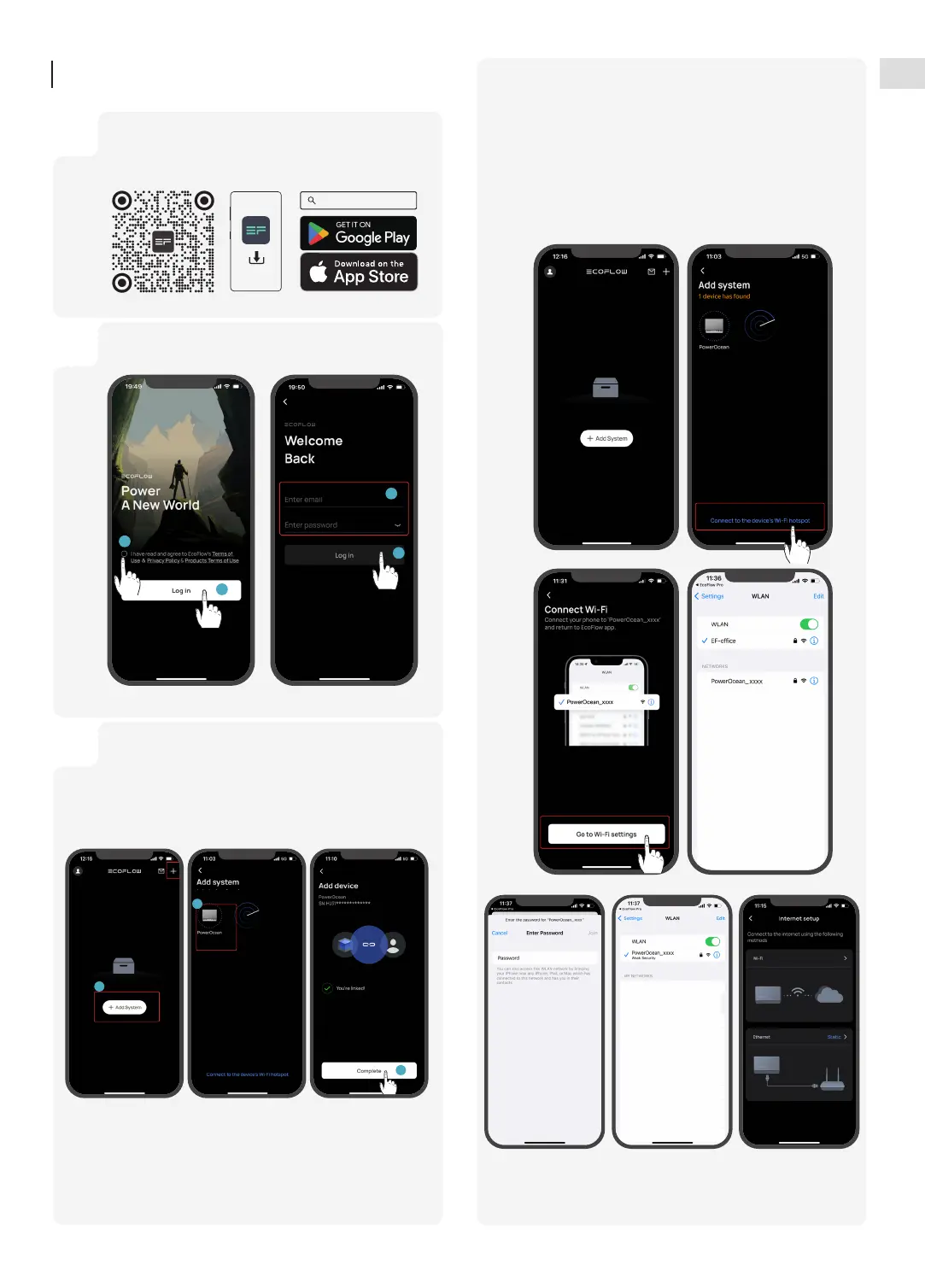
Scan the QR code or download at:
https: //download.ecoflow.com/ecoflowproapp
EcoFlow Pro
1
Enter the installer account and password.
2
You can connect to the system via Bluetooth or Wi-Fi.
Click Add System or + to automatically search for
bluetooth devices nearby, and click EcoFlow PowerOcean
to connect, then click Complete to proceed.
3
2
3
System
Commissioning
1. Click "Add System" or "+" on the top right corner and then
click "Or connect to the system's Wi-Fi" to access to your
phone's Wi-Fi settings.
2. Find "PowerOcean_xxxx" and click it to enter the password
for the Wifi, then click "Join".
3. After successfully connected your phone to "PowerOcean_
xxxx", tap the "EcoFlow Pro" on the top left of your
phone's Wi-Fi setting page to shift back and proceed to
commissioning.


 To Next Page