4
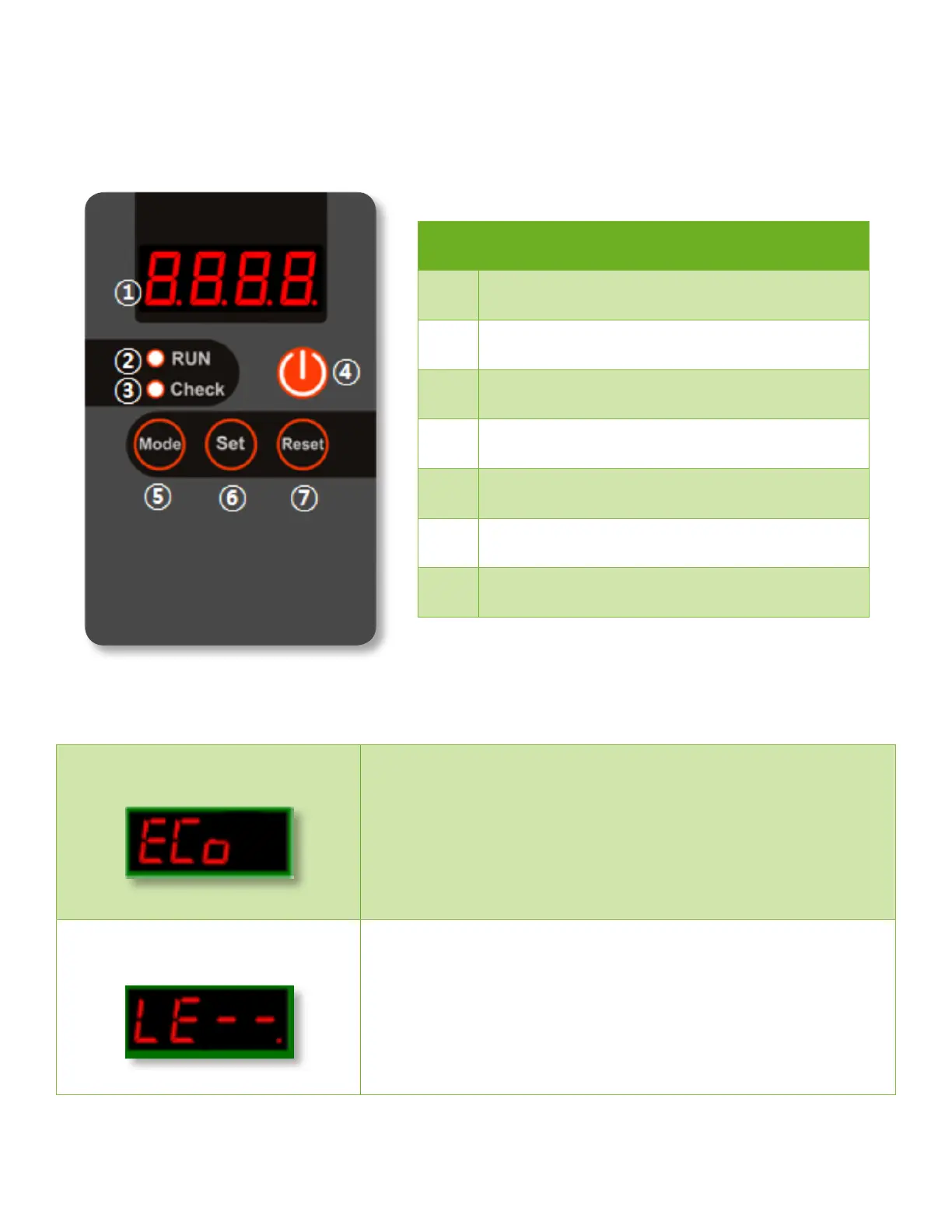
Buttons and Display
No Description
1
LED display
2
System is running
3
Check error code in LED display
4
System RUN On/O
5
Mode button (see uses below)
6
Set button (see uses below)
7
Reset alarm to resume running
Standard Mode
The standard mode is the default and should be used unless connecting system to a
holding tank with a float sensor.
Setting to standard mode:
1. Press and hold “Set” button for 3 seconds and release
2. Press “Reset” button once
3. Press and hold “Mode” button for 3 seconds and release
Level Mode
This mode must be used when connecting the system to a holding tank using a float
sensor. The system will automatically stop running when the water level rises to the
level to activate the float sensor.
Setting to level mode:
1. Press and hold “Set” button for 3 seconds and release
2. Press “Set” button once
3. Press and hold “Mode” button for 3 seconds and release
Operational Modes


 To Next Page