9
In the menus, the cursor is used to indicate which command line can
be changed. When a parameter can be changed, the cursor switches from
to
To con rm a value that you have entered/changed, press
To go back/undo what you have changed, press
The control system can be in one of the following modes: Start, Operating, Pause or
Stopped.
When the output control is activated, “Operating” appears on the top line of the display.
In xed output mode, the display shows “Man. oper.”
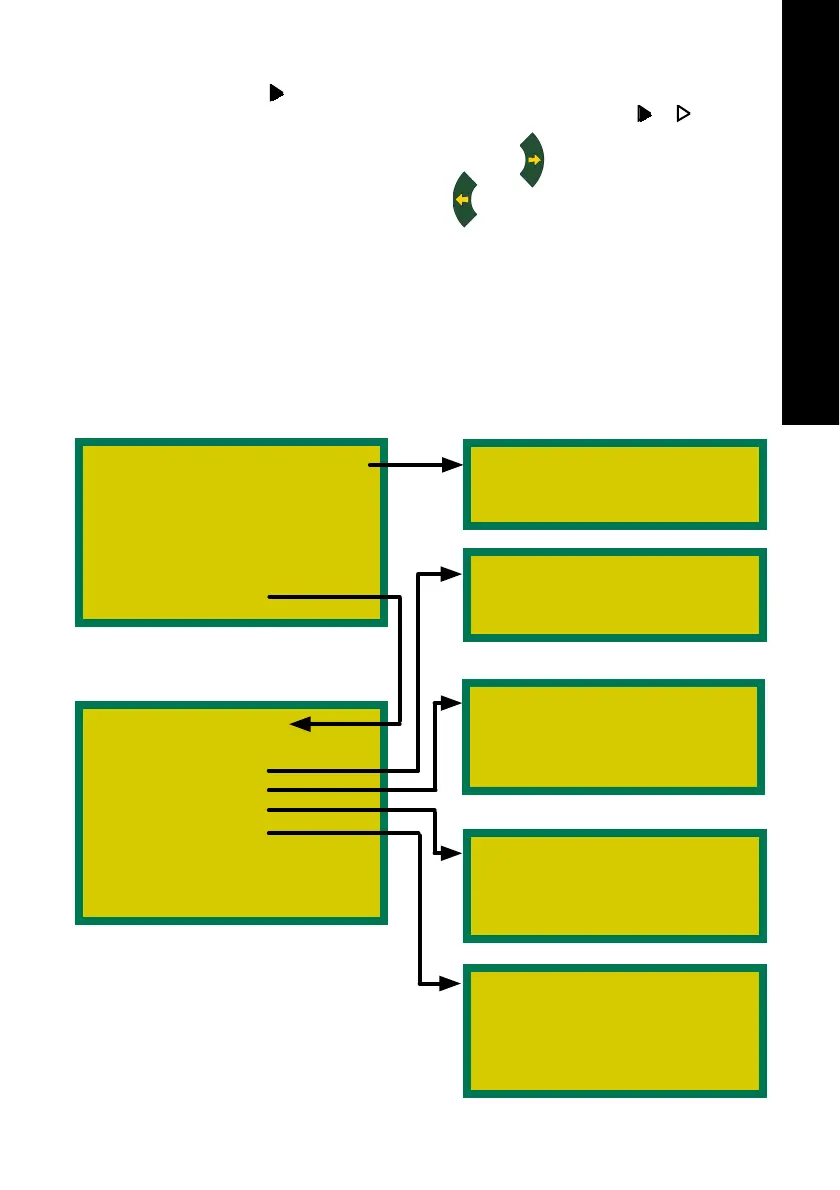
Menu structure
Status: Opeating 85%M
u
Temperature 60.0°C
Curr. feed XX %
Op. time int. XXX h
Service 1 XXX h
Service 2 XXX h
Settings
Settings menu
u
Load burner No
Operating
Pause
External feed
Sensors
Maint. burn No
Service 1 189 h
Reset par. No
USING THE CONTROL SYSTEM
Temperature menu
u
Oper. temp. 73°C
Operating menu
u
Oper. temp. 73°C
Adjust feed 0%
Pause menu
u
Run time 0.0 s
Stop time 20 m
Post-run time 30 s
External feed
u
Run time ext. 30 s
Start external No
Manual time 1 m
Sensors
u
Optical req. 30
Optical actual xxx
Level req. 78
Level actual xxx


 To Next Page