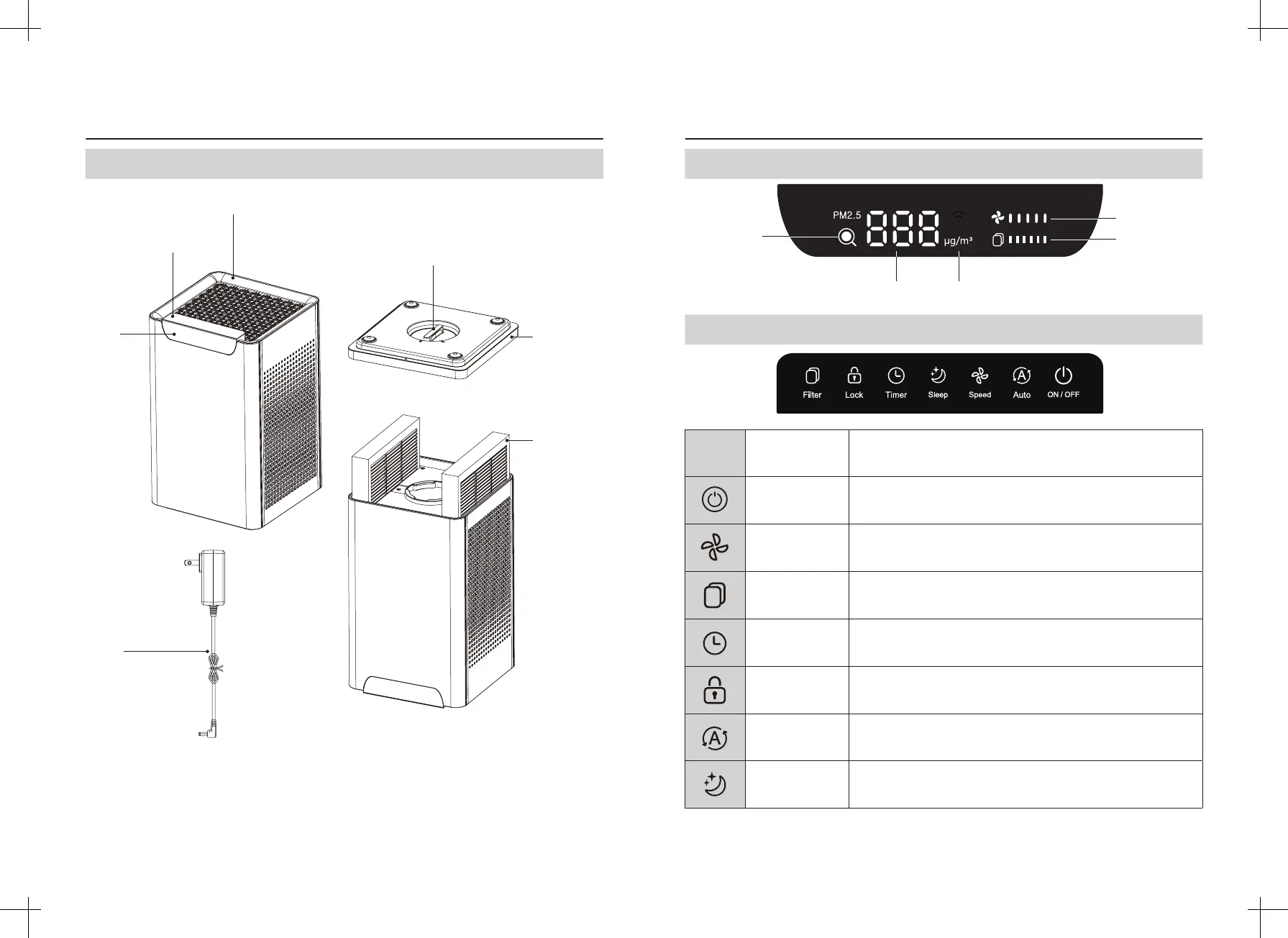
Air quality
indicator
PM2.5 value The unit of PM2.5
Air speed
display area
Filter life
display area
Display
Touch Panel
SYMBOL SYMBOL NAME DESCRIPTION
ON / OFF Power ON / OFF.
Air Speed Air speed adjustment, 1st-5th gear.
Filter replacement
reminder reset
REPLACE FILTER WHEN THE ICON LIGHT IS ON;
When Press, refer the section on page.10 for “Filter replacement reminder
reset”.
Timer Setting Press this key to setup timer.
Child Lock Press this key to control the child lock on / o function.
Auto Mode
Press this key to enter automatic mode, air speed is adjusted according to
the change of PM2.5 value.
Sleep Press this key to enter / exit sleep mode.
If the product picture is dierent from the real one, the real one shall prevail.
PRODUCT PARTS PRODUCT PARTS
Base
Composite lter
Display
Adapter
Base knob
Host
Touch Panel
Product Parts Structure and Name
-03- -04-



 To Next Page