70
H77H2-M4 USER MANUAL
Chapter 5
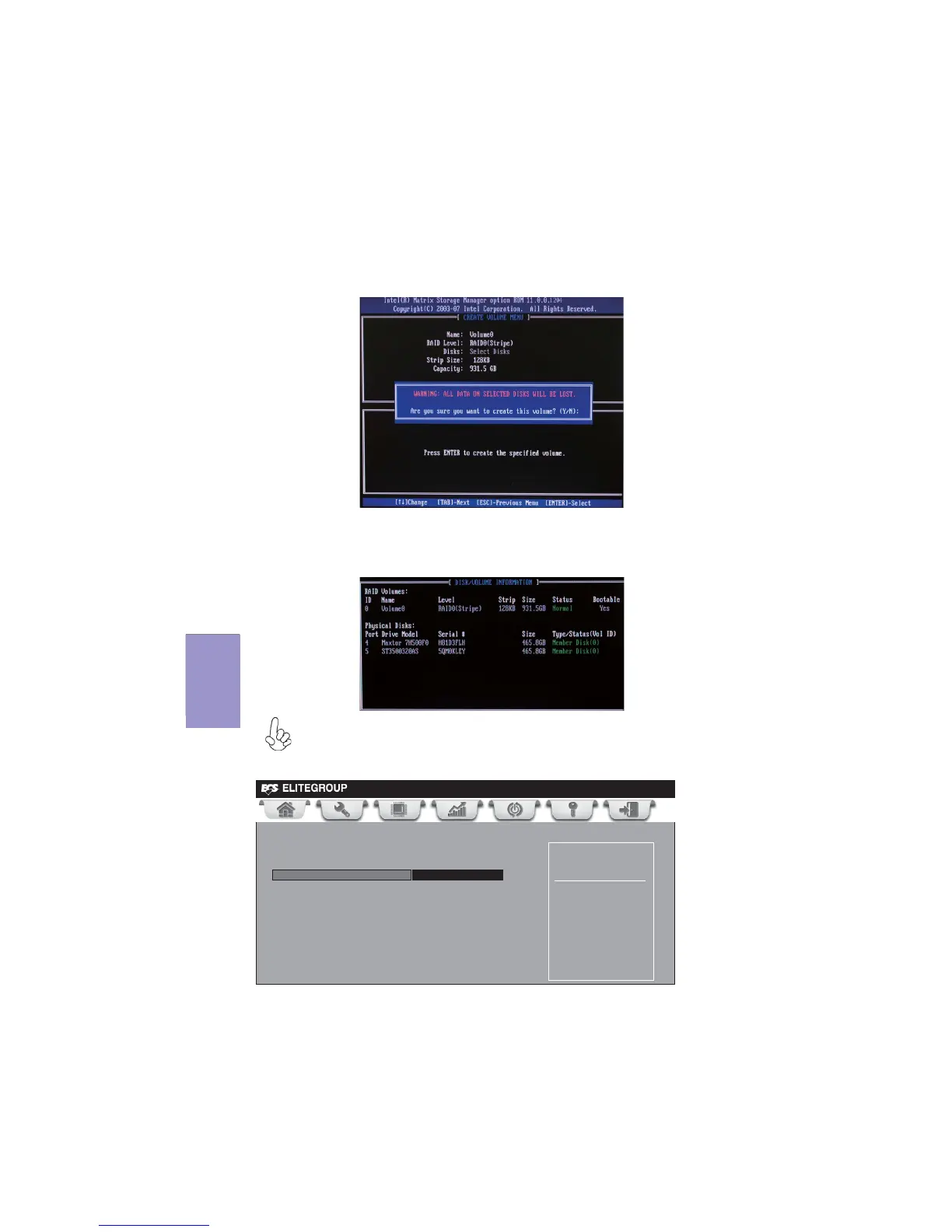
Pressing <Y> deletes all the data in the HDDs.
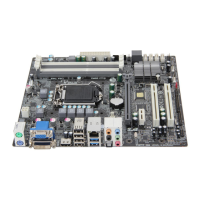
5. The following screen appears, displaying the relevant information about
the RAID set you created.
Users please be noted that RAID 0 (Stripe) is set to accelerate the data
access, and RAID 1 (Mirror) is set to provide the data backup. If you want
to set RAID 0, you need to set the 2nd Boot Device item in the BIOS to Intel
Volume0. See section “Advanced Setup” for details.
4. When done, press <Enter> to confirm the creation of the RAID set. A dia-
logue box appears to confirm the action. Press <Y> to confirm; otherwise,
press <N>.
Main Advanced Chipset M.I.B III Boot Security Save &Exit
Hard Disk Drive Priorities
1st Boot Intel volume 0
Sets the system boot order
+/- : Change Opt.
Enter/Dbl Click : Select
lk
mn
: Select Screen
/Click : Select Item
F1: General Help
F2: Previous Values
F3: Optimized Defaults
F4: Save & Exit
ESC/Right Click: Exit


 To Next Page