10
Installing the Motherboard
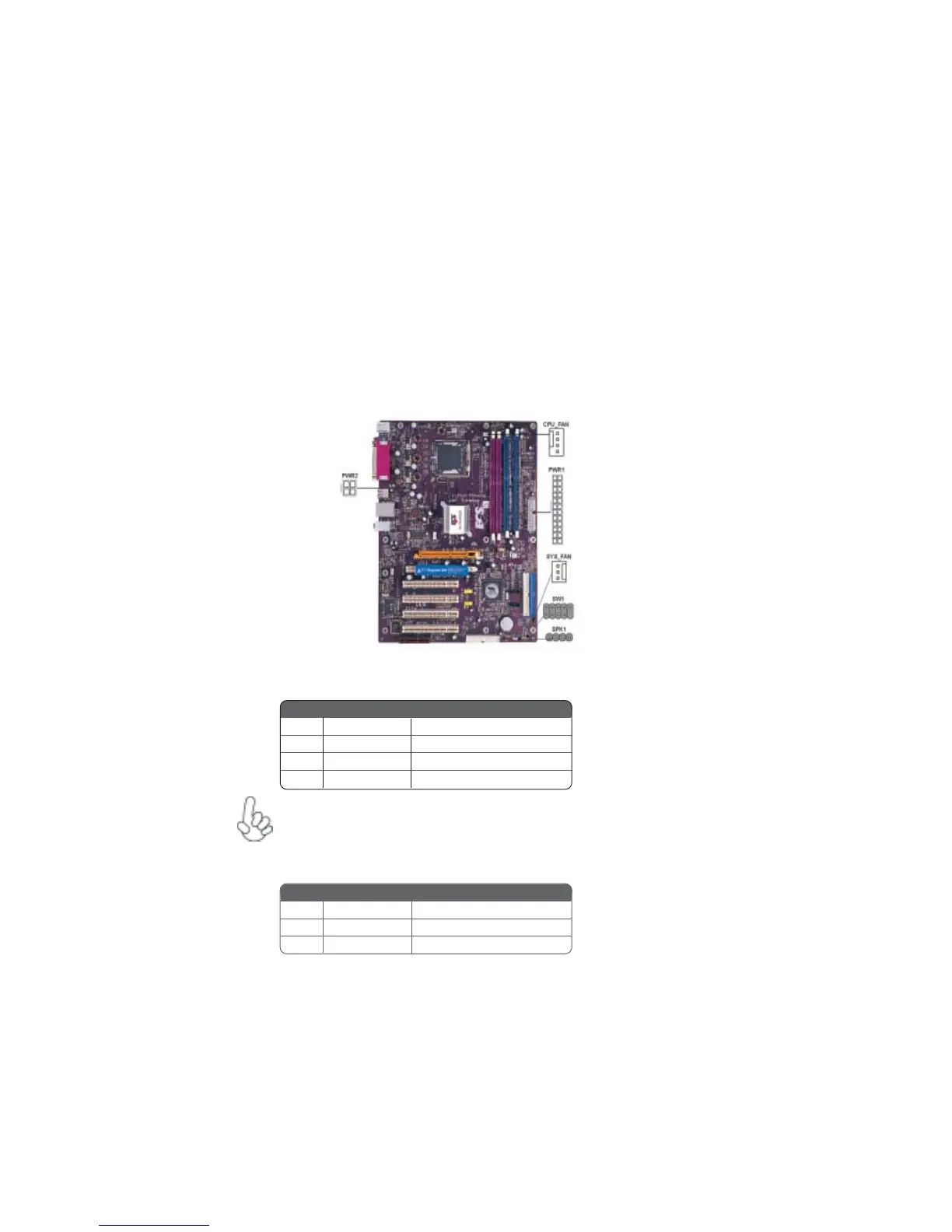
Connecting Case Components
After you have installed the motherboard into a case, you can begin con-
necting the motherboard components. Refer to the following:
1 Connect the CPU cooling fan cable to CPU_FAN.
2 Connect the system cooling fan connector to SYS_FAN.
3 Connect the case speaker calbe to SPK1.
4 Connect the case switches and indicator LEDs to the SW1.
5 Connect the standard power supply connector to PWR1.
6 Connect the auxiliary case power supply connector to PWR2.
CPU_FAN: CPU FAN Power Connector
SYS_FAN: System cooling FAN Power Connector
Users please note that the fan connector supports the CPU cooling
fan of 1.1A~2.2A (26.4W max.) at +12V.
Pin Signal Name Function
1 GND System Ground
2 +12V Power +12V
3 Sense Sensor
4 PWM CPU FAN control
Pin Signal Name Function
1 GND System Ground
2 +12V Power +12V
3 Sense Sensor



 To Next Page