EasyManua.ls Logo

edelkrone HEADONE - User Manual

edelkrone HEADONE
7 pages
Print Icon
To Next Page IconTo Next Page
Loading...
USER’S MANUAL
HEADONE
Before operating your edelkrone,
please watch the user’s manual video from the link below
http://edel.kr/ho
5. START USING
Download the edelkrone App on your mobile device from App Store or
Google Play. Links can be found at www.edelkrone.com/headone
There are no on/off buttons on the HeadONE. To switch on, attach the battery
to the HeadONE.
edelkrone App will automatically pair with your HeadONE via Bluetooth.
You are now ready to use your HeadONE. Just keep following the instructions
on your mobile device or visit manuals.edelkrone.com for a detailed video
instruction.
1.
2.
3.
4.
Make sure your mobile device’s Bluetooth connection is on.
Always start using with a fully charged battery.
A detailed video explaining the application usage details can be found at:
http://edel.kr/ho
DISPOSAL OF THE PRODUCT & WARNINGS
For more information and tips about your HeadONE, please watch the user’s
manual videos at:
http://edel.kr/ho
4. USING MOTION BOX WITH FLEXTILT HEAD 2
FlexTILT Head 2 is recommended
as a tripod head solution for
HeadONE.
With FlexTILT Head 2, you can easily:
-Adjust the center of gravity of your setup,
-Pan/tilt, and
-Change the height of the camera.
A detailed video explaining how to operate the SliderONE can be found from :
manuals.edelkrone.com
A detailed video explaining how to use the FlexTILT Head 2 with HeadONE
can be found at:
http://edel.kr/ho
Should the product become damaged beyond repair, or if you wish to
dispose of it, it must be disposed separately from the municipal waste
stream via designated collection facilities appointed by the government or
the local authorities. Observe the regulations of your area and country that
relate to the disposal of electronic products.
* Keep your electronic Motion Control Unit away from all sorts of liquids.
* Do not attempt to disassemble or modify any internal parts of your Motion Control Unit. If the
device appears to be malfunctioning, discontinue use immediately and contact support for
qualified service.
* Never force a different type of connector into a port.
* Never use or store your Motion Control Unit in areas subject to extreme temperatures, or high
levels of vibration.
* Environmental factors may affect your Motion Control Unit’s performance. Keep your product
away from environmental hazards such as dust or heavy resonance. Do not use chemical
materials to clean your product.
* Avoid dropping or causing physical damage to your Motion Control Unit.
* Do not place heavy objects on top of your Motion Control Unit.
**edelkrone cannot be held responsible for damage caused by improper use or
modification of the product.
Question and Answer IconNeed help?

Do you have a question about the edelkrone HEADONE and is the answer not in the manual?

Summary

1. Whats in the Box & Basics

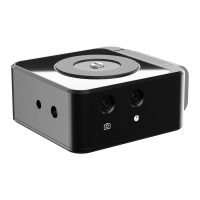
HeadONE Unit

The main HeadONE device, the core component of the system.

3;8-16 Mounting Screw

Standard threaded screw for attaching equipment to the HeadONE.

Built-in LP-E6 Battery Bracket

Integrated compartment for LP-E6 type batteries to power the device.

Shutter Trigger Port

Port for connecting a shutter release cable for remote camera control.

LANC Port

LANC (Control) port for remote operation and data transfer.

3;8-16 to 1;4-20 Reducer Bushing

Adapter bushing to convert 3/8"-16 threads to 1/4"-20.

3;8-16 Mounting Port

Standard 3/8"-16 threaded female port for mounting accessories.

1;4-20 Mounting Port

Standard 1/4"-20 threaded female port for mounting accessories.

2. Reducer Bushing & Pop-Up Mounting Screw Usage

3. Mounting HeadONE with Camera and FlexTILT Head 2

Disposal of Product & Warnings

Safety and Disposal Precautions

Guidelines for safe handling, environmental disposal, and product care.

4. Using Motion Box with FlexTILT Head 2

5. Starting Usage and App Connection

Overview

The Edelkrone HeadONE is a compact, motion control unit designed for filmmakers, offering precise camera movements and integration with a mobile app for enhanced control. It serves as a versatile tool for achieving smooth, repeatable camera motions, making it suitable for time-lapses, stop-motion, and various video productions.

Function Description:

The HeadONE is a single-axis motion control device that allows for precise panning movements. It is designed to be mounted on a tripod, and a camera can then be attached to the HeadONE, often via an additional tripod head like the Edelkrone FlexTILT Head 2. The device is controlled wirelessly via a dedicated Edelkrone app on a mobile device (iOS or Android), connecting via Bluetooth. This app enables users to program complex motion paths, control speed, and set keyframes for automated camera movements. The HeadONE is powered by an LP-E6 battery, which is integrated into a built-in bracket. It features various mounting ports and connectivity options, including a shutter trigger port and a LANC port, allowing for synchronization with cameras for advanced shooting techniques.

Important Technical Specifications:

  • Mounting Screw: 3/8"-16 mounting screw (pop-up design, accessible with a coin).
  • Reducer Bushing: Includes a 3/8"-16 to 1/4"-20 reducer bushing, which is initially mounted on the 3/8"-16 mounting port.
  • Mounting Ports:
    • 3/8"-16 mounting port (bottom, for tripod attachment).
    • 1/4"-20 mounting port (side).
  • Battery: Built-in LP-E6 battery bracket for power.
  • Connectivity:
    • LANC port.
    • Shutter trigger port.
    • Bluetooth for mobile app control.
  • Dimensions: Compact, cube-like form factor. (Specific dimensions not provided in the manual, but implied by images).
  • Weight: Lightweight for portability. (Specific weight not provided).

Usage Features:

  • Easy Setup: The HeadONE attaches to a tripod by rotating it clockwise. A camera can then be mounted on top, either directly or via an intermediate head like the FlexTILT Head 2.
  • Pop-Up Mounting Screw: Features a unique 3/8"-16 screw that can be popped up or hidden using a coin, providing flexibility for different mounting scenarios. The included 3/8"-16 to 1/4"-20 reducer bushing allows for compatibility with 1/4"-20 threaded accessories.
  • Mobile App Control: The primary method of control is through the Edelkrone App, available on App Store and Google Play. The app automatically pairs with the HeadONE via Bluetooth once the battery is attached.
  • No On/Off Buttons: The device powers on automatically when a battery is attached and powers off when the battery is removed.
  • FlexTILT Head 2 Integration: The FlexTILT Head 2 is recommended as a tripod head solution for the HeadONE. When used together, it allows for easy adjustment of the center of gravity, pan/tilt movements, and changes in camera height, enhancing the versatility of the setup.
  • Motion Control Capabilities: The app enables users to:
    • Adjust the center of gravity of the setup.
    • Perform pan/tilt movements (when used with a compatible head like FlexTILT Head 2).
    • Change the height of the camera (when used with a compatible head like FlexTILT Head 2).
    • Program and execute precise, repeatable camera movements.
  • Video Tutorials: Edelkrone provides detailed video tutorials for mounting, application usage, and general operation, accessible via QR codes and specific URLs (e.g., http://edel.kr/ho).

Maintenance Features:

  • Battery Management: Always start using the HeadONE with a fully charged battery to ensure optimal performance.
  • Bluetooth Connection: Ensure the mobile device's Bluetooth connection is on for seamless app control.
  • Cleaning: Do not use chemical materials to clean the product.
  • Environmental Protection:
    • Keep the electronic Motion Control Unit away from all sorts of liquids.
    • Avoid using or storing the device in areas subject to extreme temperatures or high levels of vibration.
    • Protect the product from environmental hazards such as dust or heavy resonance.
  • Physical Care:
    • Avoid dropping or causing physical damage to the Motion Control Unit.
    • Do not place heavy objects on top of the unit.
  • Repair and Modification:
    • Do not attempt to disassemble or modify any internal parts of the Motion Control Unit.
    • If the device malfunctions, discontinue use immediately and contact support for qualified service.
    • Edelkrone is not responsible for damage caused by improper use or modification of the product.
  • Connector Usage: Never force a different type of connector into a port.
  • Disposal: If the product is damaged beyond repair or needs to be disposed of, it must be separated from municipal waste and disposed of via designated collection facilities, adhering to local and national regulations for electronic product disposal.

The Edelkrone HeadONE is designed for ease of use and precision, empowering filmmakers to capture dynamic and controlled camera movements with the convenience of mobile app integration.

edelkrone HEADONE Specifications

General IconGeneral
Brandedelkrone
ModelHEADONE
CategoryCamera Accessories
LanguageEnglish

Related product manuals