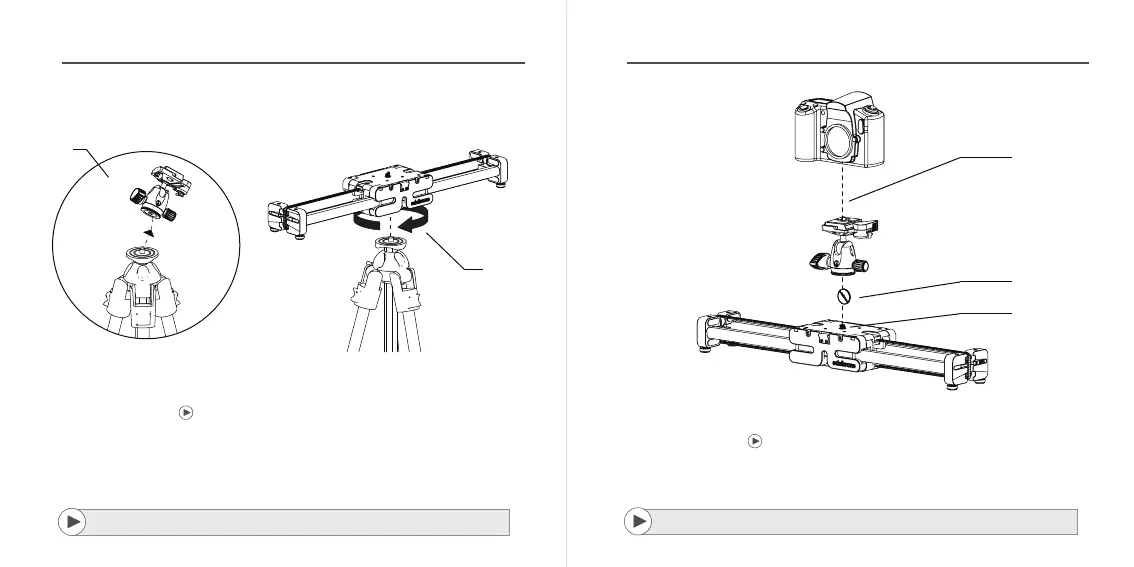
2. MOUNTING YOUR SLIDERPLUS TO YOUR TRIPOD
1/
Detach tripod head
2/
Put your SliderPLUS/PRO on top of your
tripod and turn it clockwise until it’s tight.
1
2
*Detailed video explaining how to attach this belt and mountaing details can be found
from : manuals.edelkrone.com
Detailed video explaining mounting your SliderPLUS to your tripod steps at the link:
manuals.edelkrone.com
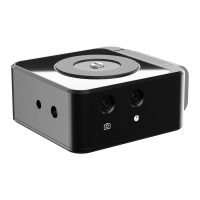
3. MOUNTING YOUR CAMERA TO YOUR SLIDERPLUS
1/
2/
3/
SliderPLUS has 3/8”-16 screw for your tripod head hidden inside. You can access this screw
with the help of a coin.
Using a coin, turn the screw until it pops out.To lock the screw back again just press it down
and turn it counter clockwise.
Place your tripod head on the screw and turn it clockwise until it tightens.
2
1
3
*Before operating your product, please watch the users manual videos from the link:
manual.edelkrone.com
Before operating your product, please watch the users manual videos from the link:
manuals.edelkrone.com


 To Next Page