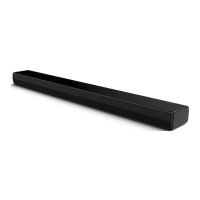
The Edenwood TB122B is a 2.1 channel soundbar with a built-in subwoofer, designed to enhance your audio experience for TV and other external devices. It offers various connectivity options including HDMI ARC, Optical, AUX, USB, and Bluetooth®, providing flexibility for different setups.
Function Description
The soundbar serves as an external audio system, delivering improved sound quality compared to typical TV speakers. Its 2.1 channel configuration with a built-in subwoofer aims to provide a richer audio experience with enhanced bass.
Key functions include:
- Audio Playback: Plays audio from connected TVs, external audio devices, USB drives, and Bluetooth® enabled devices.
- Sound Modes: Offers preset equalizer (EQ) effects such as NEWS, MOVIE, and MUSIC to optimize sound for different content types.
- Bass Adjustment: Allows users to adjust the bass level to their preference.
- Volume Control: Standard volume adjustment and mute functions.
- Standby/On: Switches the unit between active and standby modes.
- Automatic Power Off: Automatically enters standby mode after 15 minutes of inactivity or disconnection from an external source, promoting energy saving.
Important Technical Specifications
General:
- Brand: Edenwood
- Model: TB122B
- Dimensions (WxHxD): 944 x 64 x 106 mm
- Net weight: 2.8 kg
Power:
- Power Supply: AC 100-240V~50/60Hz
- Power Consumption: 25 W
- Standby Power Consumption: < 0.5 W
Audio:
- Speakers Impedance: 8Ω x 2
- Audio input sensitivity: 500mV
- Frequency Response: 40Hz - 20KHz
- Amplifier (RMS Output power):
- Total: 60 W
- Main Unit: 15 W x 2 + 30 W (likely 15W per channel for the main speakers and 30W for the built-in subwoofer)
Connectivity:
- HDMI ARC Socket: Supports Audio Return Channel for simplified connection with ARC-compliant TVs.
- OPTICAL Socket: For digital audio connection from external devices.
- AUX Socket: 3.5mm input for analog audio connection.
- USB Socket:
- Type: Hi-Speed USB (2.0)
- Power: 5V 500mA
- Supported File Systems: FAT32 / FAT16
- Max Capacity: 32GB
- Supported Audio Format: MP3
- Bluetooth®:
- Version / Profiles: V 5.1 (A2DP, AVRCP)
- Frequency Range: 2402 MHz ~ 2480 MHz
- Max. Transmitting Power (EIRP): < 10 dBm
- Operational Range: Approximately 8 meters
Remote Control:
- Battery type: AAA (1.5V x 2)
- Distance/Angle: 19.7 feet (6m) / 30°
Usage Features
Controls:
- Main Unit Controls: Power (ON/OFF), Volume (+/-), Source selection.
- Remote Control: Comprehensive control including Power, Source, Volume (+/-), Bass (+/-), Mute, Previous/Next Track, Play/Pause, and EQ selection.
Connectivity Options:
- HDMI ARC: Connects to an ARC-compliant TV, allowing the TV remote to control the soundbar's volume and mute functions if HDMI-CEC is enabled on the TV. Requires HDMI 1.4 or higher version cable.
- OPTICAL: Connects to external devices with an OPTICAL OUT socket.
- AUX: Connects to external audio devices via a 3.5mm to 3.5mm audio cable or an RCA to 3.5mm audio cable.
- USB: Insert a USB flash drive to play MP3 music files.
- Bluetooth®: Pairs with Bluetooth® enabled devices (e.g., smartphones, tablets) to stream audio wirelessly. Supports A2DP for audio streaming and AVRCP for remote control of playback.
Audio Settings:
- EQ Effects: Choose from NEWS, MOVIE, or MUSIC modes to optimize audio for different content.
- Bass Level Adjustment: Fine-tune the bass output using the remote control (range: bass+3 to bass-3).
- PCM Audio Format: For HDMI and Optical inputs, it is recommended to set the audio output of the source device (TV, game console, DVD player) to PCM format, as the unit may not decode all digital audio formats.
Placement and Mounting:
- Table Placement: Can be placed directly in front of the TV stand.
- Wall Mounting: Designed for wall mounting below a wall-attached TV. Requires drilling two parallel holes (Ø 5.5-6 mm) 796 mm apart. Wall mount brackets and screws are included, but a screwdriver is not. Wall mounting should be done by qualified personnel to prevent injury and property damage. Suggested wall mounting height is ≤ 1.5 meters.
Battery Usage (Remote Control):
- Requires two AAA batteries.
- Ensure correct polarity (+ and -) when inserting batteries.
- Do not mix old and new batteries, or different types of batteries (alkaline, standard, rechargeable).
- Remove batteries if the unit is not used for a long time to prevent leakage.
Maintenance Features
Cleaning:
- Clean the unit only with a dry or slightly damp cloth.
- Do not use chemical solvents, as they may damage the finish.
Troubleshooting:
- The manual provides a dedicated troubleshooting section to address common issues such as no power, remote control not working, no sound, TV display problems with HDR content, and Bluetooth® pairing issues.
- Users are advised not to attempt self-repair to maintain warranty validity.
- For "No sound" issues, ensure the unit is not muted, the correct source is selected, the source device's audio output is set to PCM (for digital inputs), and the volume is turned up.
- For Bluetooth® issues, ensure the function is activated, re-pair the device, and maintain a distance within 8 meters.
Safety Instructions:
- Emphasizes reading all safety and operating instructions.
- Warnings against exposure to rain or moisture, blocking ventilation, and placing near heat sources.
- Instructions for proper disposal of batteries and the product itself (WEEE directive compliance).
- The apparatus is a Class II electrical appliance, meaning it does not require a safety connection to electrical earth.
- The mains plug/appliance coupler serves as the disconnect device and must remain readily operable.



 To Next Page
 General