ROUTING THE MAIN CABLE
CAMERA
CTS
DISPLAY
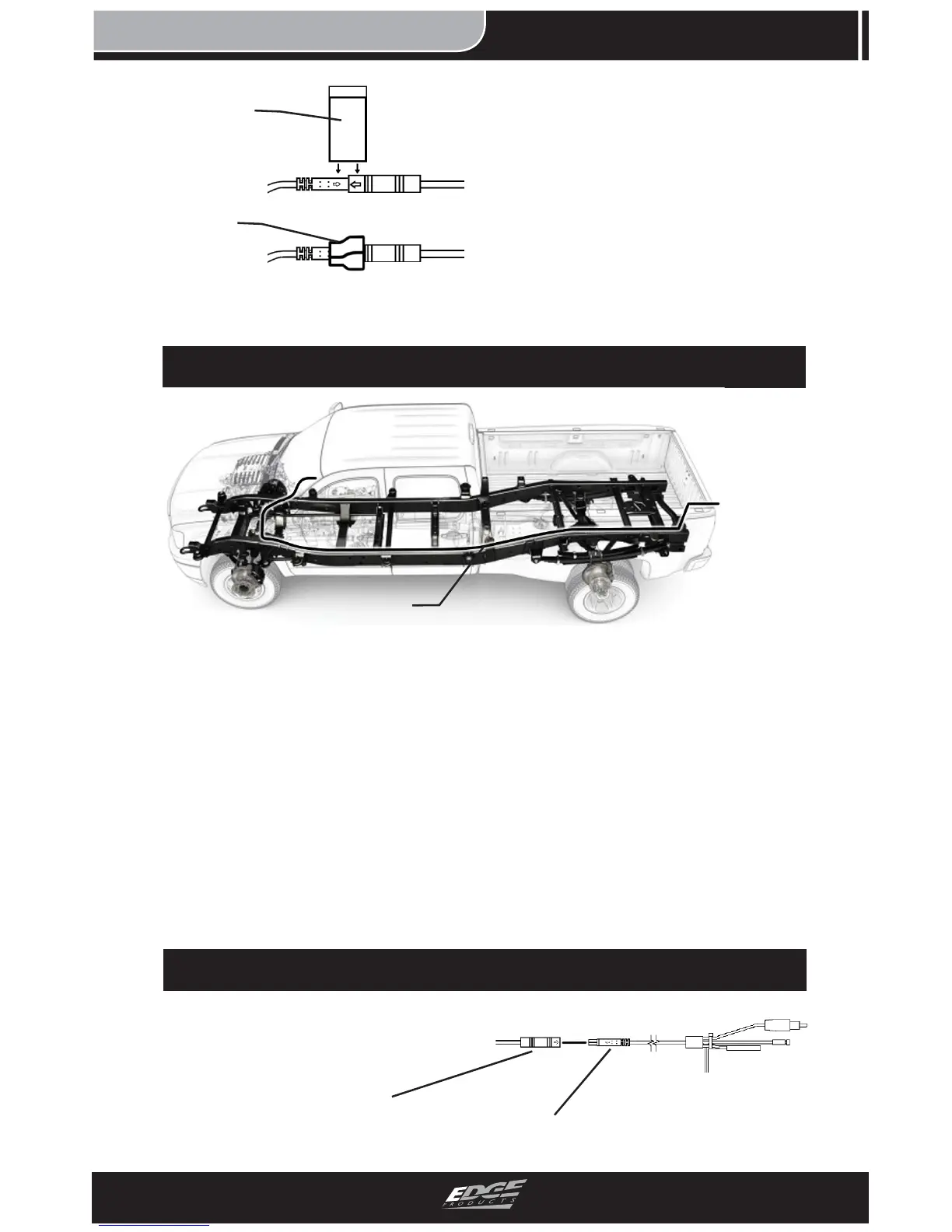
FIGURE 6 - ROUTED CABLE VIEW
1. Route the MAIN CABLE
along the factory wiring har-
ness located on the truck frame.
Use the ZIP-TIES to fasten the
cable. Avoid routing near:
-Hot surfaces such as exhaust
components.
-Moving parts such as suspen-
sion. (If installing on a car,
routing through the trunk and
cab is recommended).
2. Locate an existing point of
entry into the truck cab along
the fi re wall and route the
MAIN CABLE into the cab.
IN-CAB & FUSE CONNECTIONS
MAIN
CABLE
1. Plug the routed MAIN
CABLE into the JUNCTION
CABLE.
FIGURE 7
MAIN
CABLE
JUNCTION
CABLE
FIGURE 5
3. Wrap the seam on the con-
nection made in step 1 as shown
in Figure 5 to better the seal.
4. Firmly press/squeeze the
wrapped tape to create the best
seal and adhesion possible.
TAPE
TAPED
SEAM


 To Next Page