EasyManua.ls Logo

EdgeStar PAC801W - User Manual

EdgeStar PAC801W
23 pages
Print Icon
To Next Page IconTo Next Page
Loading...
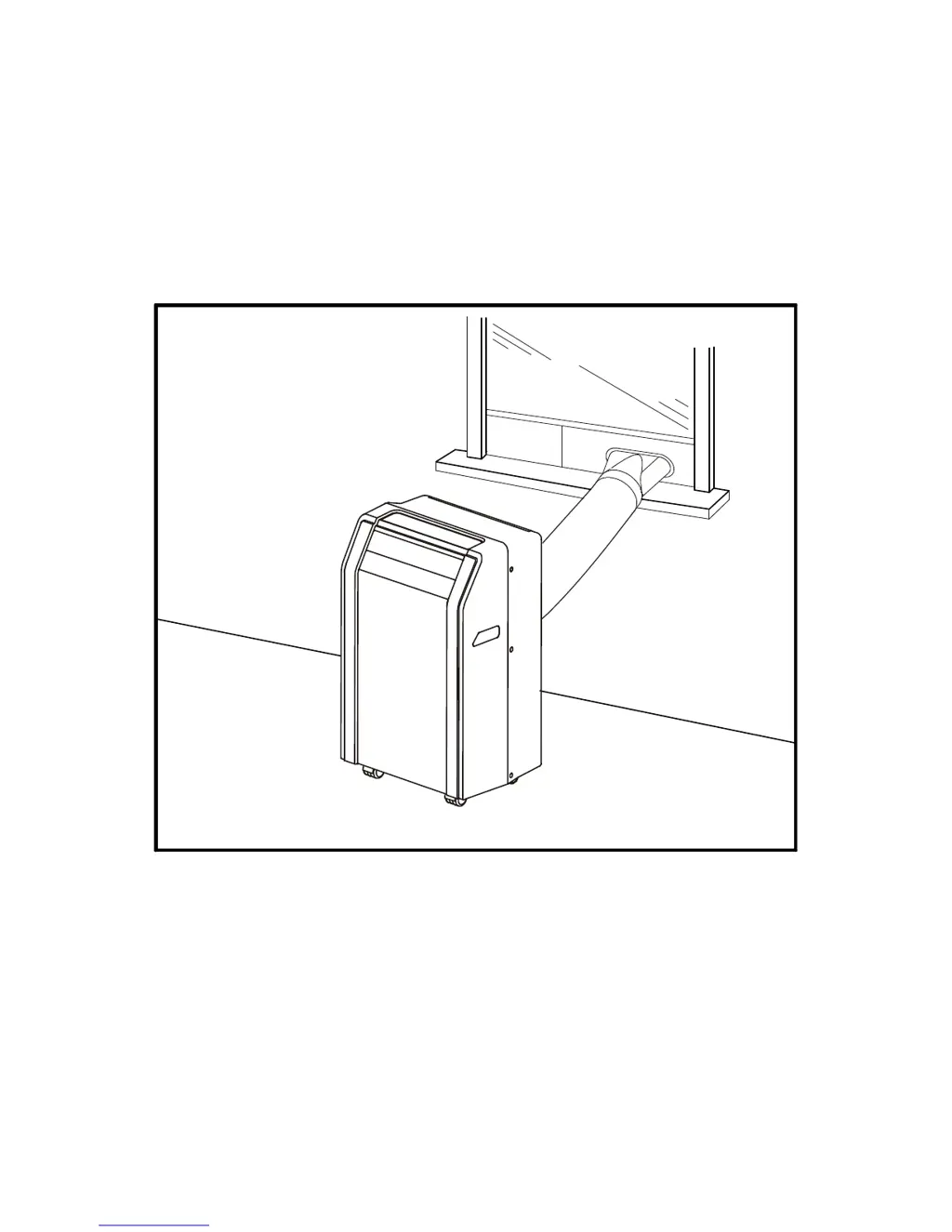
Portable Air Conditioner
Owner’s Manual
This manual covers models:
PAC801W, PAC1201W & PAC1401W
This manual contains important information regarding safety precautions, and the proper
installation, use and maintenance of your portable air conditioner.

Questions and Answers

  • T
    Thomas WestJul 31, 2025
    What to do if my EdgeStar PAC801W Air Conditioner is not functioning at all?
    • A
      Ashley SnyderJul 31, 2025
      If your EdgeStar Air Conditioner is not functioning, ensure it's plugged in and the LCDI power cord hasn't tripped; if so, press the Reset button. Try another outlet or check the circuit breaker, referring to the unit's rating label for amperage. Also, check if the water reservoir is full, indicated by a P1 error code; if full, drain the unit. If indicator lights don't turn on, the control panel may be disconnected.
  • Y
    yvaldezAug 4, 2025
    Why does my EdgeStar Air Conditioner blow cold air, but not lower the room temperature?
    • B
      Benjamin GatesAug 4, 2025
      If your EdgeStar Air Conditioner blows cold air but doesn't lower the room temperature, ensure the unit is vented properly. Reduce the area being cooled or use additional units. Close any open doors and windows, and eliminate heat sources. Insulate the room, ensure the room temperature is below 90°F, and minimize direct sunlight. Clean or replace the filter, vacuum the condenser coils, and clear any obstructions from the air intake or exhaust ports.
  • R
    Ryan DaughertyAug 10, 2025
    Why is my EdgeStar PAC801W making a loud noise?
    • Z
      zmendozaAug 10, 2025
      If your EdgeStar Air Conditioner is making a loud noise, ensure it is on a level surface. Also, check the fan for any foreign objects and remove them. If the floor below the unit is uneven, move the unit to a level surface.
  • S
    Shelly BatesAug 14, 2025
    What to do if my EdgeStar Air Conditioner is not cooling at all?
    • D
      Debbie MerrittAug 14, 2025
      If your EdgeStar Air Conditioner is not cooling, make sure it's set to cooling mode and the temperature is set lower. The compressor may take up to 3 minutes to turn on, or longer if it's too warm. Ensure the room temperature is below 90°F. Clean any dusty or blocked filters and remove obstructions from the exhaust hose and port.
  • O
    ohensonAug 19, 2025
    What to do if my EdgeStar PAC801W trips the power cord or the circuit breaker?
    • L
      Laura SmithAug 19, 2025
      If your EdgeStar Air Conditioner runs briefly and then trips the power cord or circuit breaker, it might be plugged into an outlet that can't supply enough current. If the unit works in a different room or circuit, contact an electrician.
  • J
    Jacob PalmerAug 25, 2025
    Why is my EdgeStar PAC801W Air Conditioner making a continuous metallic knocking or pinging sound?
    • A
      amber24Aug 26, 2025
      If your EdgeStar Air Conditioner is making a continuous metallic knocking or pinging sound, shut it off and let it sit on a level surface for at least 24 hours before restarting. The unit may have been shipped on its side.

Summary

Important Safety Information

Electrical Safety

Precautions for safe use of the unit's electrical components and power supply.

General Safety

General safety guidelines for operating the portable air conditioner.

Introduction

Parts Identification

Front View

Diagram and labels for the front components of the air conditioner.

Back View

Diagram and labels for the rear components of the air conditioner.

Installing the Carbon Filter

Window Kit Installation Instructions

Preparations for installing the window kit

Pre-installation steps and parts identification for the window kit.

Installing the window plates

Guide on how to install the window plates for the exhaust kit.

Attaching the oval adapter to the exhaust hose

Instructions on connecting the hose adapter to the exhaust hose.

Connecting the exhaust hose to the unit

Steps for connecting the exhaust hose to the air conditioner.

Connecting the oval adapter to the window kit

Instructions for connecting the hose to the window kit.

Notes about the Exhaust hose

Important considerations and guidelines for using the exhaust hose.

Draining the Unit

Direct drainage

Method for continuous water drainage using a drain hose.

Manual Drain

Procedure for manually draining the unit's water reservoir.

Control Panel Overview

Operating the Control Panel

Power

How to turn the air conditioner on and off using the power button.

Cooling Mode

Instructions for operating the unit in cooling mode.

Dehumidifying Mode

Instructions for operating the unit in dehumidifying mode.

Automatic Mode

Instructions for operating the unit in automatic mode.

Fan Only Mode

Instructions for operating the unit in fan-only mode.

Fan Button

Explanation of how to adjust fan speed using the fan button.

Timer Button

Guide on setting the unit's timer for automatic on/off operation.

LED Display

Explanation of the information shown on the unit's LED display.

Error Codes

List of error codes and their meanings, with troubleshooting steps.

Swing Button

How to use the swing function to adjust air direction.

Sleep Button

Instructions for activating the sleep mode for temperature adjustments.

Using the Remote Control

Installing the batteries

Steps for inserting batteries into the remote control.

Normal Sounds

Energy Saving Guide

Maintenance

Cleaning the unit

Instructions for cleaning the exterior and internal parts of the unit.

Cleaning the pre-filters

Steps for cleaning the unit's air pre-filters.

Preparation for Storage

Guide on preparing the unit for long-term storage.

Troubleshooting

Troubleshooting continued

Specifications

Limited Warranty

EdgeStar PAC801W Specifications

General IconGeneral
TypePortable Air Conditioner
Cooling Capacity8, 000 BTU
Noise Level52 dB
Remote ControlYes
Fan Speeds3
Voltage115V
Operating ModesCool, Fan, Dehumidify
Installation TypePortable
RefrigerantR410A

Related product manuals