USB audio mode
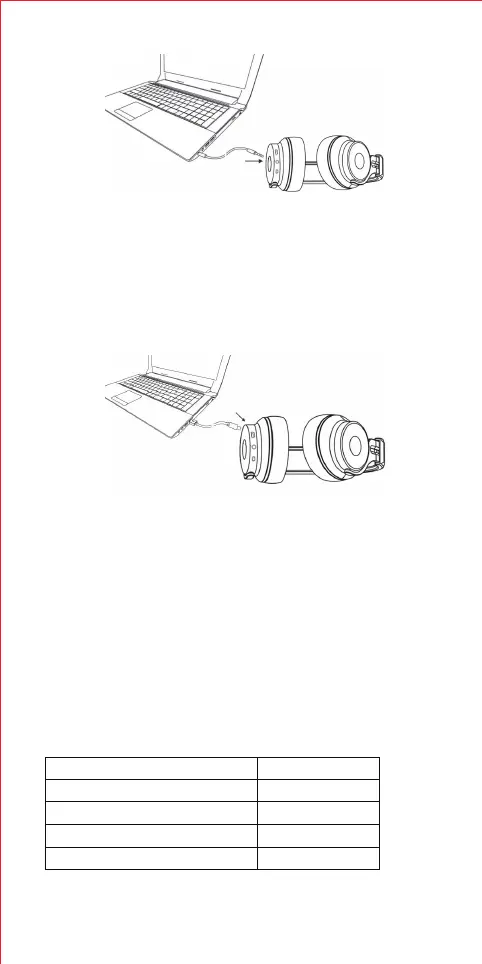
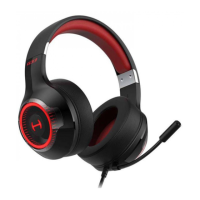
This headphone can connect to PC by USB data cable to listen to the
music on the PC.
Note:
1. Only the USB data cable with data transmission can connect to PC for
playing.
2. When connect to PC in the first time, the music maybe not directly output
from PC, you need to set the audio output to the headphone on PC.
Indicator lights
The red and blue light blinks alternatively
The blue light blinks once every 2 seconds.
The blue light blinks twice every 4 seconds.
The red light blinks
Headphone status
Pairing
Device disconnected
Device connected
Low power level
Meaning of indicator lights
Note:
1. When you insert the 3.5mm audio cable, the headphone will turn off and
Bluetooth connection will automatically disconnect, only effective with
AUX inaudio input.
2. If you want to use Bluetooth function, please plug out the 3.5mm audio
cable, re-start and pair again.
7


 To Next Page