8/16 ports Rack-mount
KVM Switch with OSD
EK-08RE EK-16RE
EK-08RE(or EK-16RE) is 19" rackmout PS/2 KVM switches which is a cost-effective solution for multiple
servers / PCs management. EK-08RE are robust and durable machines in metal enclosure and can
control up to 8 PS/2 computers using one PS/2 keyboard, monitor and PS/2 mouse.
Featuring a hot-plugging capability, EK-08RE allows you disconnect from PCs without powering down
the whole rack of servers.EK-08RE with OSD (On Screen Display) provides more convenient and
intuitive menu-driven operation for KVM switching.
With its password protection, EK-08RE can prevent unauthorized users to access. EK-08RE can be
maximized up to 49 ports by stacking up to 8 units. Flexible control control by front-panel push buttons,
keyboard hotkeys and OSD menu makes your PCs /servers management hassles-free. EK-08RE offers
an operation transparency that any professionals will come to appreciate.
Key Features:
• Rack-mount size (19") 8/16 ports KVM switch
• Supports High Video Resolution up to 1920 x 1440 with bandwidth 250MHz
• Supports Microsoft Intellimouse, Microsoft Optical Mouse, Microsoft Intellimouseexplorer, Logitech Net
Mouse…etc.
• Supports DOS, Win3.X, Win95/98/98SE/2000/ME/XP/Vista, WinNT, Netware, Unix, Linux.
• Hot Plug - Connect/Disconnect from PCs without powering down PCs
• PC selection via Push Buttons, Hotkeys (user definable) and OSD (On Screen Display Menu)
• Supports Auto Scan (Programmable) to monitor PCs
• Supports Password protection for advanced security
• Restores Keyboard status when switching PCs
• LED Display for easy status monitoring
• Buzz sound for switching confirmation

 Need help?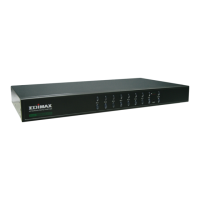

 To Next Page


 General