EasyManua.ls Logo

Edimax EW-7438RPn Mini - User Manual

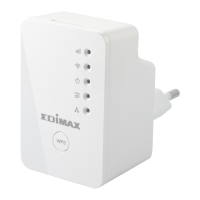
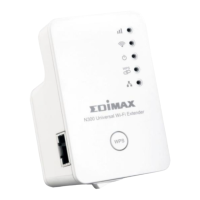
Edimax EW-7438RPn Mini
142 pages
Print Icon
To Next Page IconTo Next Page
Loading...
EW-7438RPn Mini
User Manual
07-2014 / v1.0

Table of Contents

Questions and Answers

  • D
    Daniel CaseyJul 30, 2025
    What to do if Edimax EW-7438RPn Mini isn’t working after a firmware upgrade failure?
    • R
      rossnathanJul 30, 2025
      Firmware upgrade failures can happen occasionally due to power cuts or unstable connections. First, connect a computer to one of your EW-7438RPn Mini’s LAN ports using an Ethernet cable. Then you need to modify your computer’s IP address to 192.168.2.x where x is any value between 3 and 254. From there, you need to go to 192.168.2.1 in a web browser, and you will see the page below: Click “Browse” to locate the firmware file on your computer and then click “Upload” to upload the new firmware. It may take several minutes to complete, please wait and follow the instructions on screen.
  • M
    Michael BakerAug 3, 2025
    How to fix Edimax Extender if I can't log onto the browser-based configuration interface?
    • E
      Emily HoweAug 3, 2025
      First, ensure the extender is correctly plugged into a power socket and check the LEDs. If it was just switched off or restarted, allow 2 minutes for initialization. Verify you're using the correct URL: http://edimaxext.setup. If using MAC or IP address filtering, try a different computer. Set your computer to automatically obtain an IP address (DHCP). Disable or disconnect other Wi-Fi/Ethernet adapters. Remember the password is case-sensitive, and if you've forgotten it, restore the device to factory settings.
  • X
    xgarciaAug 7, 2025
    What to do if my network device can't access the Internet through my Edimax EW-7438RPn Mini Extender?
    • J
      jennifer24Aug 7, 2025
      First, make sure your broadband router is working correctly. Then, power off both your network device and the Edimax extender, and then switch them back on. Check that the extender is powered on by looking at the PWR LED. On the configuration interface home page, under 'Wireless Configuration', the 'Status' should be 'Connected'. If it says 'Disconnected', the extender isn't connected to your router or access point.
  • L
    lnelsonAug 11, 2025
    What to do if I can't establish a connection to my Edimax wireless extender?
    • J
      jacobsonjessicaAug 12, 2025
      If encryption is enabled, double-check your WEP or WPA passphrase settings on your wireless client. Try moving closer to the wireless extender. You can also try switching off the extender and then switching it back on after 10 seconds. Also, ensure that the extender is correctly inserted into a power socket, and check the LEDs on the front panel.
  • H
    Haley MartinAug 16, 2025
    How to improve the signal of my Edimax wireless extender from my access point or router?
    • D
      Danny RobertsAug 16, 2025
      To improve the signal, keep the Edimax extender away from other radio devices like microwaves or wireless telephones. Avoid placing it in a corner of a room or near metal objects. Plug the extender directly into a wall socket if possible. Make sure there are as few obstacles as possible between the extender and the access point or router.
  • L
    Linda TownsendAug 20, 2025
    Why are file downloads very slow or frequently interrupted when using my Edimax EW-7438RPn Mini Extender?
    • J
      Jennifer TorresAug 20, 2025
      File download issues can stem from a few causes. Try resetting the wireless extender. It's also possible that your local network is experiencing technical difficulties or very high usage, so try again later. Changing the channel number may also help.
  • K
    Kenneth LeeAug 25, 2025
    Why is my Edimax EW-7438RPn Mini Extender extremely hot?
    • W
      Whitney HernandezAug 25, 2025
      It is normal for the wireless extender to heat up during frequent use. However, if you smell burning or see smoke coming from the wireless extender, disconnect it immediately, as far as it is safely possible to do so.

Summary

Product Information

Safety Information

Outlines important safety precautions for using the device.

Installation

Wi-Fi Extender Mode

Details setup for using the device as a Wi-Fi extender.

Wi-Fi Adapter;Bridge Mode

Details setup for using the device as a Wi-Fi adapter or bridge.

Wi-Fi Access Point Mode

Details setup for using the device as a Wi-Fi access point.

Reset to Factory Default Settings

Describes how to restore the device to its original settings.

Browser Based Configuration Interface

Login

Instructions for accessing the device's web interface.

Extender Mode

Wi-Fi Adapter;Bridge Mode

Access Point Mode

Basic Settings

Configures fundamental wireless network parameters.

EdiRange App

Appendix

Troubleshooting

Common issues and their solutions.

Edimax EW-7438RPn Mini Specifications

General IconGeneral
Modulation-
Frequency band2.4 GHz
Number of users- user(s)
Channels quantity- channels
Networking standardsIEEE 802.11b, IEEE 802.11g, IEEE 802.11n, IEEE 802.1x
Ethernet LAN data rates10, 100 Mbit/s
Maximum data transfer rate300 Mbit/s
Ethernet LAN (RJ-45) ports1
Security algorithms128-bit WEP, 64-bit WEP, WPA-PSK, WPA2-PSK
Antenna featuresIntegrated antenna
Antennas quantity2
AC input voltage100 - 240 V
AC input frequency50 - 60 Hz
InternalNo
Product colorWhite
Operating temperature (T-T)0 - 40 °C
Operating relative humidity (H-H)10 - 90 %
Harmonized System (HS) code85176990
Weight and Dimensions IconWeight and Dimensions
Depth38 mm
Width42 mm
Height65 mm
Weight72 g

Related product manuals