Version of October 10th, 2021 7
►Description
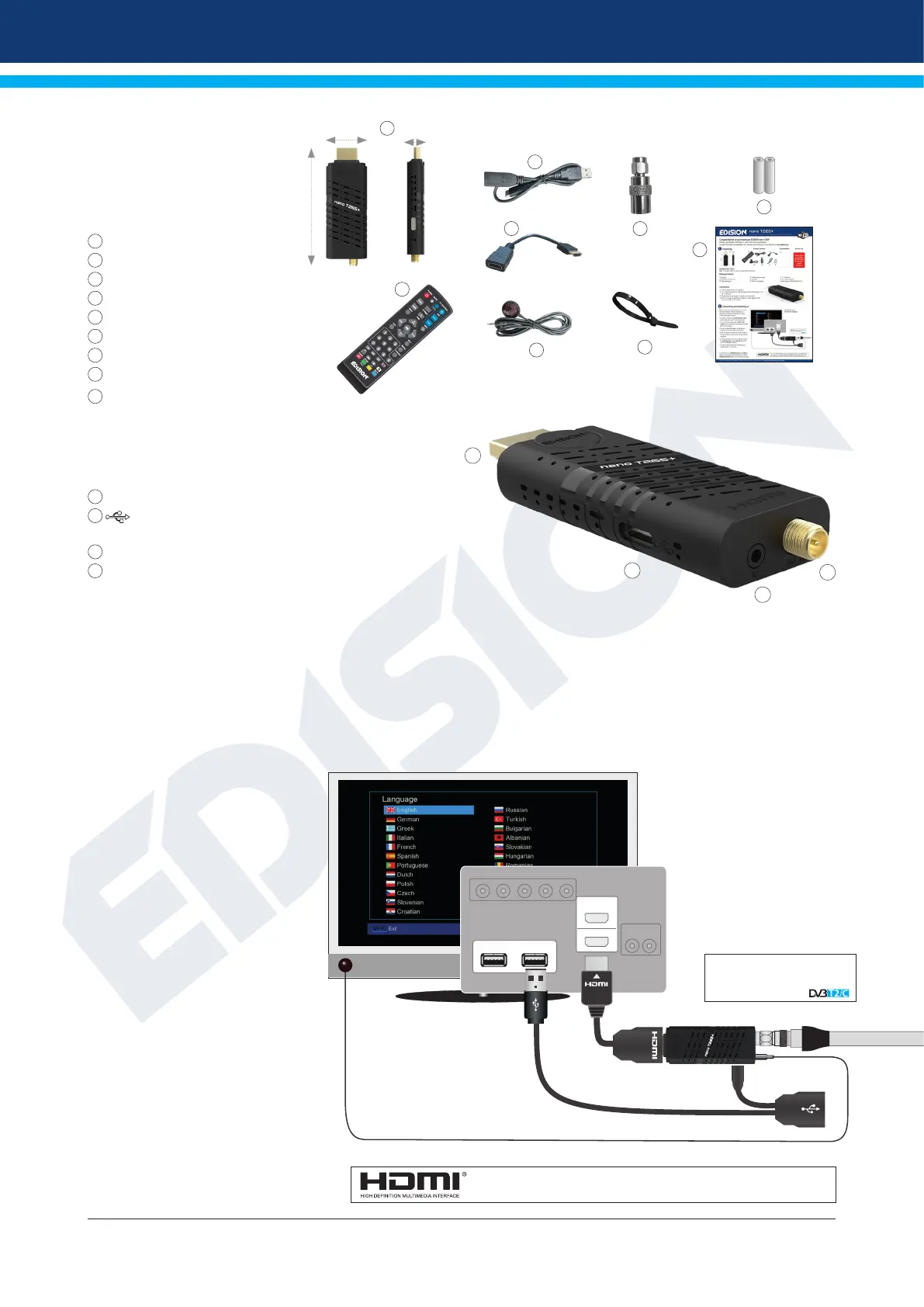
Package Contents
1
Receiver
2
IR Remote Control 2in1
3
USB cable type-Y
4
HDMI extension cable
5
IR cable
6
SMA to IEC adaptor
7
1 x Cable tie
8
2 x «ΑΑΑ» batteries
9
Mini Manual GR/EN/DE/ES/IT/FR
Connections
1
HDMI: Connection to an HDTV quality TV
2
/
USB: Connection for USB storage devices & Powering
(DC 5V) via TV USB port
3
Infrared sensor for the reception of remote control commands
4
ANT IN: Input for connecting to terrestrial or cable signal from
the antenna via SMA to IEC adaptor
Connecting and switching on
Note: For trouble-free signal reception your antenna
and cable installation should be calibrated and
inspected by a qualied professional with a digital
TV-level-measuring instrument.
• Connect the receiver using HDMI
extension cable via the HDMI port to
your TV’s HDMI input port
• Then connect the coaxial cable via
SMA to IEC adaptor with the terrestrial
or cable signal to the ANT IN input of
the receiver.
• Connect the Jack to IR cable to the
IR IN port to control the STB with the
Remote Control unit.
• Insert the batteries into the remote
control. Notes on the remote control
can be found on the back of these
instructions.
• For STB powering (DC 5V) via TV USB
port, connect the USB cable type-Y
to the USB port of the STB and to the
USB port on the TV.
• The receiver starts with the BOOT
process and is operational with in a
short time.
1
2
3
4
1
HDMI in
2
USB 2 USB 1
After the rst start,
choose your language
ANT IN:
coaxial-wire input from
terrestrial / cable signal
coaxial-wire Antenna
“The terms HDMI, HDMI High-Definition Multimedia Interface, and the HDMI Logo
are trademarks or registered trademarks of HDMI Licensing Administrator, Inc.”
2
3
4
5
6
7
8
9
12mm
80 mm
27 mm
1


 To Next Page