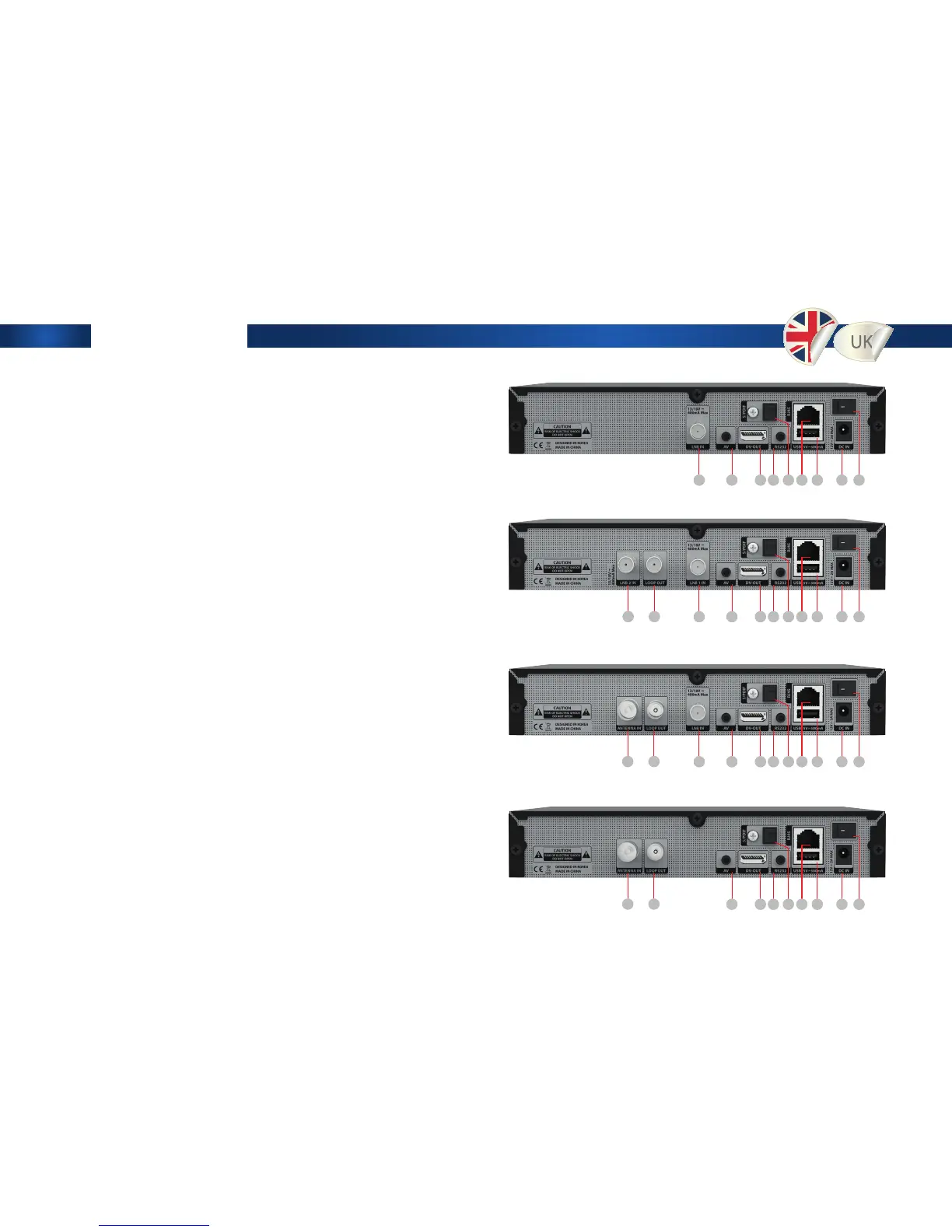
Rear View
1. LNB1 INPUT 1st satellite tuner input from the LNB
on a dish antenna. Turn the receiver OFF rst
before connecting
2. Loop Out. Only channels with the same
Polarisation (horizontal / vertical) and in the same
Frequency band are considered (low / high)
3. DVB-T2 / DVB-C Line IN
4. DVB-T2 / DVB-C Antennas Line OUT. Loop Out
5. Line OUT 3.5mm to RCA Cable
6. DV-OUT
7. 3.5mm to DB9 Serial Cable
8. S/PDIF Line OUT
9. Ethernet Communication port via HTTP, FTP, NFS,
Telnet and Samba to access your Hard Drive or to
upload channel lists. This is also used to update
Edision OS mini + software
10. USB Connect to the External HDD or USB storage
with USB cable (Max. 500mA)
11. External Power Supply
Connect the power Supply (12V / 3.5A)
12. Power Switch. Turn AC Power On/O
Edision OS mini DVB-S2
Edision OS mini DVB-S2 + DVB-S2
Edision OS mini DVB-S2 + DVB-C/T2
Edision OS mini DVB-C/T2
1
1
1
3
3
1
4
4
2
5
5
5
5
6
6
6
6
7
7
7
7
8
8
8
8
9
9
9
9
10
10
10
10
11
11
11
11
12
12
12
12


 To Next Page