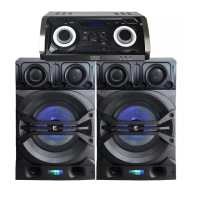
This document describes the Edison Party System 1240, a home entertainment Bluetooth and karaoke system that integrates an amplifier and a DVD player.
Function Description
The Edison Party System 1240 serves as a comprehensive home entertainment hub, combining a DVD player, an amplifier, Bluetooth connectivity, and karaoke functions. It is designed to play various disc formats, amplify audio, connect wirelessly to other devices via Bluetooth, and offer microphone inputs for karaoke.
Important Technical Specifications
General:
- Type: Amplifier/DVD
- Power Voltage: AC 100-240V~, 50/60Hz
- Power Consumption: 150W
DVD Player:
- Play Mode: NTSC/PAL
- Disc Mode: DVD, DVD+R/RW, CD, CD-R/RW, HDCD, MP3, MPEG4
- Video Resolution: ≥500 lines
- Video S/N Ratio: ≥56dB
- D/A Converter: 192KHz/24bit
- Video Output: Composite video, S-Video, Component video (Y, Cb, Cr), HDMI
- Digital Audio Output: Coaxial, Optical
Amplifier/Audio:
- Total Output Power: 150W x 2
- FM Frequency: 87.5-108MHz
- Audio S/N Ratio: ≥86dB
- Dynamic Range: ≥90dB
- Distortion: <0.1% (Max)
- Audio Output: ML/MR, Line out
Inputs/Outputs (Front Panel):
- Multifunction Button
- Standby
- Play/Pause
- Menu
- Next
- Input
- LED Display
- Mute
- Volume
- Compartment Door
- Previous
- USB Jack
- Open/Close
- Microphone 1 Jack
- Microphone 2 Jack
- Phones
Inputs/Outputs (Rear Panel):
- (Right) Speaker Output Jack
- (Left) Speaker Output Jack
- Line Out Output Jack
- AUX Audio Input
- FM Antenna Jack
- HDMI Output Jack
- Digital Signal Coaxial Output
- Video Output Jack
- S-Video Output Jack
- Digital Signal Optical Output
- Component (YUV) Video Output Jack
- AC Input (100-240V~, 50/60Hz)
- Power Switch
- Coaxial Digital Input
- Optical Digital Input
- Audio Output Jack
Usage Features
General Operation:
- Input Selection: Users can select audio sources (USB, BT, FM, AUX, OPTI, COA1, COA2, DISC) via the front panel or remote control.
- Volume Control: Adjustable via a knob on the front panel or VOL+/- keys on the remote.
- Audio Adjustment: The MENU key allows adjustment of BASS, TRE (treble), MICV (microphone volume), ECHO, XDRIVE (X-Bass effect), and SPEAKER LIGHT.
- Mute Function: Available via the remote control.
- X-Bass Effect: Can be turned on/off using the X Drive button on the remote.
- LED Light Modes: The LIGHT button on the remote cycles through LED1, LED2, LED3, and OFF modes.
DVD Player Features:
- Disc Compatibility: Fully compatible with DVD, SVCD, VCD, MP3, CD-R, and CD-RW, with high error correction.
- Picture CD Support: Reads picture CDs for digital picture display.
- Video Quality: 10-bit digital video converter with resolution over 500 lines.
- Audio Quality: 24bit/96KHz digital audio converter for high-quality sound.
- Video Outputs: Supports Component, S-Video, Composite, Optical, Coaxial HDMI, and YUV outputs.
- Language & Caption: Eight languages and 32 caption modes selectable.
- TV Screen Display: Various TV screen display selections and preferred story selections.
- Laser Head Over Current Protection System: A unique system designed to ensure constant laser current, extending the service life of the laser head, especially when reading scratched or non-standard discs.
- Playback Controls: Includes PREV, NEXT, F.WARD (fast forward up to 32X), B.WARD (fast reverse up to 32X), PLAY/PAUSE, OPEN/CLOSE.
- Subtitle Selection: Supports multi-subtitle languages (up to 32 kinds) for discs with multi-subtitle encoding.
- Title Menu: Accesses title menus for multi-title encoded discs.
- Main Menu: Returns to the main menu for DVD disc playing.
- Direction Keys: Used for selecting options in title, menu, or setup.
- Number Keys: Direct access to picture titles or specific playing times (e.g., 55 minutes, 50 seconds).
- Repeat Function: Allows repeating a chapter, title, or all content in DVD mode. In SVCD/VCD mode (with PBC off), it can repeat a single track or all tracks.
- Zoom Function: Enlarges the picture up to 4 times (2X, 3X, 4X) and reduces it (1/2, 1/3, 1/4).
- Angle Selection: Selects various viewing angles for multi-angle encoded discs (e.g., sports, concerts).
DVD System Settings (SETUP Menu):
- General Setup:
- TV Display: Adjusts TV display mode (e.g., 4:3PS, 4:3LB, 16:9).
- Angle Mark: On/Off.
- OSD Language: Sets the language for on-screen display (English, French, German, Italian, Spanish, Portuguese).
- Captions: On/Off.
- Screen Saver: On/Off.
- HDCD: On/Off.
- Last Memory: On/Off. When "On," the player resumes from the last played position after opening/closing the tray.
- Audio Setup:
- Speaker Setup:
- Downmix: Options include LT/RT (for 2-channel analog audio), Stereo (for TV/modulator connection), and V Surr (for surround sound effects).
- Spdif Setup:
- Spdif Output: Options are Off (no signal), Spdif/Raw (for Dolby Digital, DTS, MPEG audio formats to compatible receivers/decoders), and Spdif/Pcm (for 2-channel digital stereo amplifiers, modulating audio into PCM signal).
- CH EQ Setup: Not detailed, but listed.
- 3D Process:
- Reverb Mode: Eight modes: Off, Concert, Living Room, Hall, Bathroom, Cave, Arena, Church.
- Video Setup:
- Component: Set to S-Video or YUV.
- Resolution: Selectable resolutions (480i, 576i, 720p(50Hz/60Hz), 1080i(50Hz/60Hz), 1080p(50Hz/60Hz)).
- Quality: Adjusts video quality (Sharpness: Mid/High, Brightness: 00/Medium, Contrast: 00/Low).
- HDMI Setup:
- HDMI: On/Off.
- Audio Source: AUTO/PCM.
- Preference:
- TV Type: PAL.
- Audio/Subtitle/Disc Menu: Set language (ENG).
- Parental: Not detailed.
- Password Setup: Allows setting a password (default 0000).
- Default: Resets system settings to default values.
MP3 Function:
- Compression: Uses MPEG Level 3, 12:1 compression rate.
- Capacity: Can record over 600 minutes of music or 170+ songs.
- Playback: Select tracks using number buttons, repeat songs, or use mute, volume, pause, and search functions.
JPEG Function:
- Compression: Efficient compression (15-20 times) with good quality.
- Playback: Reads JPEG format picture CD discs. Select pictures using number keys or through the menu.
Tuner Applications (FM Radio):
- Antenna: Requires attachment of the supplied antenna for optimum reception.
- Input Selection: Select "FM" function via INPUT key.
- Channel Navigation: Use CH+/CH- for saved bands, TU+/TU- for manual frequency adjustment.
- Auto Scan: AUTO key scans and memorizes channels from low to high frequency.
Karaoke Functions:
- Microphone Detection: Auto-detects MIC1, MIC2 insertion.
- Microphone Volume: Adjustable via MIC.MENU and +/- keys on the remote (MVOL).
- Echo Effect: Adjustable via MIC.MENU and +/- keys on the remote (ECHO).
- Howling Prevention: Advised not to touch the top of the microphone during singing.
Bluetooth (BT) Pair and Connect:
- Pairing Process: Turn off previously paired BT devices, enable BT on phone/player, set unit to BT mode, search for "Party System 1240," select, and enter passkey (0000) if prompted.
Speaker Assembly:
- The speaker system consists of modular sections (1, 2, 3) that slide together. Section 2 slides onto section 3, then section 1 slides onto section 2.
Maintenance Features
Disc Protection:
- Handling: Always hold discs by the center and edge when loading or removing.
- Surface Care: Avoid sticking or writing on the surface; protect against fingerprints.
- Cleaning: Wipe discs with a soft cloth from the center toward the edge.
- Storage: Store discs vertically in cases when not in use. Avoid high/low temperatures, dampness, and direct sunlight to prevent damage.
Troubleshooting Guide:
- No Sound: Check connections to amplifier/TV and ensure correct operation of TV/amplifier.
- No Picture: Check connections to TV and ensure TV is on and correct AV input is selected.
- Disc Not Playing: Verify disc is loaded correctly (label side up) and is clean.
- Remote Control Not Working: Remove obstacles, point remote at sensor, check batteries.
- Picture Dividing: Ensure disc is clean and not scratched.
- System Malfunction: If controlled by a micro-computer and encounters problems, power off, wait a few seconds, then power on again. If no error message, the player should work properly.

 Need help?
 General

 To Next Page