More
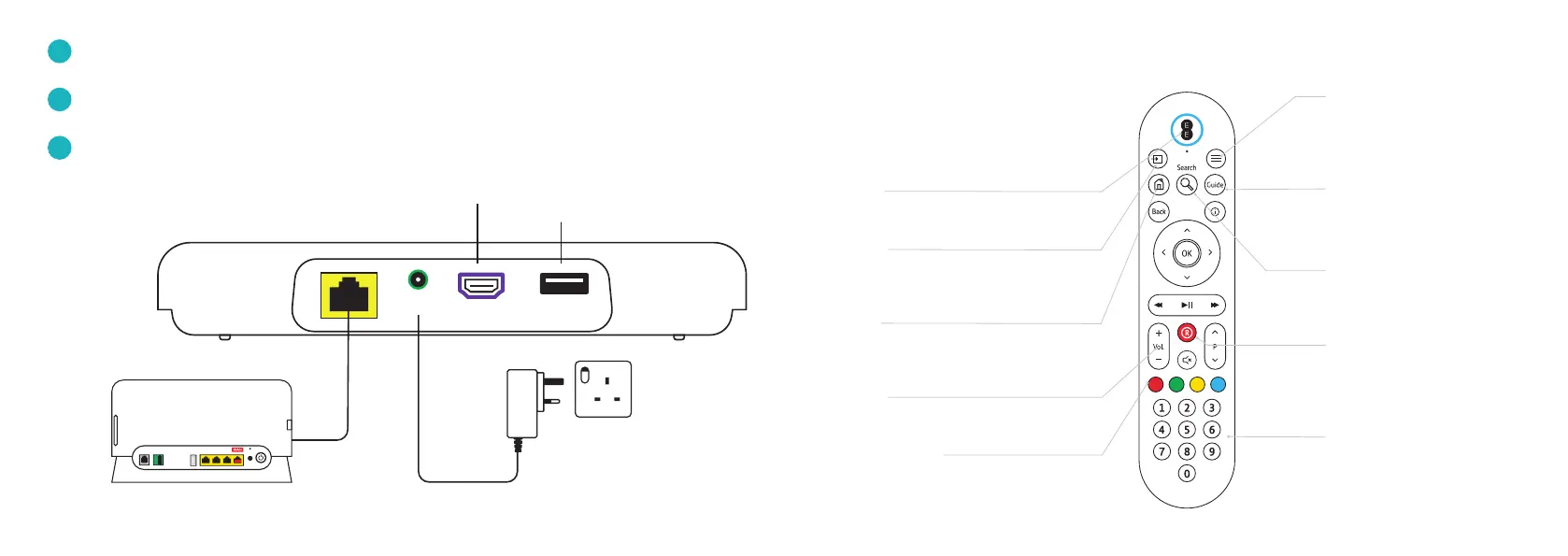
Access to accessibility features
like audio description, subtitles
and zoom.
Search
Search for content across all TV
and on demand players.
Guide
See what’s on TV and radio for the
next 7 days.
Record
No current function.
Numeric keypad
Can be used to type in letters and
to jump through recordings, for
example, 1 = 10%, 9 = 90%.
Smart Hub
HDMI cable
(connect to TV)
Use for connecting some
accessibility devices. For more
information please visit our FAQs
on ee.co.uk/help
54
YoUR REMoTE
On/off
To switch off your TV, press and hold.
Source
Use to select your TV box and switch
between devices connected to your TV.
Home
Brings up the main menu, apps
and recordings.
Your remote uses Bluetooth to control
your TV Box. It can only be paired to
one TV Box at a time. You can also use
it to control most TV’s, so there’s no
need to use separate remotes.
Volume
Controls your TV volume when paired.
Coloured buttons
Look out on-screen for the coloured
buttons as these allow quick navigation
to certain features and screens.
HDMI cable (connect to TV)
1
2A: Connect your Hub to your TV Box via WiFi
2B: Connect your Hub to your TV Box via ethernet cable
2
Power supply cable (use power cable provided in box)
3
Power
HDMI USB



 To Next Page