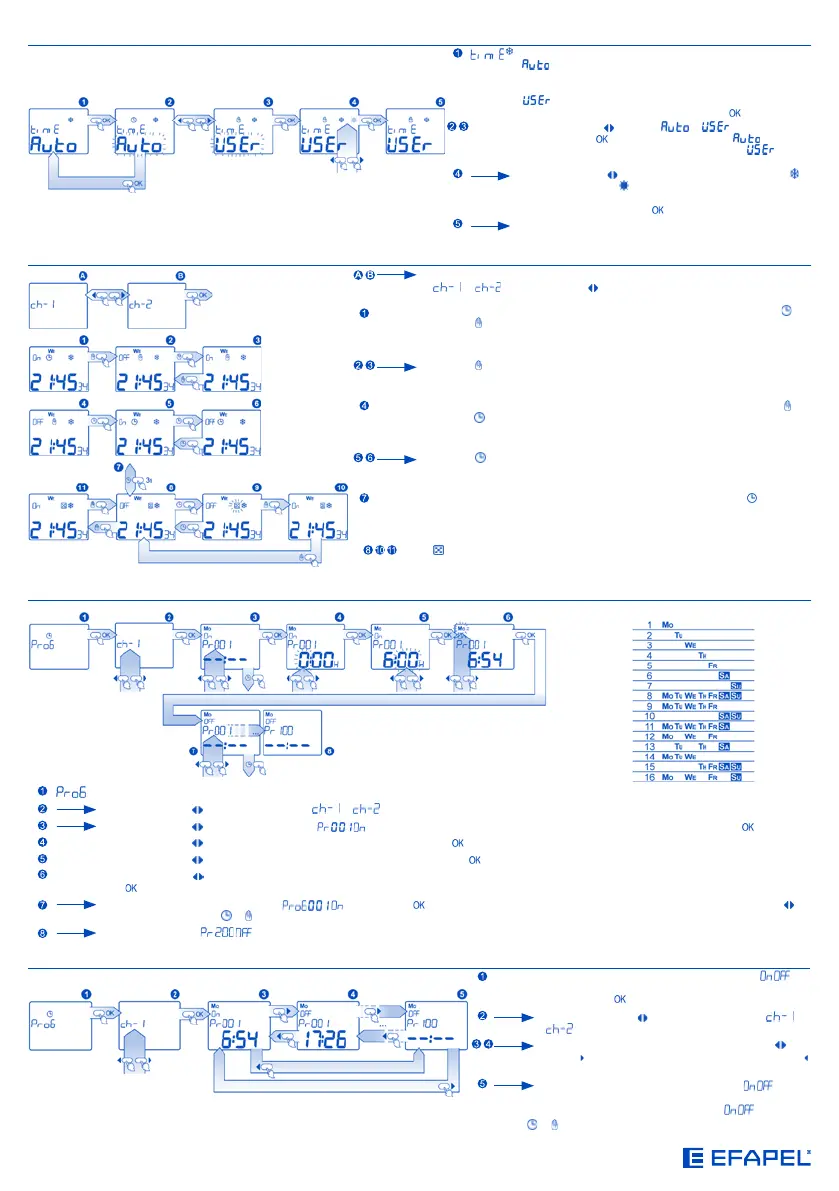
CHANGING THE OPERATION MODE AUTOMATIC, MANUAL, RANDOM
Before changing the operation mode, it is necessary to choose the channel
or using the cursors on the main screen;
MODE TO
COMMUTE
MANUAL
- if the main screen appears and the hour device is on automatic mode , by
pushing you will force the unit to commute on manual mode and the relay
changes its state;
Pushing successively, it will force the change of the relay state without the
operation mode;
MODE TO
COMMUTE
AUTOMATIC
- if the main screen appears and the hour device is on manual mode , by
pushing , you will force the unit to commute on automatic mode and the relay
changes its state;
Pushing successively, it will force the change of the relay state without the
operation mode;
COMMUTE
MODE
RANDOM
- to accede to the random mode, it is necessary to push the key , holding it
pushed during 3 seconds;
indicates that the hour device is on random mode according to the random
mode settings.
PROGRAM SETTING
Weekly Combinations
Programming
Using the cursors , choice of the channel or ; (In case of being a switch of 2 circuits)
Using the cursors , choice of the program (
) for the edition of the parameters and input of the edition mode by pushing the button;
HOUR
Using the cursors
, choice of the time and confirmation by pushing the button;
MINUTES
Using the cursors , choice of the minutes and confirmation by pushing the button;
DAY OF
THE WEEK
Using the cursors , the day of the week when the program will have to be activated (There are 16 possible combinations); confirmation by pushing
the button; the program will be saved.
The next saved program will appear (
) - Pushing the button. To get into edition and choose another program, use of the cursors ; to
exit the program, use of or .
The last program is .
PROGRAM VIEWING
SEE PRO-
GRAMME
- access to the settings for the programs in pairs ( ), for
example, hours, minutes and days of the week; visualisation
by pushing the button;
Using the cursors , choice of the channel or
; (In case of being a switch of 2 circuits)
To access the programs, use of the cursors : the
cursor increase the no. of the program; the cursor
decreases the no. of the program;
The programs are numbered in pairs, as , where
each program is submitted independently. There are
400 programs (200 pairs of programs ).
At any moment it is possible to exit all the menu screens without saving settings by pushing the buttons or .
WINTER/SUMMER TIME SETTING
- selection of the commutation Summer/Winter time mode:
- automatic change of the hour the last Sunday of March
at 2:00 to the Summer time and the last Sunday of October at
3:00 to the Winter time;
- manual commutation of the Summer/Winter time by
the user; select the option and then push the button;
MODE
SETTING
- using the cursors choice of or and confirmation
by pushing the button; after choosing , Summer/
Winter time are automatically changed; choice of and the
following screen will appear;
Using the cursors choice of Winter/Summer, where is
the Winter hour and is the Summer hour; if the symbol is
modified, the device will conveniently correct the current hour;
confirmation by pushing the button;
After having chosen the Winter/Summer hours selection, the
alteration screen will appear;


 To Next Page
 Loading...