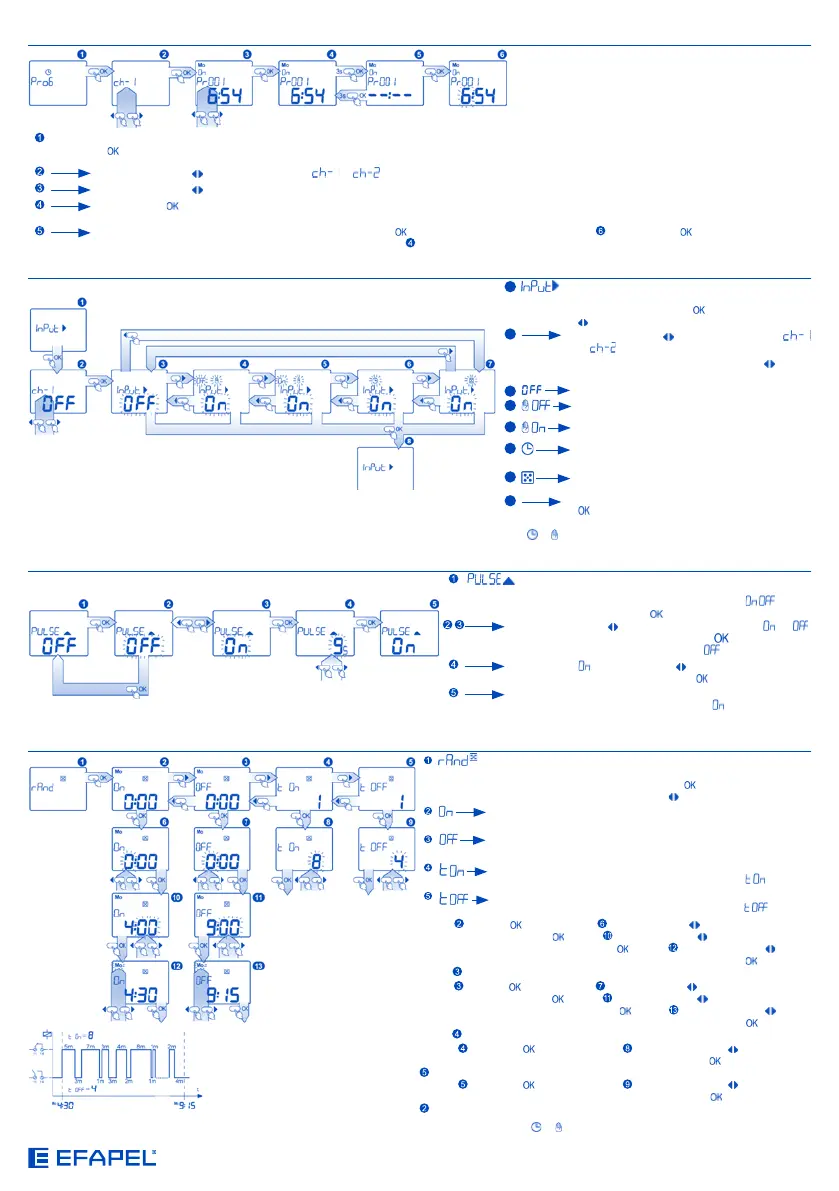
IMPLUSE PROGRAM SETTING
- commutation of the generator functioning by impulse
ON/OFF and setting of the impulse duration. The screen
displays the current state of the functioning ( ); go to
the edition by pushing the button;
Using the cursors , selection of the functioning or ;
validation of the selection by pushing the button. Go to the
main menu if the choice of the option is made;
Selection of using the cursors , setting impulses duration
in seconds; validation by pushing the button;
After the validation of the impulse mode settings, the setting
screen will open. Only the programs are available on
impulse mode.
EXTERNAL INPUTS SETTING
1
- setting of the unit functioning after the external
input “IN” has been commuted; enter into the
edition and pushing the button; using the keys
, choice of the functioning for the external input:
2
Using the cursors , choice of the channel
or ; (In case of being a switch of 2 circuits)
After the selection of the channel using the cursors , choice
of the appropriate functioning for the external input where:
3
- the function of the external input is OFF;
4
- the manual mode with the relay stills commuted
- OFF;
5
- the manual mode with the relay stills commuted
- ON;
6
- on automatic mode, the relay will be commuted
ON/OFF according to the programs present;
7
- the random mode is according to the settings of
the setting menu of the random mode;
8
Confirmation of the selection by pushing on the
button; after the confirmation, the settings
screen of the external input will appear.
At any moment it is possible to exit all the menu screens without saving settings by pushing the buttons
or .
RANDOM MODE SETTING 1 CIRCUIT
- setting of time and days when the functions of the random mode
will be ON and setting of maximum time of the relay ON and OFF
on random mode; enter by pushing the button; selection of the
appropriate screen using the cursors for:
- setting of time and day for starting the random mode (random
activation);
- setting of time and day for ending the random mode (random
activation);
- setting of the maximum time for the relay ON in minutes - the
duration of the random time is between 1 minute and minutes;
- setting of the maximum time for the relay OFF in minutes - the
duration of the random time is between 1 minute and minutes;
Screen : Push the button to enter; using the cursors setting of the hours ON;
confirmation by pushing the button; using the cursors setting of the random
minutes ON; confirmation by pushing the button; using the cursors setting
of the days when the random time is ON; confirmation by pushing the button; the
screen will appear.
Screen : Push the button to enter; using the cursors setting of the hours OFF;
confirmation by pushing the button; using the cursors setting of the random
minutes OFF; confirmation by pushing the button using the cursors setting
of the days when the random time is OFF; confirmation by pushing the button; the
screen will appear.
Screen : Push the button to enter; using the cursors setting of the
maximum time ON (in minutes), confirmation by pushing the button; the screen
will appear.
Screen
: Push the button to enter; using the cursors setting of the
maximum time OFF (in minutes), confirmation by pushing the button; the screen
will appear.
At any moment it is possible to exit all the menu screens without saving settings by pushing the buttons or .
CANCEL/RESTORE A PROGRAM
CANCEL/
RESTORE
PROGRAM
- the option is used during the settings of the program and shows the cancellation of the program (deactivation) and restoring; input by pushing the
button;
Using the cursors , choice of the channel or ; (In case of being a switch of 2 circuits)
Using the cursors , choice of the program to cancel/restore;
Pushing the button for 3 seconds - if the program is activated, it will be cancelled (inactive) and will be verified during the operation on automatic
mode (however, it will be saved into the memory and it will be possible to restore it). Horizontal lines will appear;
If the program is cancelled, it will be restored by pushing the button and the edition will be possible. by pushing the button for 3 seconds the
program will be restored without the possibility of time edition .


 To Next Page
 Loading...