DESCRIPTION
<
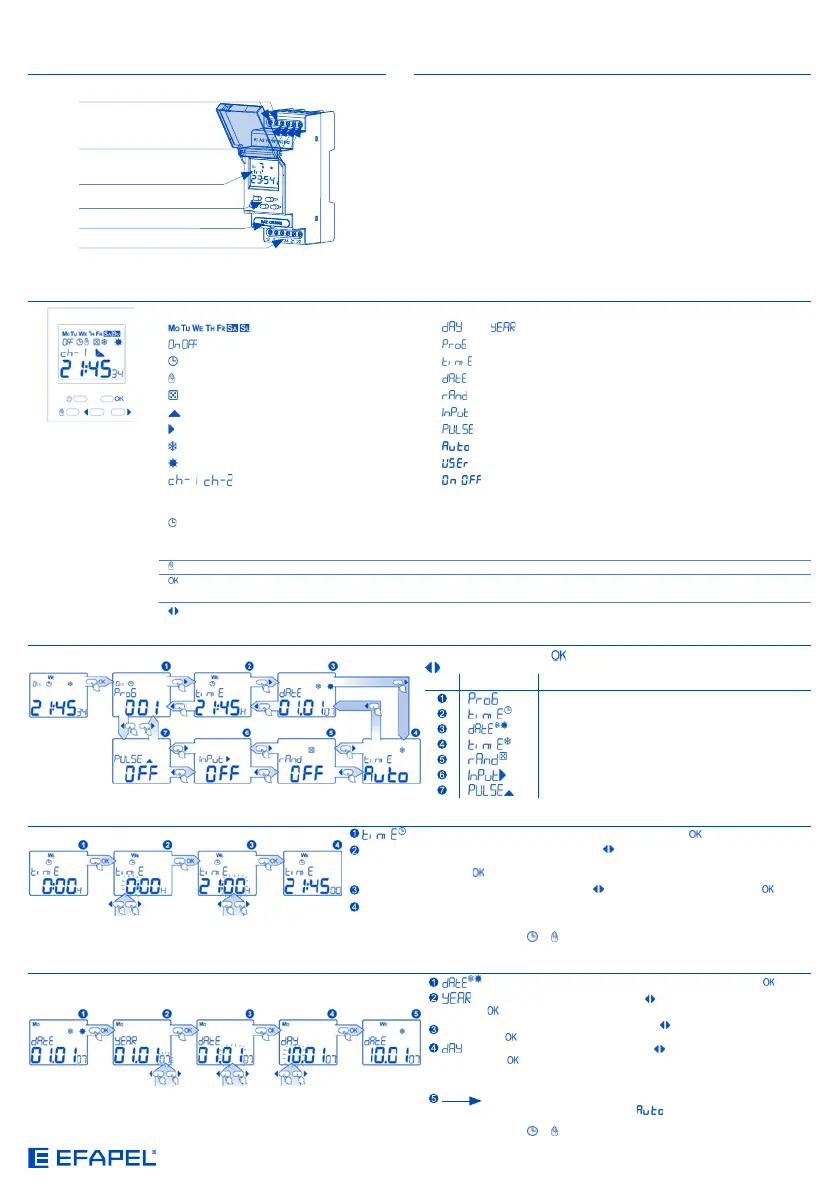
Description of the elements and information on the main screen
- week days
- day, - year
- state - program settings
- automatic mode
- hours and summer/winter tine setting
- manual mode - date setting
- random mode - random mode setting
- impulse mode
- external input setting
- external input - impulse mode setting
- winter time - automatic
- summer time - user
- channels
- on/off
Description of the buttons
- on the main screen - input of the automatic mode or state change of the relay, if the electronic timer is already on automatic mode;
- on the main screen (3 seconds) - random mode: input/output;
- on the other screens - high level output without saving the changes;
- on the main screen - input of the manual mode or state change of the relay, if the electronic timer is already on manual mode;
- on the main screen - input on the main menu;
- on the other screens - high level output without saving the changes;
- screen/commutation of the option or setting of the value: increase/decrease;
MAIN MENU
Menu input by pushing the button; search of the menu options using the cursors
Fonction Description
Program setting
Hour setting
Date setting
Summer/Winter hours setting
Random mode setting
External input setting
Impulse mode setting
DATE SETTING
- setting of the current date; input after having pushed the button;
- year choice by using the cursors and confirmation by pushing the
button, choosing the years between 2000-2009;
MONTH
- month choice by using the cursors
and confirmation by pushing
the button;
- day choice by using the cursors and confirmation by pushing
the button. The system has a protection against the incorrect
introduction of the day or month (it considers the leap years and
automatically determines the day of the week);
The confirmation induces the change of the setting screens of the
date and Summer/Winter time.
At any moment it is possible to exit all the menu screens without saving settings by pushing the buttons or .
It allows controlling an installation or equipment depending on a daily and/or weekly programming.
TIME SETTING
- setting of the current date; input after having pushed the button;
HOUR
- right hour choice using the cursors
which can define one of the following
formats: from 1 to 24H or from 1 to 12A (AM) and from 1 to 12P (PM); confirmation by
pushing the button;
MINUTES
- minutes choice by using the cursors
and confirmation by pushing the button;
The minutes confirmation simultaneously induces the change of the seconds and
the transition to the screen of time setting.
At any moment it is possible to exit all the menu screens without saving settings by pushing the buttons
or .
LEGEND CHARACTERISTICS
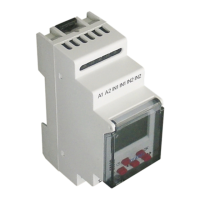
Power Terminals
(A1, A2) | (L, N)
Control Buttons
Battery
Control Terminals
(IN1, IN1, IN2, IN2)
Display
Relays Output Terminals
(12, 11, 14, 24, 21, 22)
Voltage: 230 V ~
Frequency: 50/60 Hz
1 Circuit: 1 NO + 1 NC
2 Circuits: 2 NO + 2 NC
Memory Space: 400
Programming Mode: Daily/Weekly
Operation Mode: Manual, Automatic, Random, by Impulse
Time Change Winter/Summer: Automatic, Manual
Operation Temperature: -20 °C - +60 °C
Cables Section: 0,2 - 2,5 mm
2
Protection Level: IP20
Protection Class: II
Time of Clock Maintenance: 3 Years
Time of Programme Maintenance: 10 Years
EN


 To Next Page
 Loading...