Pagina 13 di 28
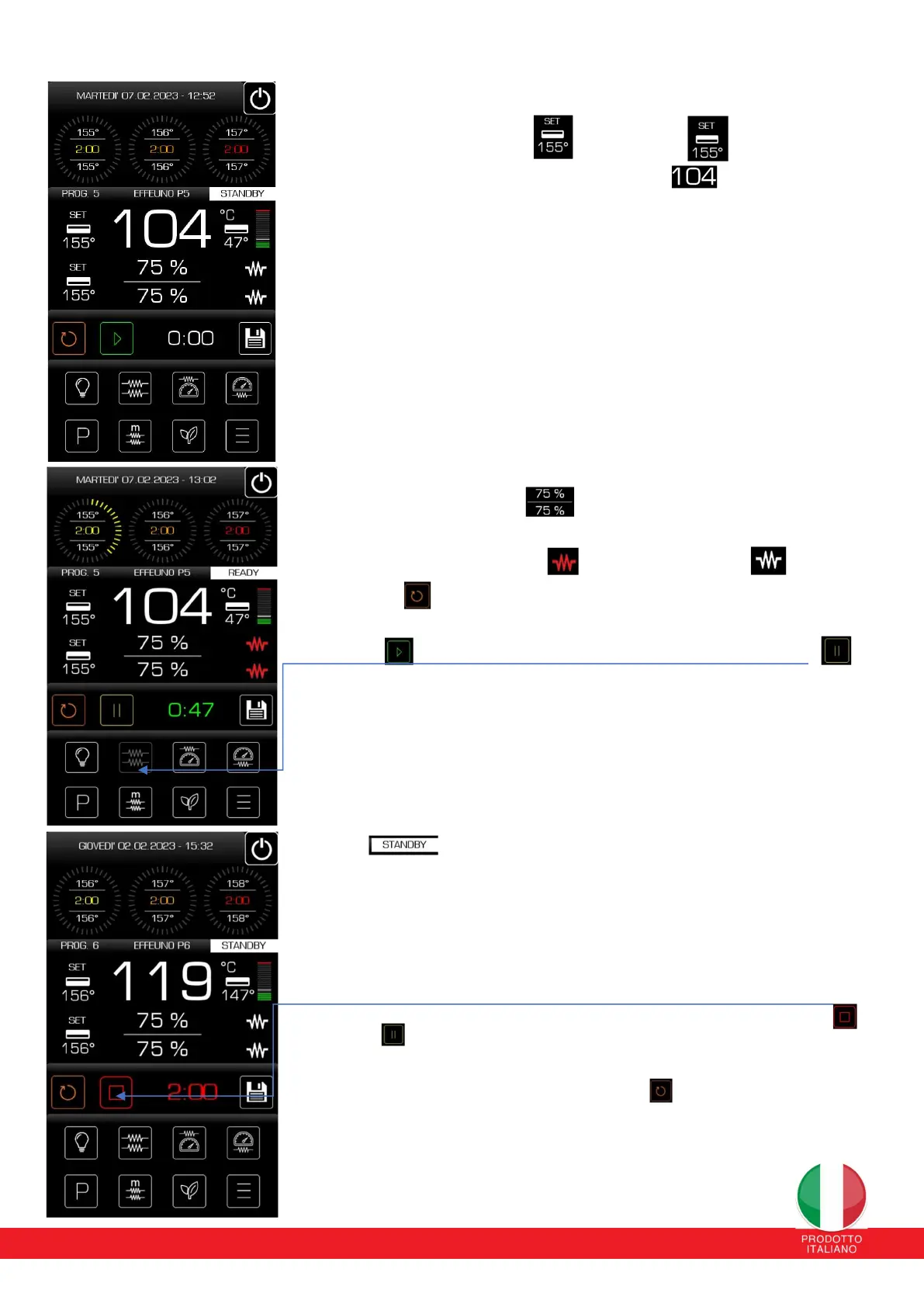
The upper temperature set-point set and the down
The temperatures detected in real time by the upper probe
inside the room.
While on the right the lower temperature detected under the stone is highlighted. The
upper/lower temperature is the main one that guides cooking, therefore the set set-point
temperature is read directly from the sky/chamber temperature probe. The audience
temperature, now settable, is limited by the lower set-point beyond which it will only go by
3-4°C due to thermal inertia. It is detected by a probe placed underneath the refractory
stone in the center; therefore, it returns information on the temperature present on the
cooking surface of the refractory stone, with a tolerance range of approximately 10-15°C
higher than the temperature detectable above the refractory stone. In the case of biscuits,
due to the composition and/or thickness of the material, the temperature displayed
concerns the lower part of the biscuit. The surface temperature of the biscuit is
significantly influenced by the temperature in the chamber. Therefore, we recommend
checking the surface part with the pyrometer so as not to let it go above 475-480°, to have
optimal cooking while avoiding the risk of burning the lower part of the pizza.
Upper and lower power percentages
• The states of the resistances of the sky and the audience. When the resistors are
delivering heat, they are displayed in red , otherwise they are white
• RESTART button Pressing it resets the chosen setting. For example, the start of the
selected program, including all phases, or the set time of the cooking phase.
• PLAY button Pressing it starts the cooking time of the first phase and the state of
the button will change appearance as shown in Fig. 2, highlighting the PAUSE button .
Pressing it pauses the time of the phase concerned as in cases of adding condiments and
then proceeding to final cooking.
The button will change appearance bringing it back to PLAY.
Pressing it restarts the time from where it was interrupted. Pausing the oven does not
interrupt oven operation; therefore the heat supply will continue even after pressing the
play/pause button. To completely stop oven operation and return to STANDBY status, press
the ON/OFF button for 4 seconds
• A pop-up will appear to inform you that STANDBY mode has been restored.
• Cooking time of the phase currently running or ready to run. The timer does not influence
cooking, it is a time and passage indicator. In fact, the set time of the first phase, the oven
will emit ten single beeps, to indicate the end of the second phase and will move on to the
next phase.
At the end of the second phase the control will emit ten double beeps, indicating the end of
the second phase and will move on to the next phase. At the end of the cycle, whether it is
composed of one, two or three phases, the control will emit twenty double acoustic signals
of different intensity and variation from those at the end of the second phase, and the
PAUSE button will change condition as shown in Fig. 3 and this will be highlighted icon
This acoustic signal can be silenced by pressing this button but the oven resistances
continue to deliver heat and maintain the temperature of the last phase. To return to the
temperatures of the first phase, press the Restart button.
This mode has been implemented to prevent the food from going through cooking again in
the case of programs that involve drying at a low temperature in the last phase (draught),
taking the temperatures as a reference. values of the first phase which is usually the
cooking phase and therefore higher.


 To Next Page
 Loading...