Pagina 24 di 28
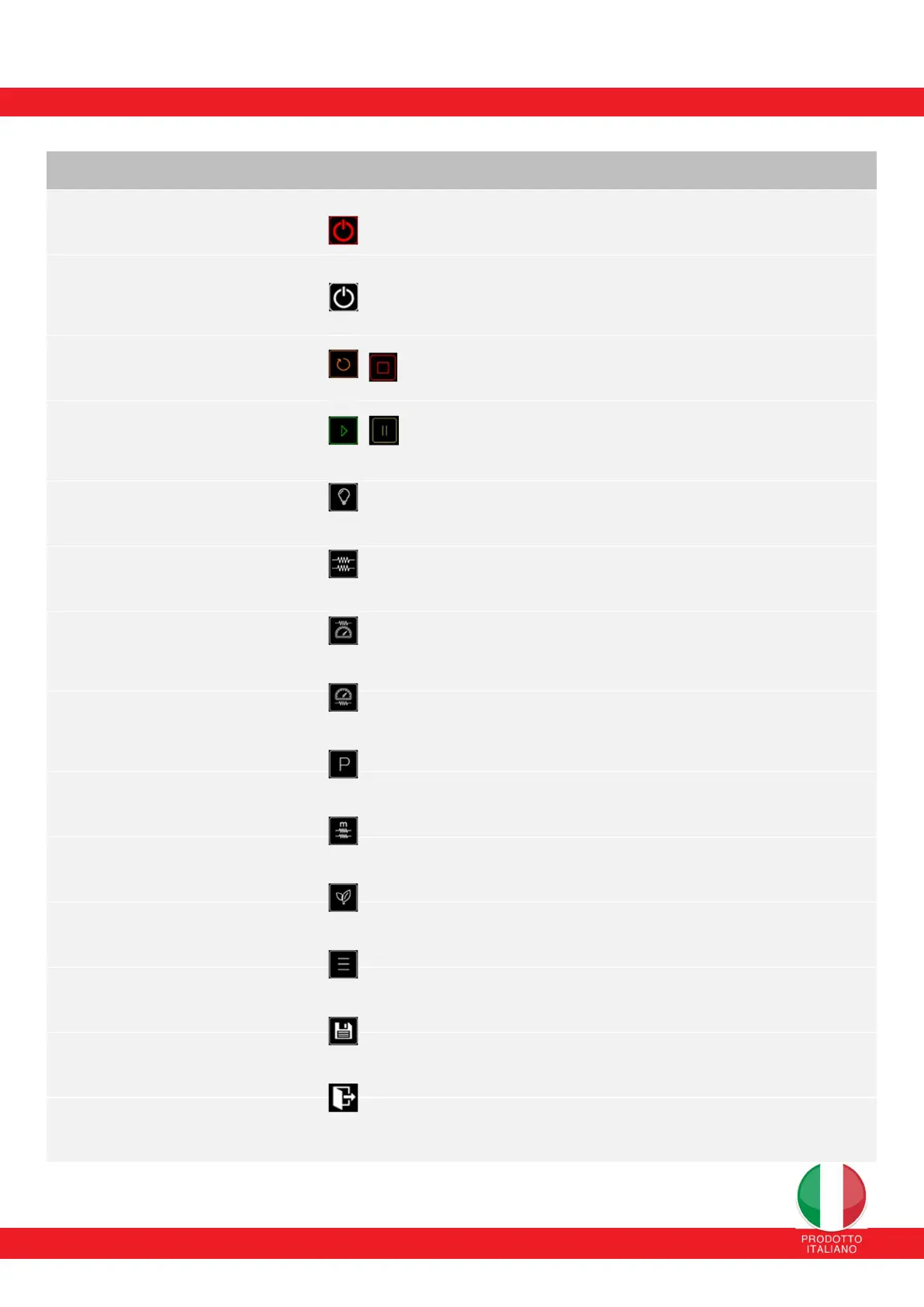
13. SUMMARY TABLE OF THE ELECTRONIC CONTROL MODE
BUTTON
ICON
FUNCTION
ON/OFF (CONTROL OFF)
Allows you to turn on the oven and enter the initial state
STANDBY [long touch - 4 sec]
ON/OFF (CONTROL ON)
Allows you to turn off the oven [long touch
It allows you to disconnect the power of the resistances and block any
cooking phases and return to cooking
initial power-on state (STANDBY) [touch - 4 sec]
RESTART/SILENCE
RESTART allows you to reset the chosen setting, such as the phases
of the selected program or the cooking time, while the SILENCE button allows
you to silence the buzzer at the end of the cycle
PLAY/PAUSA
PLAY allows you to start the cooking time of the cycle, while the PAUSE button
allows you to pause the cooking time
of the selected program (by pressing this button
Oven operation is NOT interrupted)
COOKING CHAMBER LIGHT
Allows you to turn on/off
the light inside the cooking chamber
PREHEAT MODE
It allows you to preheat the cooking chamber and approach the
set-point according to the parameters set by the selected program
SKY BOOST MODE
Allows you to compensate/recover the chamber temperature,
by setting the sky to a maximum value of 100% which can be set in the
SETTINGS/PARAMETERS menu for a maximum time of 180 seconds. IT WORKS
ONLY IN READY MODE
AUDIENCE BOOST MODE
It allows you to compensate/recover the temperature of the audience,
setting the audience to a maximum value of 100% which can be set in the
SETTINGS/PARAMETERS menu for a maximum time of 180 seconds. IT WORKS
ONLY IN READY MODE
PROGRAM SELECTION
Allows you to access the section
available programs to select
MAINTENANCE MODE
It allows you to stabilize the working temperature inside the chamber
cooking according to the parameters set by the selected program
ECO MODE
It allows you to optimize energy resources
reducing the power supplied to the load (top/floor) by 40%
SETTINGS
Allows you to access the sections dedicated to the different settings
(PROGRAMS, SETTINGS, ALARM LOG, PARAMETERS, PROGRAM UPDATE)
SAVING CHANGES
Allows you to save changes to the current program/section
GO BACK TO THE HOME PAGE
Allows you to return to the main page


 To Next Page
 Loading...